
Simulate External APIs locally with the WireMock Extension for LocalStack
Learn how to use the WireMock extension for LocalStack to simulate external APIs locally. You'll learn how to install and use the extension with a sample application to mock OpenAI API responses, enabling deterministic integration testing without external dependencies.
Introduction
Building cloud applications that depend on external APIs is rarely straightforward. Your Lambda function might need to call a payment gateway, your Step Functions workflow might rely on a third-party identity provider, or your microservices might integrate with partner APIs that are rate-limited, unstable, or simply not available in your test environment. These external dependencies create bottlenecks: tests become flaky, developers wait on sandbox access, and CI pipelines fail for reasons that have nothing to do with your code.
We’re introducing a WireMock extension for LocalStack that tackles these problems directly. It lets you run WireMock alongside your emulated AWS services inside the same LocalStack environment, allowing your AWS application code to talk to simulated versions of any HTTP API through WireMock, all without leaving your local machine. The extension supports both the open-source WireMock image and WireMock Cloud via WireMock Runner.
Let’s install the WireMock extension, see how it integrates with LocalStack, and deploy a sample application: a serverless chat backend that uses Lambda and API Gateway to handle requests, with WireMock simulating the OpenAI API. By the end, you’ll have a working local setup where your AWS infrastructure and external API mocks run side by side with no cloud credentials, rate limits, or waiting on external services.
What is WireMock?
WireMock Cloud is an API simulation tool that lets you create mock versions of HTTP APIs. If you’re building an application that depends on external services, WireMock lets you realistically simulate those dependencies with controllable, predictable responses.
Using WireMock Cloud, you can define request matchers, return canned responses, simulate delays and failures, define stateful mocking behaviour, and record real API traffic to replay later (including for APIs running in non-public environments, such as corporate networks). WireMock supports REST, SOAP, GraphQL, and gRPC; you can create mocks manually, import them from OpenAPI / Swagger specs, or use WireMock’s MCP server to create and manage simulations using AI agents. WireMock Cloud is built on the open source WireMock library but offers UI-based mock management, team collaboration, and a host of enterprise-readiness features.
The recently-introduced WireMock Runner adds the capability to record and run simulated API traffic anywhere your code runs - including locally, in your cluster, and in your CI/CD pipeline. The control plane stays in the cloud (management, collaboration, UI), but the execution plane runs locally. This hybrid approach works well with LocalStack. You get the convenience of cloud-based mock management combined with local execution, running alongside your emulated AWS services in the same environment.
Why run WireMock as a LocalStack Extension
LocalStack Extensions let you run additional services inside the LocalStack container, sharing the same network and lifecycle as your emulated AWS resources. For applications that call both AWS services and external HTTP APIs — a Lambda function that processes payments, a Step Functions workflow that verifies identity, an API Gateway that proxies to a partner service – the WireMock extension puts everything in one place.
Start LocalStack, and WireMock comes up automatically at wiremock.localhost.localstack.cloud:4566. Your Lambda code can call DynamoDB, SQS, and your mocked third-party API without any network configuration or separate containers.
Running WireMock as an extension enables you to:
- Skip Docker Compose files or multi-container orchestration. Install the extension once, and WireMock runs whenever LocalStack runs.
- Let Lambda functions, ECS tasks, and any other LocalStack-emulated compute reach WireMock directly on the same local network.
- Spin up a fresh WireMock instance with each LocalStack restart, useful for running deterministic integration tests.
- Pull your mock API configurations from WireMock Cloud and run them locally via WireMock Runner.
- Develop and test your full application stack entirely offline, without third-party API credentials.
You can install the WireMock extension using the LocalStack CLI or the Extensions Library on the LocalStack Web Application.
How to use the WireMock extension for LocalStack
Let’s walk through getting the extension running and deploying a sample application. We’ll install the WireMock extension, start LocalStack, and then deploy a serverless chat backend that demonstrates how Lambda and API Gateway can interact with a mocked OpenAI API through WireMock.
Prerequisites
Before starting, make sure you have the following installed:
- Docker for running LocalStack and the WireMock container
- LocalStack CLI with a valid LocalStack Auth Token (available with a free LocalStack account)
- Node.js/npm for the sample application and AWS CDK
- AWS CDK Local (
npm install -g aws-cdk-local aws-cdk) - WireMock CLI (
npm install -g @wiremock/cli) - A WireMock Cloud account (free tier available)
Start your LocalStack container with your LOCALSTACK_AUTH_TOKEN environment variable set:
export LOCALSTACK_AUTH_TOKEN=your-auth-tokenlocalstack startStep 1: Install the WireMock extension for LocalStack
To install the extension, you can either use the LocalStack CLI or the Extensions Library on the LocalStack Web Application.
To install the extension using the LocalStack CLI, start your LocalStack container, configure your Auth Token as an environment variable and run the following command:
localstack extensions install localstack-wiremockYou will see the following output after the installation of the extension is successful:
┏━━━━━━━━━━━━━━━━━━━━━┳━━━━━━━━━━━━━━━━━━━━━━━━━━━━━━━━━━━┳━━━━━━━━━┳━━━━━━━━━━━━━━━━━━━━━━━━━━━━┳━━━━━━━━━━━━━━━━━━━━━┓┃ Name ┃ Summary ┃ Version ┃ Author ┃ Plugin name ┃┡━━━━━━━━━━━━━━━━━━━━━╇━━━━━━━━━━━━━━━━━━━━━━━━━━━━━━━━━━━╇━━━━━━━━━╇━━━━━━━━━━━━━━━━━━━━━━━━━━━━╇━━━━━━━━━━━━━━━━━━━━━┩│ localstack-wiremock │ WireMock Extension for LocalStack │ 0.1.0 │ LocalStack + WireMock team │ localstack-wiremock │└─────────────────────┴───────────────────────────────────┴─────────┴────────────────────────────┴─────────────────────┘Alternatively, you can navigate to the Extensions Library on the LocalStack Web Application. The library allows the installation and management of Extensions as simple as the click of a button.
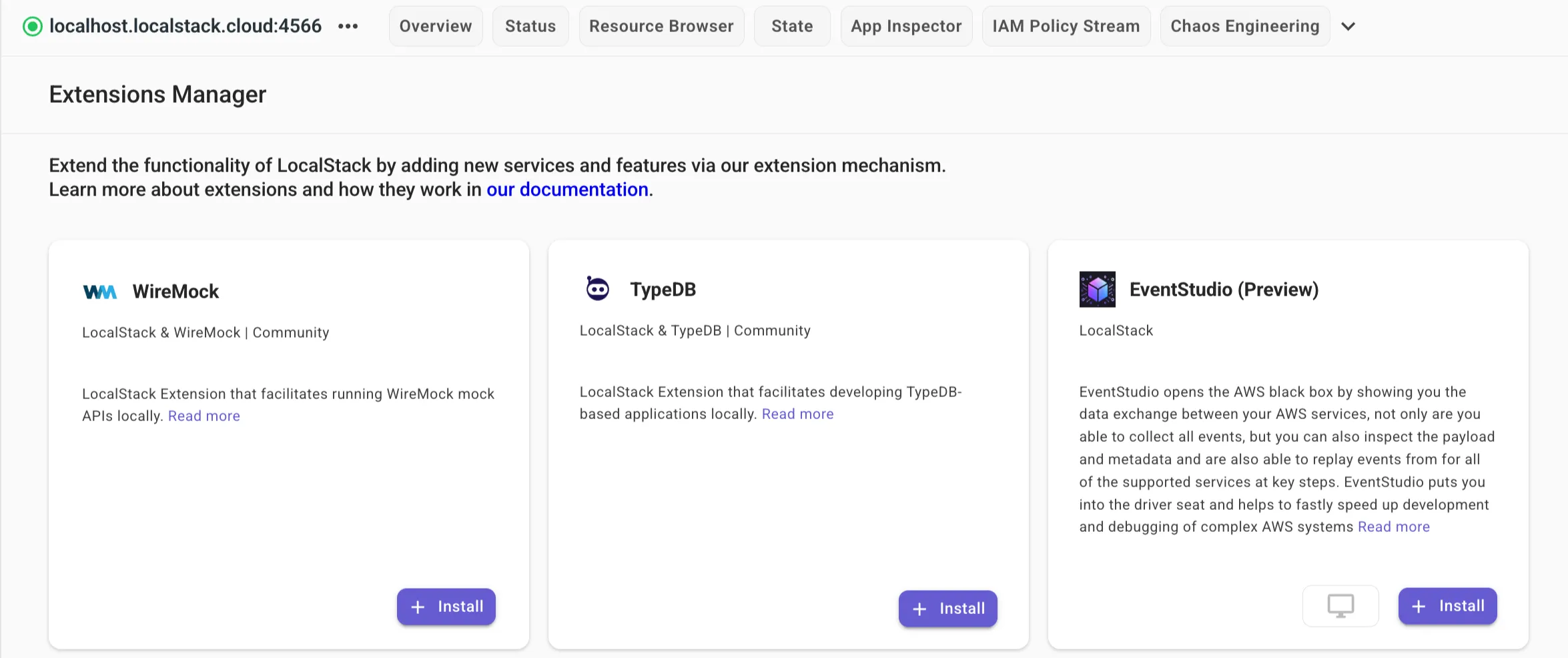
Click on the + Install button on the Web Application to install the extension on your local machine.
Step 2: Clone the sample application
We’ve prepared a sample application that demonstrates how Lambda and API Gateway can interact with WireMock to simulate the OpenAI API. Clone the LocalStack Extensions repository and navigate to the sample app:
git clone https://github.com/localstack/localstack-extensions.gitcd localstack-extensions/wiremock/sample-app-runnerThe project structure looks like this:
sample-app-runner/├── bin/│ └── app.ts # CDK app entry point├── lib/│ └── chat-stack.ts # CDK stack definition├── lambda/│ ├── index.ts # Lambda function code│ ├── package.json│ └── package-lock.json├── test/│ └── api.test.ts # Integration tests├── cdk.json├── package.json└── README.mdThe application is a serverless chat backend. It exposes two endpoints through API Gateway: GET /models to list available AI models, and POST /chat to send a message and receive a response.
The Lambda function makes HTTP calls to what it thinks is the OpenAI API, but in our local setup, those calls go to WireMock instead, which returns mocked responses. In lambda/index.ts the API base URL is from an environment variable, which the CDK stack sets to the LocalStack WireMock endpoint. This keeps the code portable: point to WireMock locally, swap to the real OpenAI endpoint (https://api.openai.com) in production.
const WIREMOCK_BASE_URL =  process.env.WIREMOCK_BASE_URL ||  "http://wiremock.localhost.localstack.cloud:4566";
const response = await fetch(`${WIREMOCK_BASE_URL}/models`, { ... });
Step 3: Create an OpenAI mock API in WireMock Cloud
Before running the extension with WireMock Runner, you need to create a mock API in WireMock Cloud and pull its configuration locally.
3.1: Log in to WireMock Cloud
First, log in to the WireMock CLI. If you don’t have an account yet, the login flow will guide you through creating one:
wiremock login3.2: Create an OpenAI mock API from a template
Go to WireMock Cloud and click Create new mock API.
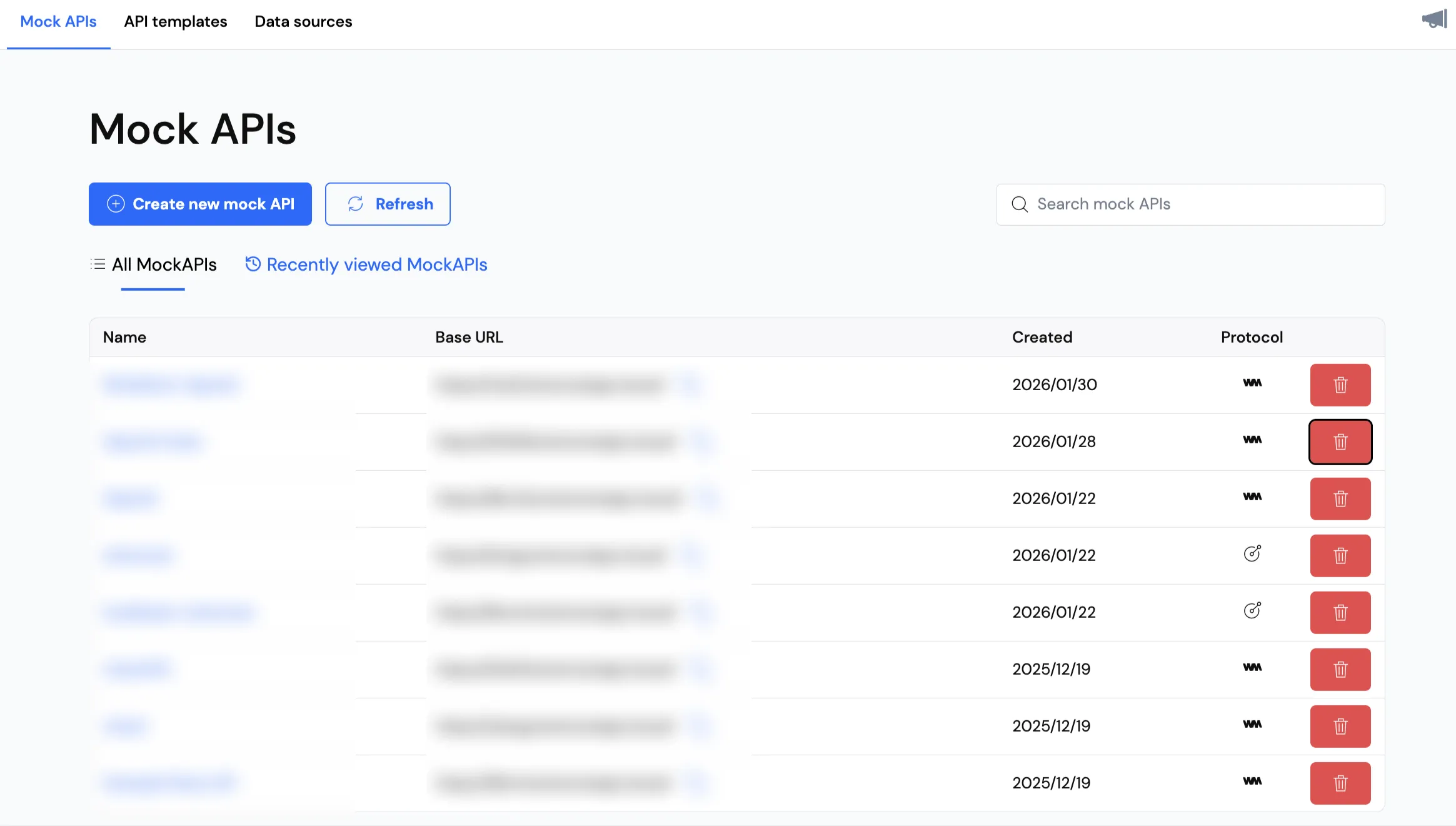
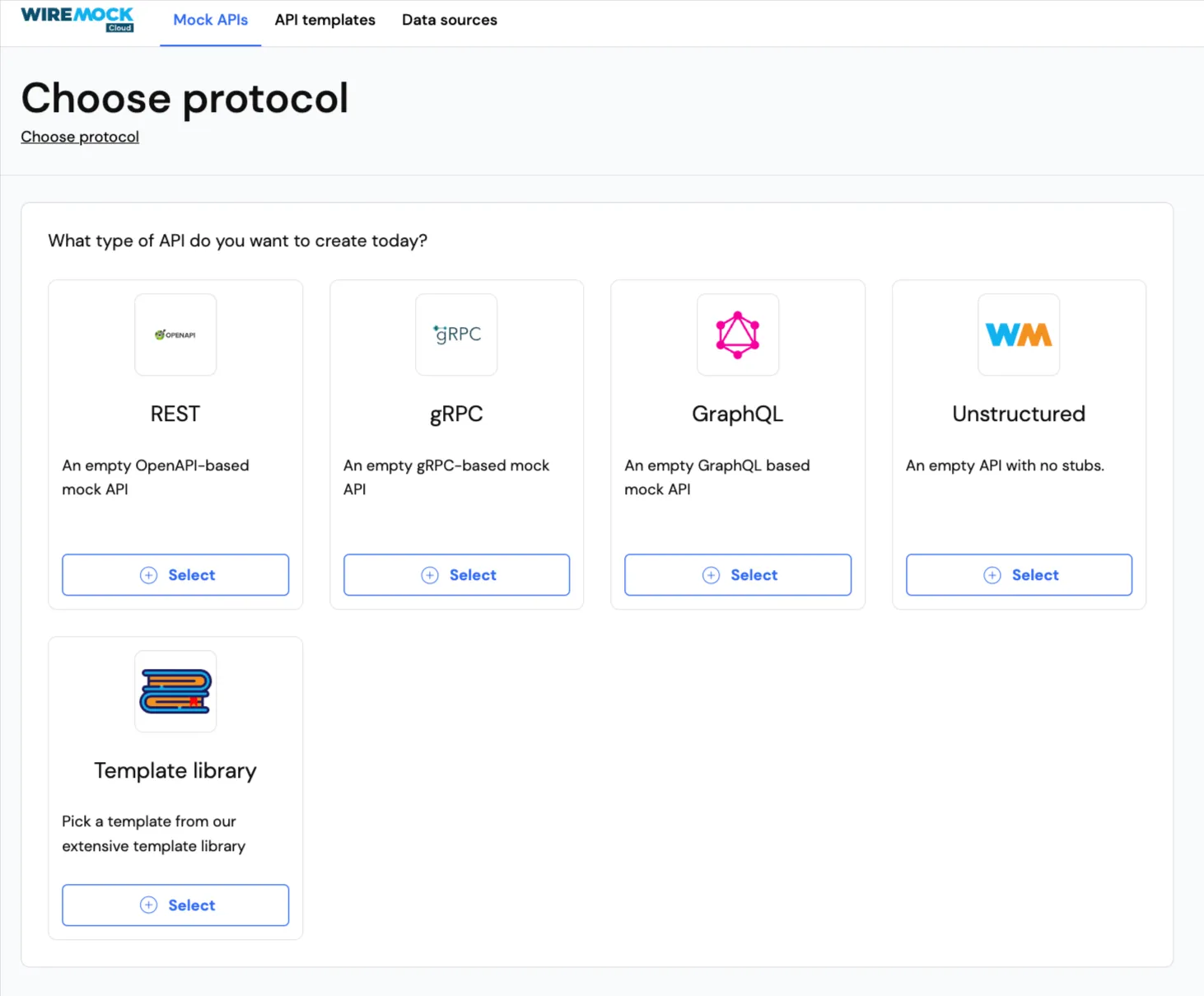
On the protocol selection screen, click Template library to browse available API templates.
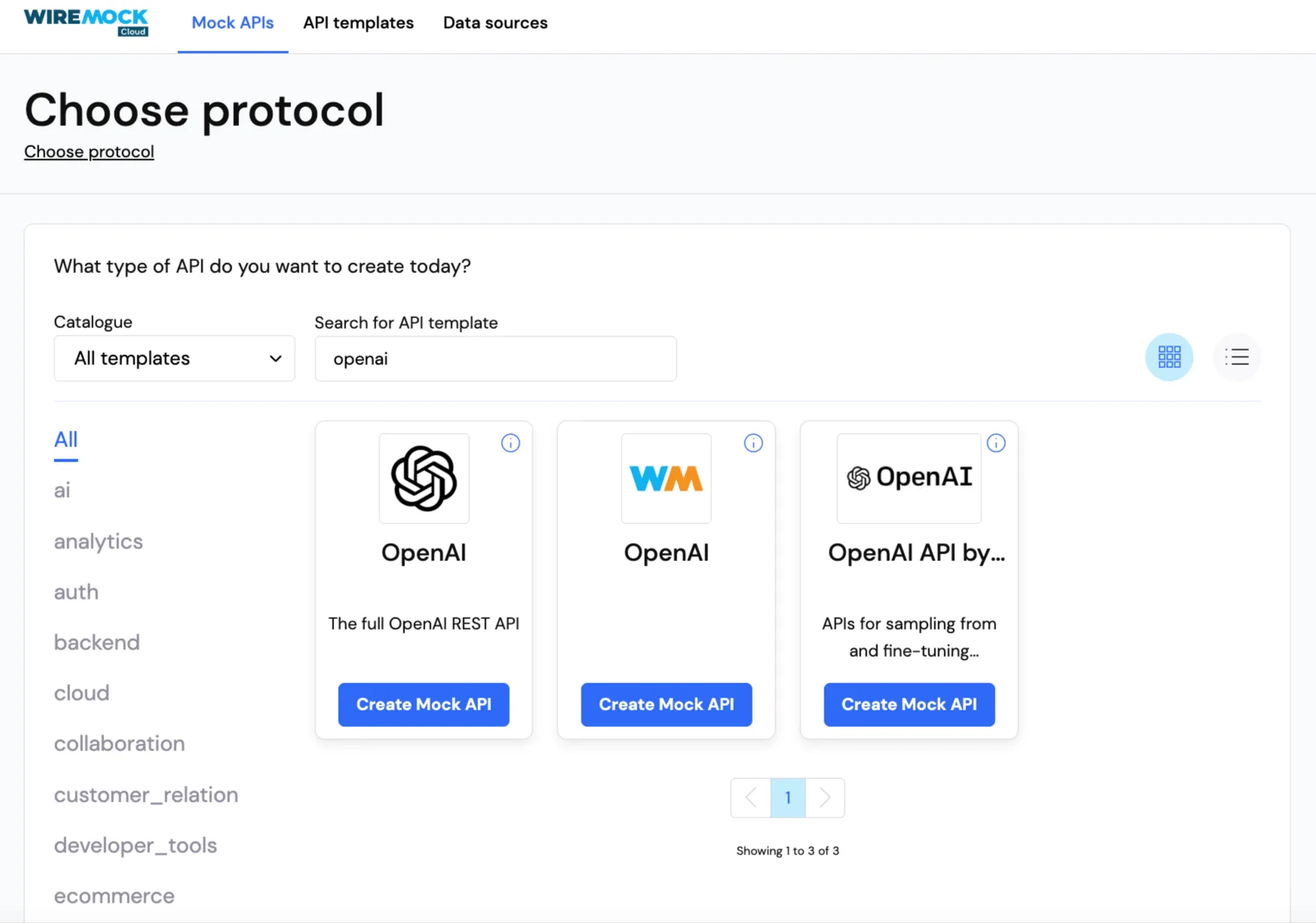
Search for “OpenAI” in the template search box. You’ll see several OpenAI templates. Select the middle one labelled OpenAI (with the WireMock logo).
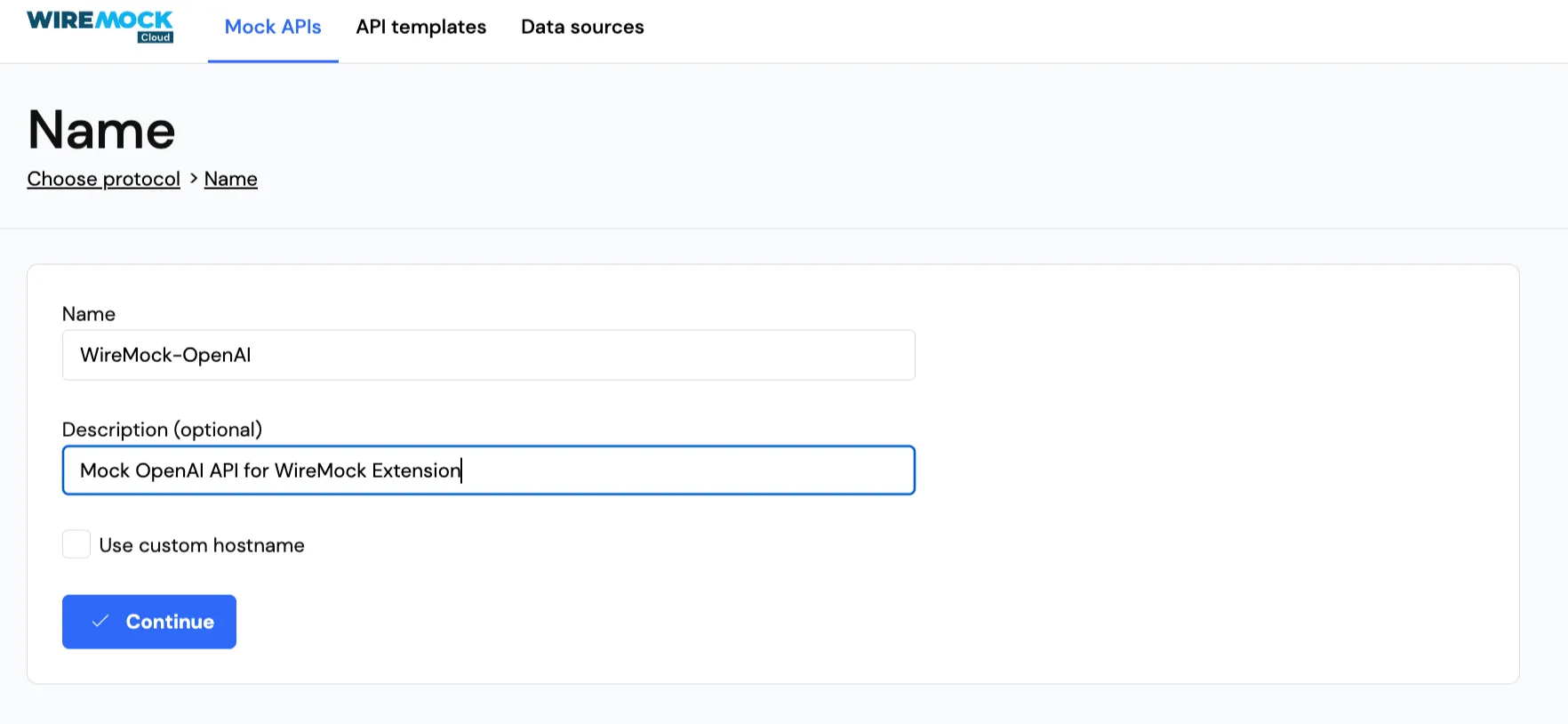
Give your mock API a name (e.g., “WireMock-OpenAI”) and an optional description, then click Continue to create it.
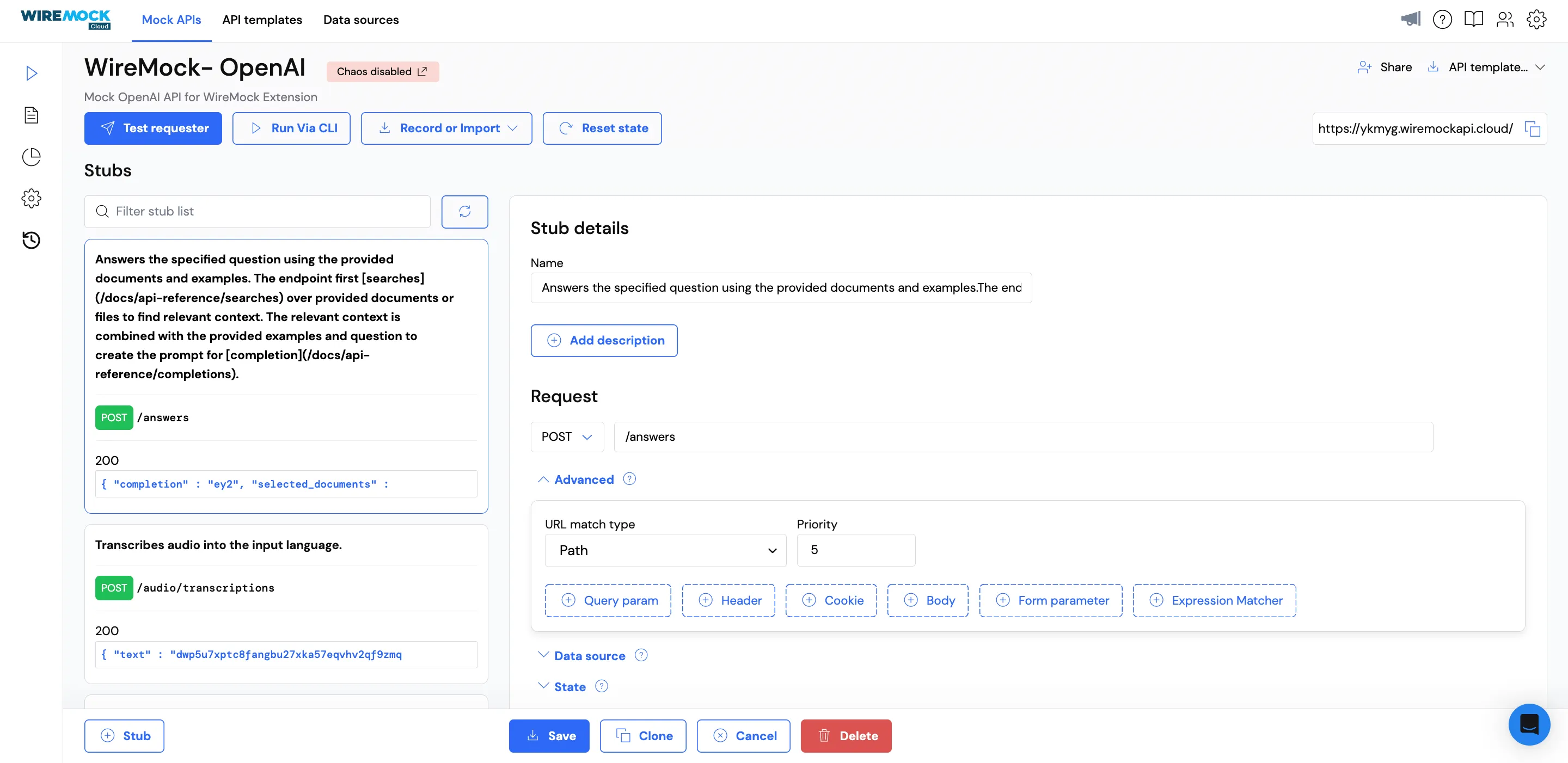
Once created, you’ll land on the Stubs page, which shows all the pre-configured OpenAI endpoints: chat completions, models, embeddings, and more.
3.3: Pull the configuration locally
Copy your mock API ID from the URL. For example, if your URL is https://app.wiremock.cloud/mock-apis/r1y4l/stubs/..., your mock API ID is r1y4l.
Pull the mock API configuration to your local machine:
wiremock pull mock-api <your-mock-api-id>This creates a .wiremock directory containing your wiremock.yaml configuration and stub mappings. The sample app will use this configuration when WireMock Runner starts.
Step 4: Deploy the application to LocalStack
With the WireMock configuration in place, let’s start LocalStack with WireMock Runner enabled and deploy our sample application.
4.1: Get your WireMock Cloud API token
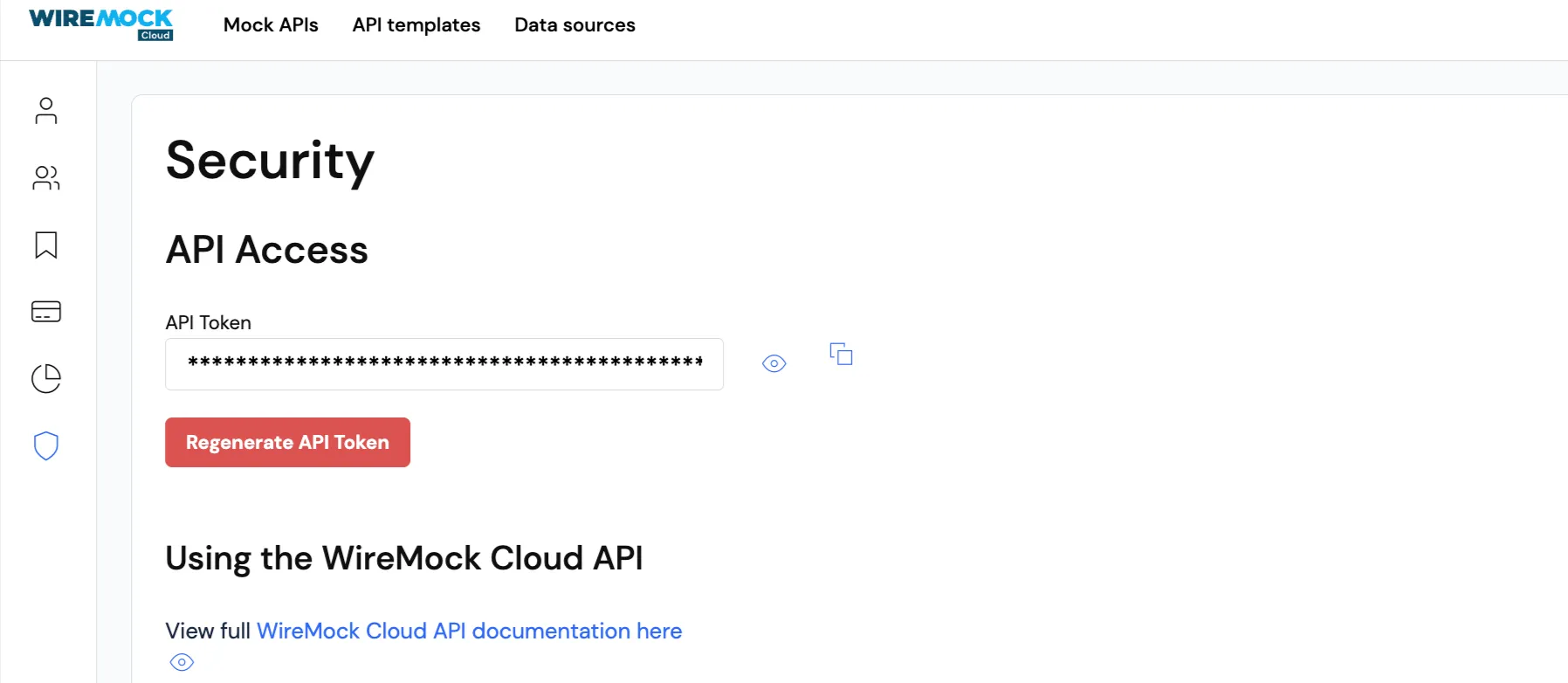
You’ll need an API token to authenticate WireMock Runner with WireMock Cloud. In the WireMock Cloud web app, go to Settings → API Tokens and create a new token. Copy it somewhere safe. You’ll need it in the next step.
4.2: Start LocalStack with WireMock Runner
If LocalStack is already running, stop it first:
localstack stopNow start LocalStack with the WireMock environment variables. Replace the token and path with your own values:
LOCALSTACK_WIREMOCK_API_TOKEN="your-api-token" \LOCALSTACK_WIREMOCK_CONFIG_DIR="$(pwd)" \localstack startThe WIREMOCK_API_TOKEN authenticates with WireMock Cloud, and WIREMOCK_CONFIG_DIR points to the directory containing your .wiremock folder. When LocalStack starts, the WireMock extension will spin up WireMock Runner and load your mock API configuration.
4.3: Install dependencies
Navigate to the sample app directory and install the npm dependencies:
cd localstack-extensions/wiremock/sample-app-runnernpm install4.4: Bootstrap and deploy with CDK
Bootstrap the environment before you deploy the CDK app on LocalStack:
cdklocal bootstrapNow deploy the stack:
cdklocal deployAfter deployment completes, you’ll see output with your API endpoints:
Outputs:WiremockChatStack.ApiEndpoint = https://<api-id>.execute-api.localhost.localstack.cloud:4566/dev/WiremockChatStack.ChatEndpoint = https://<api-id>.execute-api.localhost.localstack.cloud:4566/dev/chatWiremockChatStack.ModelsEndpoint = https://<api-id>.execute-api.localhost.localstack.cloud:4566/dev/modelsThe stack has created a Lambda function and API Gateway. The Lambda function is configured to call http://wiremock.localhost.localstack.cloud:4566 for its “OpenAI” requests, which WireMock Runner will handle using your mock API stubs.
Step 5: Test the endpoints
With everything deployed, let’s verify that the application works correctly. The Lambda function will call WireMock (thinking it’s OpenAI), and WireMock will return the mocked responses from your stub configuration.
5.1: List available models
Call the /models endpoint to retrieve the list of available AI models:
curl http://<api-id>.execute-api.localhost.localstack.cloud:4566/dev/modelsYou should see a response like this:
{ "data": [ { "created": 2577568066689954468, "owned_by": "kfu9knjv50qqd9o2oocb4wezjy6b7lttg2tnqo4j...", "id": "b0ah", "object": "kath00kydj5hplcczg7jp0tgsr4a5snbbm6qoq0jf..." }, // ... more models ], "object": "j5ui73d83npx52k3sx37qa2b1iw2gri7liqn1eal..."}This response came from WireMock, not OpenAI. The Lambda function made an HTTP request to wiremock.localhost.localstack.cloud:4566/models, and WireMock returned the stubbed response based on your mock API configuration.
5.2: Send a chat message
Now test the chat completion endpoint:
curl -X POST https://<api-id>.execute-api.localhost.localstack.cloud:4566/dev/chat \ -H "Content-Type: application/json" \ -d '{"message": "Hello, how are you?"}'You should receive a mocked chat response:
{ "created": 7103458915926373359, "usage": { "completion_tokens": 8314306884961061157, "prompt_tokens": 3647872210849270554, "total_tokens": 1216298665279749073 }, "model": "s46d0c7xc7dxl7oue3yd93akieg89bcgg0lxrkqi...", "id": "qibo", "choices": [ { "finish_reason": "x3voee2ztjal9104gycih5z12kqr72mekae82okn...", "index": 4265740550686910933, "message": { "role": "system", "content": "Ea aut qui aut. Omnis eos aliquid mollitia nostrum magni et corporis..." } }, // ... more choices ], "object": "r4031lu9bt4n6pszmr636elk0gcf0j7xoep5izy3..."}The Lambda function sent a chat-completion request to WireMock, which matched it against your stubs and returned a preconfigured response. No actual OpenAI API calls were made.
5.3: Run integration tests
The sample app includes integration tests with Jest that verify the API endpoints work correctly. Run them with:
npm testThis executes the test suite in test/api.test.ts, which makes requests to both endpoints and validates the responses. If all tests pass, your LocalStack + WireMock setup is working correctly.
 PASS  test/api.test.ts (12.749 s)  WireMock Chat API    GET /models      ✓ should return a list of models with correct format (9487 ms)    POST /chat      ✓ should return a chat response with correct format (174 ms)      ✓ should return error when message is missing (74 ms)
Test Suites: 1 passed, 1 totalTests:       3 passed, 3 totalSnapshots:   0 totalTime:        12.895 sRan all test suites.
Conclusion
The WireMock extension for LocalStack offers local-first integration testing without the usual pain. In this tutorial, we built a serverless chat backend that combines AWS services (Lambda, API Gateway) with a mocked external API (OpenAI via WireMock), all running locally, without cloud credentials, rate limits, or network dependencies.
LocalStack handles AWS emulation, but end-to-end tests still break when they hit real third-party APIs. Payment gateways time out. Identity providers rate-limit you. Partner services go down on weekends. WireMock fills that gap: AWS service behaviour from LocalStack plus downstream HTTP/API behaviour from WireMock creates a fully local, deterministic integration environment.
If you’re building microservices or event-driven apps that call both AWS and external APIs, this setup makes sense. You get faster feedback loops and fewer CI failures. Teams can develop in parallel without waiting on partners. And if you’re in a regulated industry, you’ll appreciate having better control over data movement and fewer firewall exceptions to worry about.
Learn More
- WireMock Documentation: Official docs covering stubbing, templating, stateful mocks, and WireMock Runner
- WireMock Cloud: Cloud platform for designing, sharing, and managing mock APIs
- WireMock Cloud Academy: Video tutorials for getting started with WireMock Cloud
- LocalStack Documentation: Getting started guides, service coverage, and configuration options
- LocalStack Extensions: How extensions work and how to build your own
- Extensions Library: Browse available community extensions
- LocalStack Slack Community: Join the community for questions and discussions