

Automate Terraform testing with LocalStack & GitHub Actions
Learn how to automate Terraform testing in GitHub Actions with LocalStack to validate modules without cloud costs or credentials. This tutorial shows how to set up CI workflows, run Terraform tests, and get fast feedback loops.

Introduction
In a previous blog, we demonstrated how LocalStack enables local Terraform testing with tflocal, validating infrastructure-as-code without real cloud deployments. The next step is making this repeatable in a team: every commit and pull request should validate your Terraform modules long before anything reaches production. Manual testing and ad-hoc validation don’t scale, and traditional Terraform CI pipelines can be slow, costly, and painful to operate.
By integrating LocalStack into your CI/CD pipeline, you can automate Terraform testing in an isolated setup that mirrors AWS behavior, without requiring credentials or real cloud resources. In this tutorial, you will:
- Configure a CI Auth Token for running LocalStack in CI
- Start LocalStack as a Docker container in GitHub Actions
- Run Terraform tests using the same module & test pattern from the previous post
The goal is simple: faster iterations, safer collaboration, and confidence that your Terraform modules work as intended, before they shape your cloud environment.
How LocalStack works with GitHub Actions
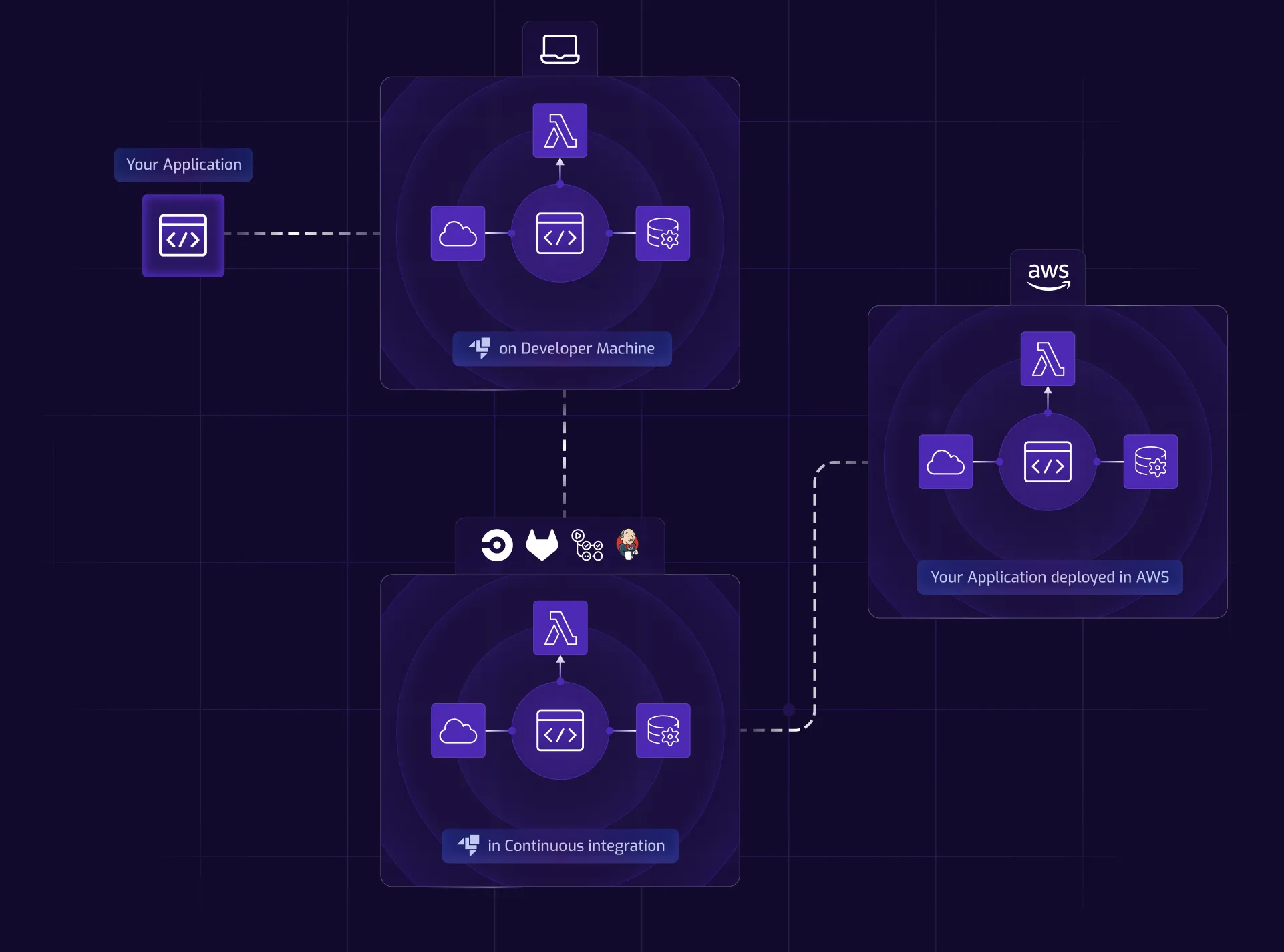
LocalStack integrates with GitHub Actions (and other CI systems) through a Docker-based execution model. At its core, LocalStack runs as a Docker container within your GitHub Actions runner, providing a self-contained, consistent, and isolated testing environment for your infrastructure code, without ever connecting to the real AWS cloud.
To streamline setup, we provide an official GitHub Action called setup-localstack. This action handles the essential steps: pulling the LocalStack Docker image, configuring the LocalStack CLI, and launching the container.
Here’s a minimal example:
- name: Start LocalStack uses: LocalStack/setup-localstack@v0.2.4 with: image-tag: 'latest' install-awslocal: 'true' env: LOCALSTACK_AUTH_TOKEN: ${{ secrets.LOCALSTACK_AUTH_TOKEN }}Your LocalStack license provides access to additional features, including Cloud Pods for state snapshots and collaborative debugging, by including your authentication token (LOCALSTACK_AUTH_TOKEN) in the workflow.
To complete the testing environment setup, you’ll need to separately install Terraform and our tflocal wrapper. These tools work together with LocalStack to execute your infrastructure tests in an environment that accurately mirrors AWS behavior.
The flow is straightforward: push code → GitHub Actions starts LocalStack → the runner executes your infrastructure tests → you get fast feedback without touching your actual cloud resources.
Prerequisites
- A GitHub account (to fork a sample repository and run workflows)
- A LocalStack account with access to CI Auth Tokens
- Familiarity with Terraform and the
tflocalwrapper
Step 1: Configure a CI Auth Token
Before implementing LocalStack with GitHub Actions, you’ll need to set up a CI Auth Token to enable LocalStack licensed features in CI.
A CI Auth Token is purpose-built for automated environments. It allows LocalStack to authenticate and activate licensed features when running in your GitHub Actions workflow.
To create your CI Auth Token:
- Navigate to the LocalStack Web Application and open the Settings page.
- Navigate to the Auth Tokens tab and scroll to the CI Auth Tokens section.
- Enter a name for your token and click Generate new CI Auth Token.
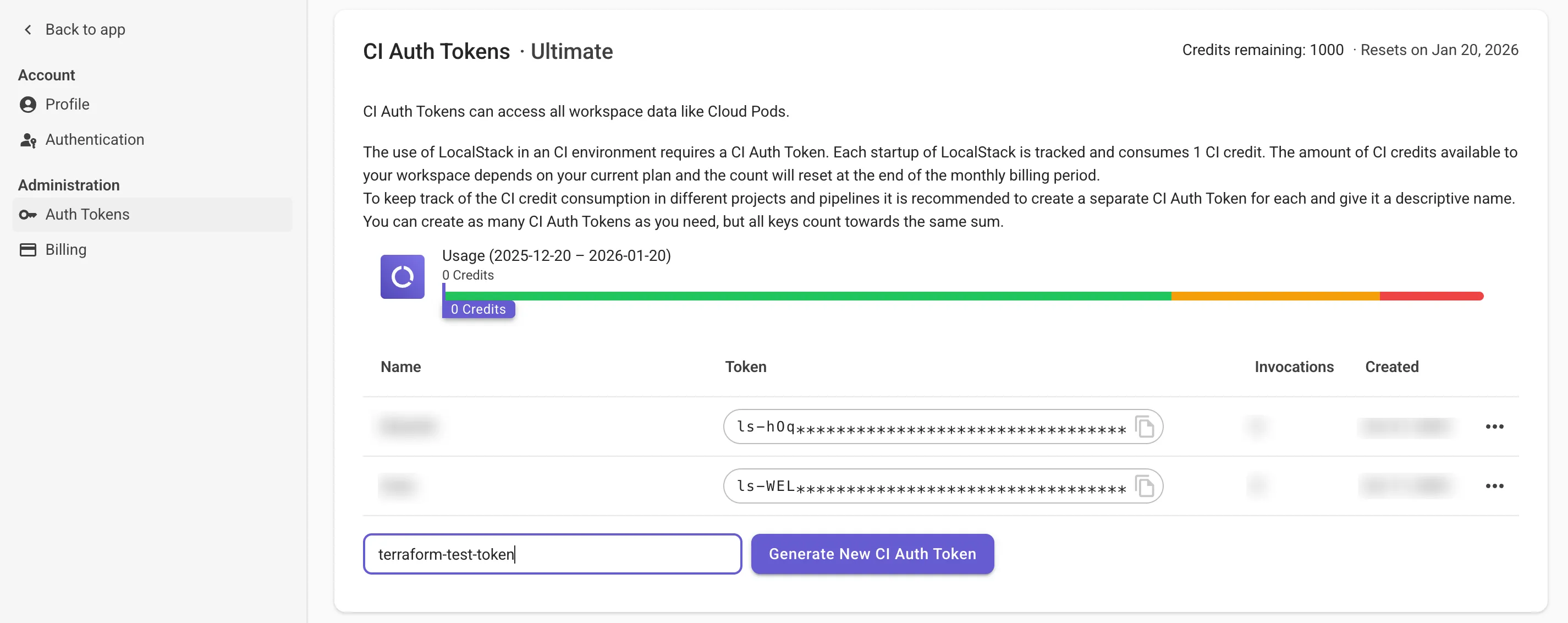
- Copy the generated token. You’ll need this for your GitHub repository settings.
Step 2: Set up the sample project
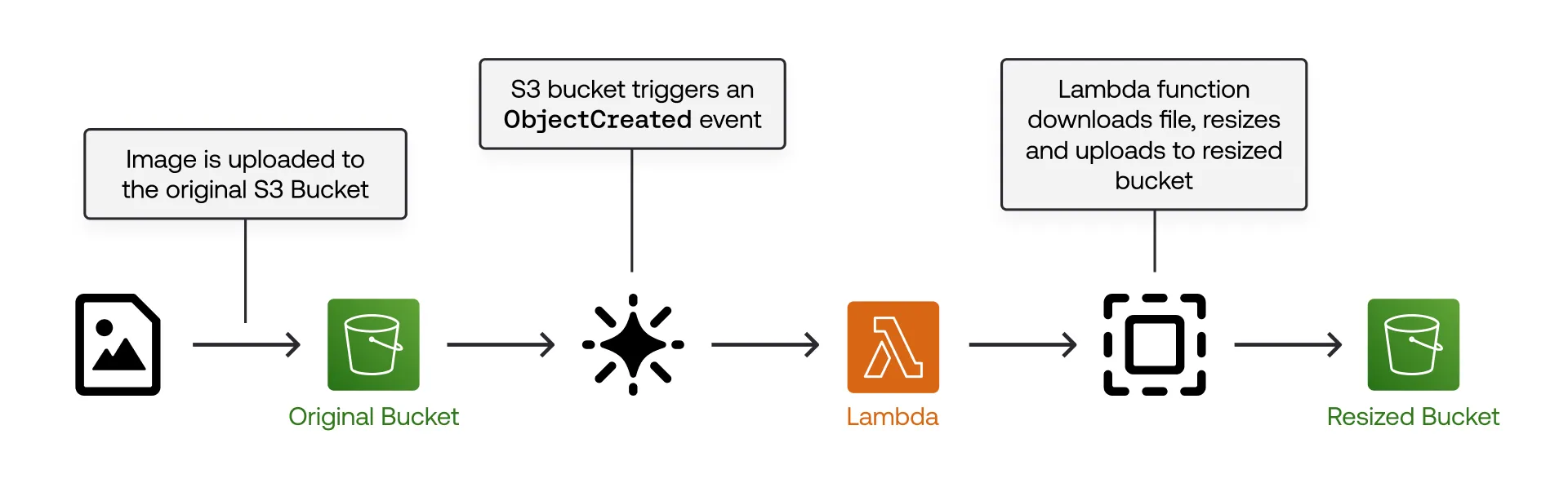
To recap from our previous blog, we’ll be using our public example that sets up a serverless workflow to resize images uploaded to an S3 bucket.
The Terraform module sets up S3 bucket notifications to trigger a Python Lambda function that performs image resizing operations using Pillow and uploads the resized image to another S3 bucket.
For integration testing, we’ve used the Terraform tests framework to implement the following test process:
- Deploys the primary infrastructure using a
main.tffile in the root directory - Uploads an image file to the S3 bucket (
original-images) to trigger the resize. - Waits 10 seconds, then verifies the resized image exists in the other S3 bucket (
resized-images).
2.1: Fork and clone the repository
Fork the LocalStack sample repo on GitHub, then clone your fork:
git clone https://github.com/<username>/terraform-tests-localstack-github-actions-ci.gitReplace <username> with your GitHub username used to fork the repository.
2.2: Create the workflow file
Next:
- Create a
.githubdirectory and aworkflowssubdirectory. - Create a
main.ymlfile insideworkflows.
Step 3: Configure the GitHub Actions workflow
In this step, you’ll assemble the workflow file end-to-end: define the trigger, start LocalStack on the runner, build the Lambda artifact, and run the Terraform tests with tflocal.
3.1: Add the workflow trigger
Add the following content to the main.yml file:
name: Deploy on LocalStack
on:  push:    branches:      - main  pull_request:    branches:      - main
This ensures that every time a pull request is raised or a new commit is pushed to the main branch, the action is triggered.
3.2: Add the job skeleton
Create a new job named terraform and check out the code:
jobs: terraform: name: Setup infrastructure using Terraform runs-on: ubuntu-latest steps: - name: Checkout the code uses: actions/checkout@v43.3: Install dependencies
To achieve the goal, you can use a few prebuilt Actions:
actions/checkout: Clone the repository for deploying the module.setup-localstack: Set up the GitHub Actions workflow with LocalStack container &localstackCLIsetup-terraform: Set up the GitHub Actions workflow with Terraform CLI.setup-python: Set up the GitHub Actions workflow with Python &pip.
Install Terraform and Python in the runner as part of the job steps:
- name: Setup Terraform  uses: hashicorp/setup-terraform@v3  with:    terraform_version: '1.11.0'
- name: Install Python  uses: actions/setup-python@v4  with:    python-version: '3.10'
3.4: Set up LocalStack
Next, set up LocalStack in your runner:
- name: Start LocalStack uses: LocalStack/setup-localstack@main with: image-tag: 'latest' install-awslocal: 'true' configuration: LS_LOG=trace env: LOCALSTACK_AUTH_TOKEN: ${{ secrets.LOCALSTACK_AUTH_TOKEN }}This action pulls the LocalStack image (localstack/localstack:latest), installs the localstack CLI, and sets up awslocal to redirect AWS API requests to the LocalStack container. The LS_LOG=trace configuration can be used for debugging later.
A repository secret LOCALSTACK_AUTH_TOKEN is also specified to activate your LocalStack license on the GitHub Actions runner. We’ll configure this secret in Step 4.
3.5: Build the Lambda function
As the next step, build the Lambda function for deployment in the demo:
- name: Build the Lambda function run: | docker run --platform linux/x86_64 --rm -v "$PWD":/var/task "public.ecr.aws/sam/build-python3.11" /bin/sh -c "pip3 install -r requirements.txt -t libs; exit" cd libs && zip -r ../lambda.zip . && cd .. zip lambda.zip lambda_function.py rm -rf libs3.6: Run the Terraform tests against LocalStack
To run the Terraform tests, we’ll use the tflocal CLI. This sets AWS provider endpoints to http://localhost:4566 by creating a localstack_providers_override.tf file, which overrides the default AWS provider endpoints to point to the local cloud emulator APIs.
The Terraform test framework automatically deploys and tests the module without requiring plan or apply commands. Since tflocal is a wrapper over the terraform CLI, we can run the tests with tflocal test without additional configuration.
Add the following step:
- name: Install tflocal  run: |    pip install terraform-local
- name: Run Terraform Tests  run: |    tflocal init    tflocal test
The commands install the tflocal CLI and initialize the Terraform module, use a setup module to create the infrastructure, and a loading module to validate it. After test execution, Terraform automatically attempts to destroy all created resources.
Step 4: Run the GitHub Actions workflow
Before you trigger your workflow, set up the CI Auth Token in your GitHub repository secrets. In your forked GitHub repository secrets:
- Set the name as
LOCALSTACK_AUTH_TOKEN - Set the secret as the CI Auth Token
Now, commit and push your workflow to your forked GitHub repository.
With the GitHub Action workflow in place, your Terraform module will be deployed and tested on LocalStack whenever changes are made to the main branch of your GitHub repository.
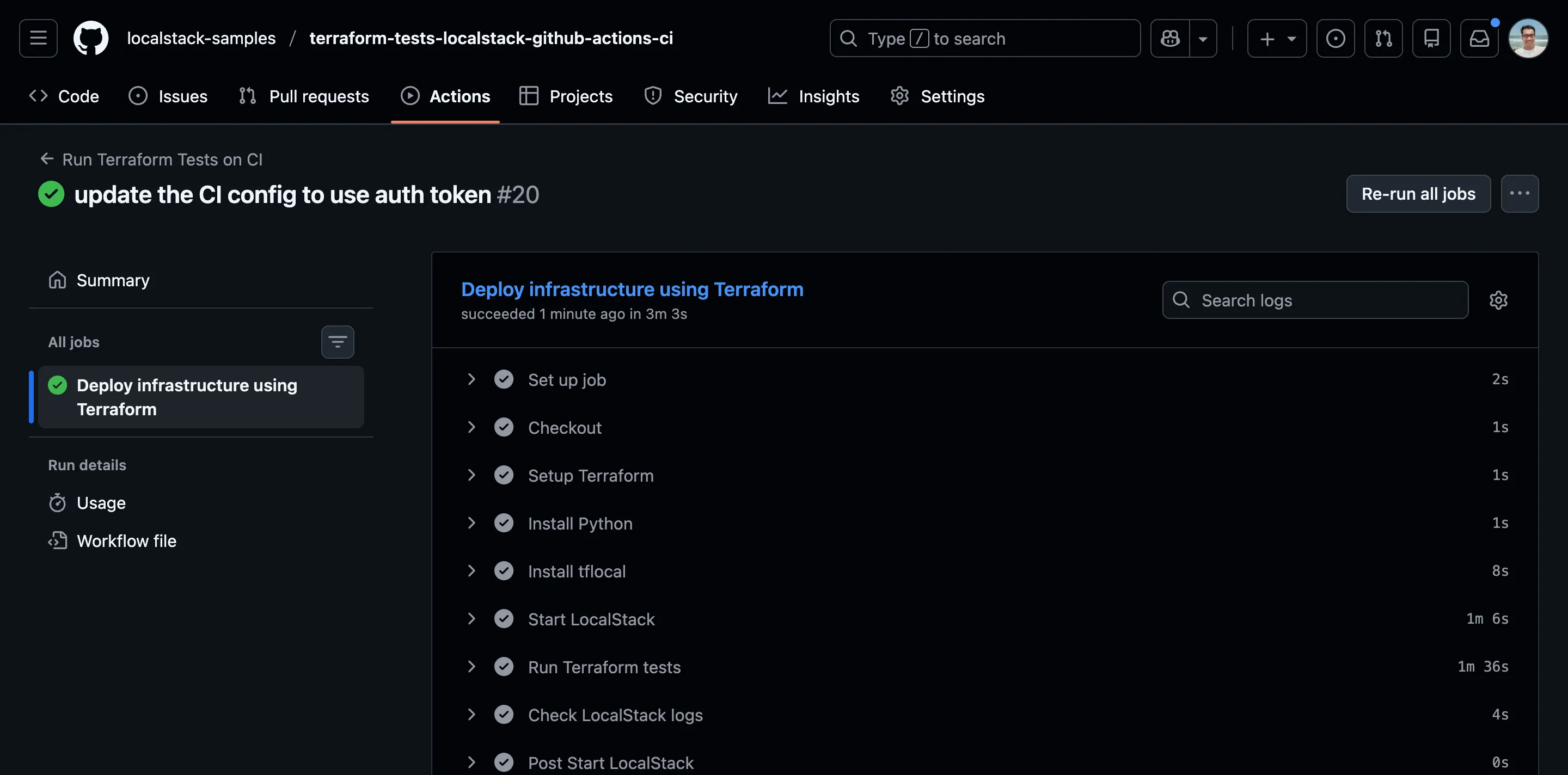
You’ve now successfully automated your infrastructure testing. Every commit and PR can trigger a comprehensive test of your Terraform configurations in an isolated environment, giving you confidence before deploying to production.
Best Practices for using LocalStack in CI
Now that you have the workflow running, here are a few quick ways to get more out of LocalStack in CI environments like GitHub Actions.
- Use state management tools like Cloud Pods to snapshot, restore, and share environments.
- Use CI caching, artifacts, and marketplace actions (like
setup-terraform) to keep workflows fast and consistent. - Capture diagnostics in CI with our diagnostics endpoint and inspect them with tools like
diapretty.
And finally, keep the LocalStack docs handy for CI integrations and feature configuration.
Conclusion
By integrating LocalStack with GitHub Actions, you can create a robust, automated testing pipeline for your Terraform modules that provides fast feedback, supporting a quick and agile test-driven development cycle.
This happens without incurring any costs on the actual AWS cloud, hence no waiting around for prolonged CI runs. From the initial set-up to advanced IaC debugging, LocalStack offers a robust, production-like environment right in your CI pipeline.