
Build Knowledge Graph Applications with LocalStack and TypeDB Extension
Learn how to build knowledge graph applications with TypeDB extension for LocalStack. You'll learn how to install and use the extension with a sample application to understand the TypeDB schema, data and query relationships, and how LocalStack and TypeDB fit together.

Introduction
TypeDB is a polymorphic database designed for complex data relationships. Don’t worry if you aren’t sure what that means yet; I’ll explain in more detail in a bit, but what’s important is that it lets you express nested structures, inheritance, and inference directly in your schema. If you’re building an application dealing with knowledge graphs or access control systems, TypeDB is a natural fit.
We’re excited to introduce a TypeDB extension for LocalStack that brings TypeDB into your local AWS development workflow. With this extension, LocalStack users can now build and test these relationship-heavy applications without needing to provision external infrastructure. With the TypeDB extension installed, a fully functional TypeDB server spins up inside your LocalStack environment. Your application code connects to TypeDB the same way it would in production, without any code changes or external database setup.
In this post, we’ll set up the TypeDB extension and build a user and group management service using Lambda, API Gateway, and TypeDB. This example app would show how nested group memberships work and how TypeQL queries can be used to resolve transitive relationships recursively. By the end, you’ll have a working local setup with the app deployed to LocalStack via Terraform, featuring a web user interface that provides a clear picture of how TypeDB and LocalStack integrate.
What is TypeDB?
TypeDB is an open-source database that organises data as entities, relations, and attributes rather than rows or nodes. You define a schema using TypeQL, the database’s query language, and all data must conform to that schema, similar to how objects in code must match their class definitions. This strict typing catches errors early and makes queries predictable.
TypeDB uses the schema to understand your data model and optimise queries accordingly. Relations in TypeDB are first-class citizens: a “membership” relation between a user and a group is a concrete thing you can query, extend, and attach attributes to. This differs from foreign keys in SQL (which are just pointers) or edges in graph databases (which are typically lightweight connections). When your domain has multi-way relationships or nested hierarchies, TypeDB lets you model them directly instead of working around database limitations.
TypeDB also supports functions and inference in the schema. You can define recursive functions that traverse relationships. For example, a function that returns all groups a user belongs to, including indirect memberships through nested groups. The database evaluates these at query time, so you write the logic once in the schema rather than implementing it in application code. This makes TypeDB particularly useful for access control, organisational hierarchies, and knowledge graphs where transitive relationships matter.
Why run TypeDB as a LocalStack Extension
LocalStack Extensions let you run additional services inside the LocalStack container, sharing the same network and lifecycle as your emulated AWS resources. For applications that combine AWS services with TypeDB, like a Lambda function that queries a knowledge graph, or an API Gateway fronting a TypeDB-backed service, the extension eliminates the need to manage a separate database instance. You can start LocalStack, and the TypeDB server comes up automatically, with your application code connecting to it at typedb.localhost.localstack.cloud:4566.
Running TypeDB as an extension allows you to:
- Skip Docker Compose setup or separate containers. Install the extension once, and TypeDB is available whenever LocalStack runs.
- Connect your application to the same hostname locally and in CI, simplifying configuration across environments.
- Let Lambda functions, Step Functions, or any AWS service emulated by LocalStack interact with TypeDB in the same local network.
- Spin up a fresh TypeDB instance with each LocalStack restart, useful for running tests against a clean database state.
- Develop and test TypeDB-powered applications entirely offline, without provisioning any external infrastructure.
You can install the TypeDB extension using the LocalStack CLI or using the Extensions Library on the LocalStack Web Application.
How to use the TypeDB extension for LocalStack
Let’s walk through getting the extension running and deploying a sample application. We’ll install the TypeDB extension, start LocalStack, and then deploy a user/group management service that demonstrates TypeDB’s relationship modelling capabilities.
Prerequisites
Before starting, make sure you have the following installed:
- Docker for running LocalStack and the TypeDB server
- LocalStack CLI with a valid LocalStack Auth Token (available with a free LocalStack account)
- Terraform for deploying the sample infrastructure
- Node.js/npm (optional, for the web user interface)
Start your LocalStack container with your LOCALSTACK_AUTH_TOKEN environment variable set. You can use the following command to start LocalStack:
export LOCALSTACK_AUTH_TOKEN=your-auth-tokenlocalstack startStep 1: Install the TypeDB extension for LocalStack
To install the extension, you can either use the LocalStack CLI or the Extensions Library on the LocalStack Web Application.
To install the extension using the LocalStack CLI, start your LocalStack container, configure your Auth Token as an environment variable and run the following command:
localstack extensions install localstack-extension-typedbYou will see the following output after the installation of the extension is successful:
┏━━━━━━━━━━━━━━━━━━━━━━━━━━━━━┳━━━━━━━━━━━━━━━━━━━━━━━━━━━━━━━━━━━━━━━━━━━━┳━━━━━━━━━┳━━━━━━━━━━━━━━━━━━━━━━━━━━┳━━━━━━━━━━━━━┓┃ Name ┃ Summary ┃ Version ┃ Author ┃ Plugin name ┃┡━━━━━━━━━━━━━━━━━━━━━━━━━━━━━╇━━━━━━━━━━━━━━━━━━━━━━━━━━━━━━━━━━━━━━━━━━━━╇━━━━━━━━━╇━━━━━━━━━━━━━━━━━━━━━━━━━━╇━━━━━━━━━━━━━┩│ localstack-extension-typedb │ LocalStack Extension: TypeDB on LocalStack │ 0.1.2 │ LocalStack + TypeDB team │ typedb │└─────────────────────────────┴────────────────────────────────────────────┴─────────┴──────────────────────────┴─────────────┘Alternatively, you can navigate to the Extensions Library on the LocalStack Web Application. The library allows the installation and management of Extensions as simple as the click of a button.
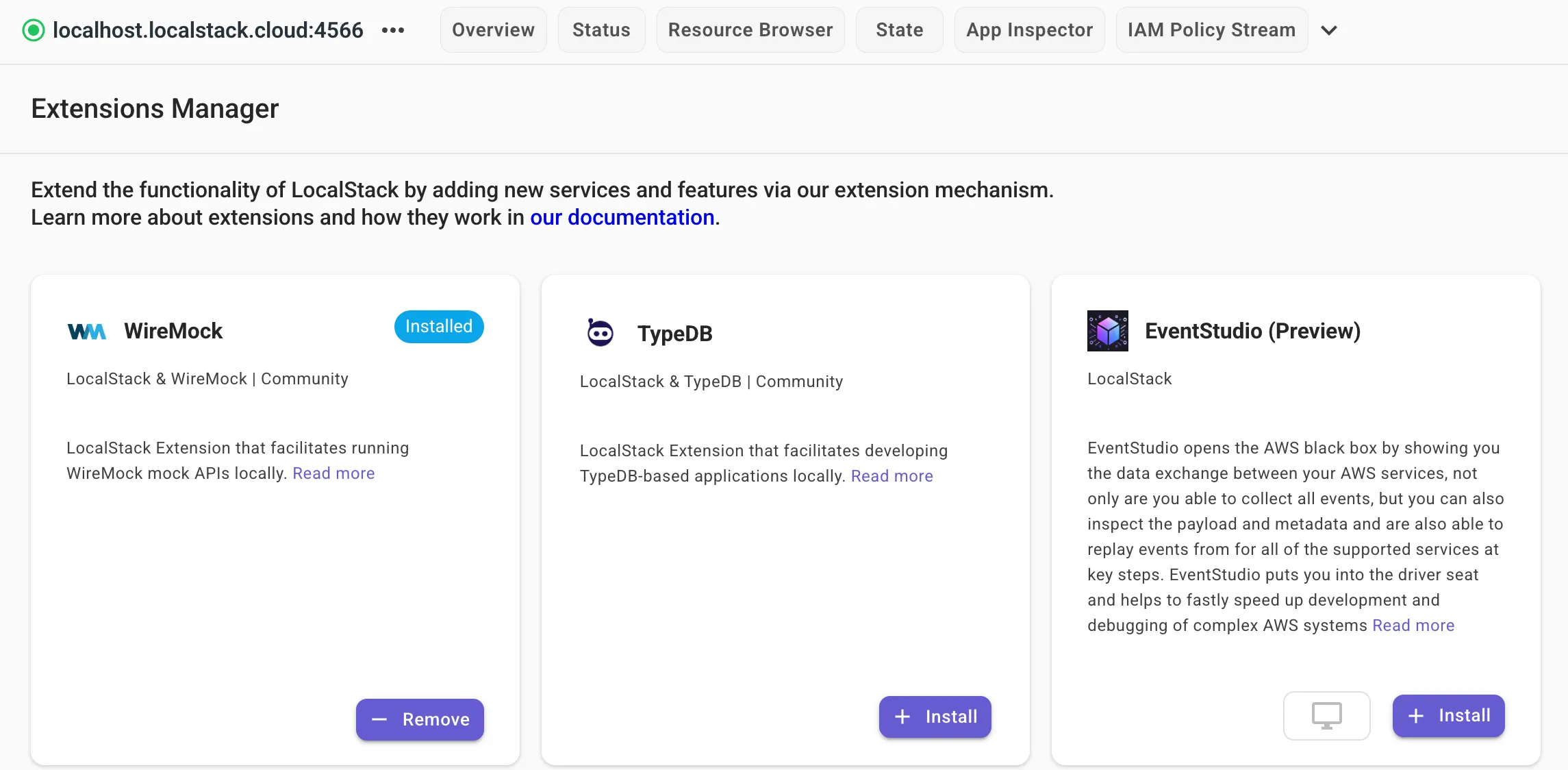
Click on the + Install button on the Web Application to install the extension on your local machine.
Step 2: Clone the sample application
We’ve prepared a sample application that demonstrates TypeDB’s capabilities with AWS services. Clone the repository to your local machine:
git clone https://github.com/typedb-osi/typedb-localstack-demo.gitcd typedb-localstack-demoThe project structure looks like this:
├── app/│ ├── lambda/│ │ ├── handler.py # Lambda function code│ │ ├── schema.tql # TypeDB schema definition│ │ ├── typedb_http_driver.py # HTTP client for TypeDB│ │ └── requirements.txt│ └── web/│ ├── index.html # Web UI│ ├── script.js│ └── style.css├── main.tf # Terraform configuration└── Makefile # Build and deploy commandsThe application is a user and group management service. Users can belong to groups, and groups can contain other groups (nested memberships). The interesting part is querying all groups a user belongs to, including indirect memberships through nested groups. TypeDB handles this elegantly through its recursive functions.
Step 3: Understanding the TypeDB schema
Before deploying, let’s look at how the data model works. Open app/lambda/schema.tql. This file defines the entire structure of our database.
3.1: Entities and inheritance
Here, we define a principal as an abstract entity, something that can be a member of a group. Both user and group inherit from principal. This means a group can contain users and other groups, enabling nested hierarchies. The @key annotation makes user-name and group-name unique identifiers.
entity principal @abstract,  owns name,  plays membership:member;
entity user sub principal,  owns email @unique @card(1..),  owns user-name @key;
entity group sub principal,  owns group-name @key,  plays membership:container;
3.2: Relations as first-class citizens
Here, the membership relation connects a container (a group) with a member (a user or another group). Unlike a foreign key in SQL, this relation is a concrete object in the database. You can query it, filter it, and extend it with attributes if needed.
relation membership, relates container, relates member;3.3: Recursive functions for transitive queries
This is where TypeDB gets powerful. The schema includes two functions that recursively traverse the membership graph:
fun group-members($group: group) -> { principal }: match { membership (container: $group, member: $member); } or { membership (container: $group, member: $group-member); $group-member isa group; let $member in group-members($group-member); }; return { $member };The group-member function returns all members of a group: direct members and members of nested sub-groups. It works by:
- Finding direct members of the group
- For any member that is itself a group, recursively calling
group-memberson that sub-group - Returning the combined results.
Similarly, get-groups returns all groups a principal belongs to, including indirect memberships:
fun get-groups($principal: principal) -> { group }: match { membership (member: $principal, container: $group); } or { membership (member: $principal, container: $container); let $group in get-groups($container); }; return { $group };SQL databases would need recursive CTEs or multiple application-level queries to handle this. TypeDB puts the logic in the schema instead, executing it at query time.
Step 4: Deploy the application to LocalStack
With LocalStack running and the TypeDB extension installed, let’s install dependencies, deploy the infrastructure, and verify everything works.
4.1: Install Dependencies
First, set up a Python virtual environment and install the required packages:
make installThis creates a .venv directory and installs localstack, pytest, requests, terraform-local, and the TypeDB driver. The virtual environment keeps these dependencies isolated from your system Python.
4.2: Deploy the infrastructure
Now deploy the Lambda function and API Gateway to LocalStack:
make tf-deployThis command:
- Copies the Lambda code to the
build/directory - Installs Python dependencies inside a Docker container (for Lambda compatibility)
- Runs
tflocal initandtflocal applyto deploy the infrastructure
The Terraform configuration creates a Lambda function (user-service) that handles all API requests, an API Gateway with endpoints for users, groups, and memberships, alongside related IAM roles and permissions.
4.3: Test the Deployment
Once deployed, you’ll see output like this:
Apply complete! Resources: 60 added, 0 changed, 0 destroyed.
Outputs:
api_endpoint = "http://users-api.execute-api.localhost.localstack.cloud:4566/test"group_all_groups_endpoint = "http://users-api.execute-api.localhost.localstack.cloud:4566/test/groups/{group_name}/all-groups"group_all_members_endpoint = "http://users-api.execute-api.localhost.localstack.cloud:4566/test/groups/{group_name}/all-members"group_groups_endpoint = "http://users-api.execute-api.localhost.localstack.cloud:4566/test/groups/{group_name}/groups"group_members_endpoint = "http://users-api.execute-api.localhost.localstack.cloud:4566/test/groups/{group_name}/members"groups_endpoint = "http://users-api.execute-api.localhost.localstack.cloud:4566/test/groups"reset_endpoint = "http://users-api.execute-api.localhost.localstack.cloud:4566/test/reset"user_all_groups_endpoint = "http://users-api.execute-api.localhost.localstack.cloud:4566/test/users/{username}/all-groups"user_groups_endpoint = "http://users-api.execute-api.localhost.localstack.cloud:4566/test/users/{username}/groups"users_endpoint = "http://users-api.execute-api.localhost.localstack.cloud:4566/test/users"
The repository includes integration tests that verify the API endpoints work correctly. Run them with:
make test-lambdaThis executes the pytest suite in tests/test_lambda.py, which creates users and groups, builds membership hierarchies, and verifies that both direct and transitive queries return the expected results. If all tests pass, your deployment is working correctly.
Step 5: Create data and query relationships
Let’s create a user, a few groups, and build a nested hierarchy: jane → dev-team → platform → acme-corp.
5.1: Create a user and groups
Run these commands to create Jane and the base groups:
curl -X POST http://users-api.execute-api.localhost.localstack.cloud:4566/test/users \  -H "Content-Type: application/json" -d '{"username": "jane", "email": "jane@acme.io"}'
curl -X POST http://users-api.execute-api.localhost.localstack.cloud:4566/test/groups \  -H "Content-Type: application/json" -d '{"group_name": "dev-team"}'
curl -X POST http://users-api.execute-api.localhost.localstack.cloud:4566/test/groups \  -H "Content-Type: application/json" -d '{"group_name": "platform"}'
curl -X POST http://users-api.execute-api.localhost.localstack.cloud:4566/test/groups \  -H "Content-Type: application/json" -d '{"group_name": "acme-corp"}'
5.2: Build the hierarchy
Add Jane to the dev team, then nest the groups:
curl -X POST http://users-api.execute-api.localhost.localstack.cloud:4566/test/groups/dev-team/members \  -H "Content-Type: application/json" -d '{"username": "jane"}'
curl -X POST http://users-api.execute-api.localhost.localstack.cloud:4566/test/groups/platform/members \  -H "Content-Type: application/json" -d '{"group_name": "dev-team"}'
curl -X POST http://users-api.execute-api.localhost.localstack.cloud:4566/test/groups/acme-corp/members \  -H "Content-Type: application/json" -d '{"group_name": "platform"}'
5.3: Run the Queries
Now query Jane’s direct groups:
curl http://users-api.execute-api.localhost.localstack.cloud:4566/test/users/jane/groupsThis returns just “dev-team”. Next, query all transitive groups:
curl http://users-api.execute-api.localhost.localstack.cloud:4566/test/users/jane/all-groupsThis returns all three groups even though Jane is only a direct member of dev-team. TypeDB’s get-groups function recursively traversed the hierarchy in a single query, with no loops or multiple round-trips in application code.
Step 6: Explore with Web UI
For a visual representation of the data, start the web interface:
make web-uiThis serves a simple web application at http://localhost:3000. The UI lets you:
- View all users and groups in the sidebar.
- Click on a user to see their direct and indirect group memberships.
- Click on a group to see its direct and indirect members (both users and sub-groups).
- Create new users and groups.
- Add members to groups.
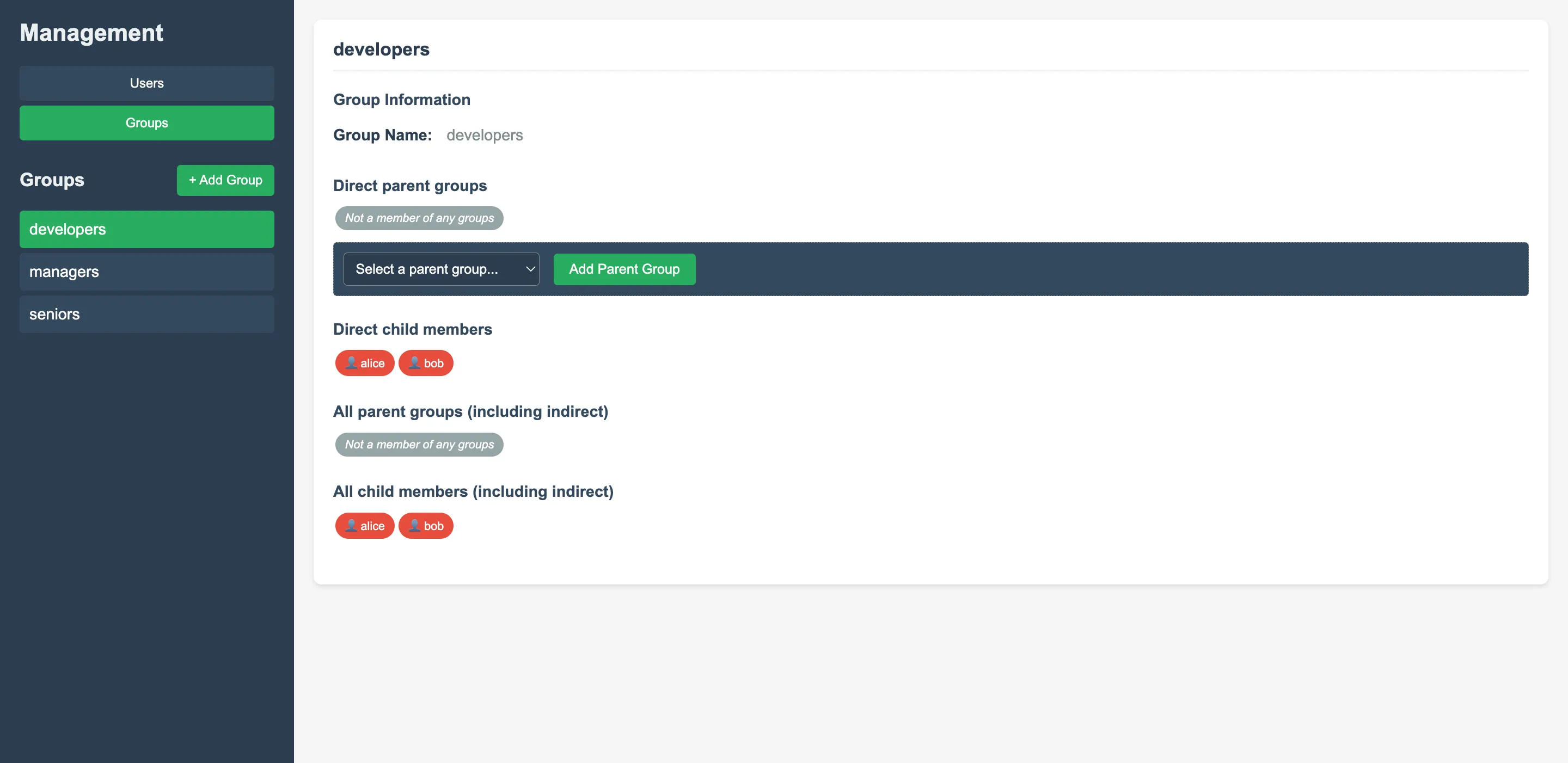
The web interface makes the transitive relationships easy to visualise. When you click on “company”, you’ll see that its direct members include only “engineering”, but its indirect members include “backend-team” and “alice”, all resolved by TypeDB’s recursive functions.
Conclusion
The TypeDB extension for LocalStack brings a powerful polymorphic database into your local development environment with minimal setup. In this tutorial, we built a user and group management service showing how TypeDB handles schema-based data modelling and first-class relations. The recursive functions that resolve transitive relationships at query time eliminate the need for complex application logic.
When your application needs to model complex relationships, the TypeDB extension keeps that logic in the schema rather than scattered across your codebase. TypeDB’s expressive schema pairs well with LocalStack’s local development approach. You can iterate on your data model and test transitive queries before pushing to production.
Learn More
- TypeDB Documentation: Official docs covering schema design, TypeQL queries, and driver SDKs
- TypeDB Discord: Community chat for questions and discussions
- LocalStack Documentation: Getting started guides, service coverage, and configuration options
- LocalStack Extensions: How extensions work and how to build your own
- Extensions Library: Browse available community extensions