

Effective Unit Testing for AWS Step Functions
AWS recently introduced enhancements to the TestState API for unit-testing individual states in a Step Functions state machine and LocalStack has partnered with them to support using this new feature locally.
The AWS Step Functions team recently launched enhancements to their existing TestState API, a mechanism for unit-testing individual states in a Step Functions state machine. To provide local testing support, LocalStack has partnered with AWS to provide the same testing enhancements in our LocalStack emulator. Any code you write for testing state machines in the AWS cloud can also be executed in your local environment.
The original TestState API was introduced at re:Invent 2023 making it possible to inspect a state’s behaviour for a given input. The user is shown the expected state output, along with any intermediate steps computed along the way. This feature is especially useful when using complex JSONPath or JSONata expressions in your state machine. When the original TestState was launched, the process of testing and debugging with Step Functions became much easier.
In this blog post, we’ll look at the recent enhancements to TestState (launched at re:Invent 2025) making it even easier to test your state machines. With LocalStack, you get all the benefits of this enhanced feature, but running directly in your local environment.
The New Features
Let’s look at what was recently introduced in the AWS Step Functions service (as well as LocalStack’s emulator). The new enhancements to TestState include:
- Mocking the results (or errors) for Task states - It’s now possible to test Task states, without actually executing the task (such as an AWS service call, or an HTTP call). By providing a mocked result, you avoid the cost and undesirable side-effects of invoking the real task. This allows for faster and easier testing of the state’s input and output mappings (JSONPath or JSONata), as well as error handling edge cases.
- The Execution Role becomes optional - When it isn’t necessary, such as a when mocking is used, you no longer need to specify the state machine’s Execution Role.
- Support for all state types - The new
TestStateAPI can test all state machine state types, including map states (inline and distributed), parallel states, activity tasks, and service integration patterns such as.syncand.waitForTaskToken. - Accepting the full state machine definition - In addition to the current behaviour of only accepting the ASL for a single state to be tested, you can now provide the full state machine definition, along with the relevant state’s name. This removes the burden of extracting the state definition from the ASL, because the
TestStateAPI does that for you. - Ability to mock the Context object - This gives you tighter control over the state machine’s runtime environment, making it easier to test certain edge cases, and providing more predictable values for ID fields.
Why Test Locally?
The new TestState API enables testing your state machines in your local development environment, before deploying to the AWS cloud. The many advantages of this include:
- Fast iteration of changes while coding in your IDE and running unit tests. No need to deploy a full state machine and the supporting resources.
- Fine-grained control over the input, output, and error conditions for each of your states, allowing mocking of edge cases that are hard to test in production.
- No cost to run - AWS provides the
TestStateAPI free of charge.
With LocalStack we address another dimension - the ability to use TestState without any concerns around cloud security. If your organization has strict security or compliance regulations, or if you’re completely air-gapped from the internet, you’ll appreciate that LocalStack runs entirely on your local machine. This is especially true when your state machine integrates with other AWS services, such as Lambda, EventBridge, or API Gateway.
Example
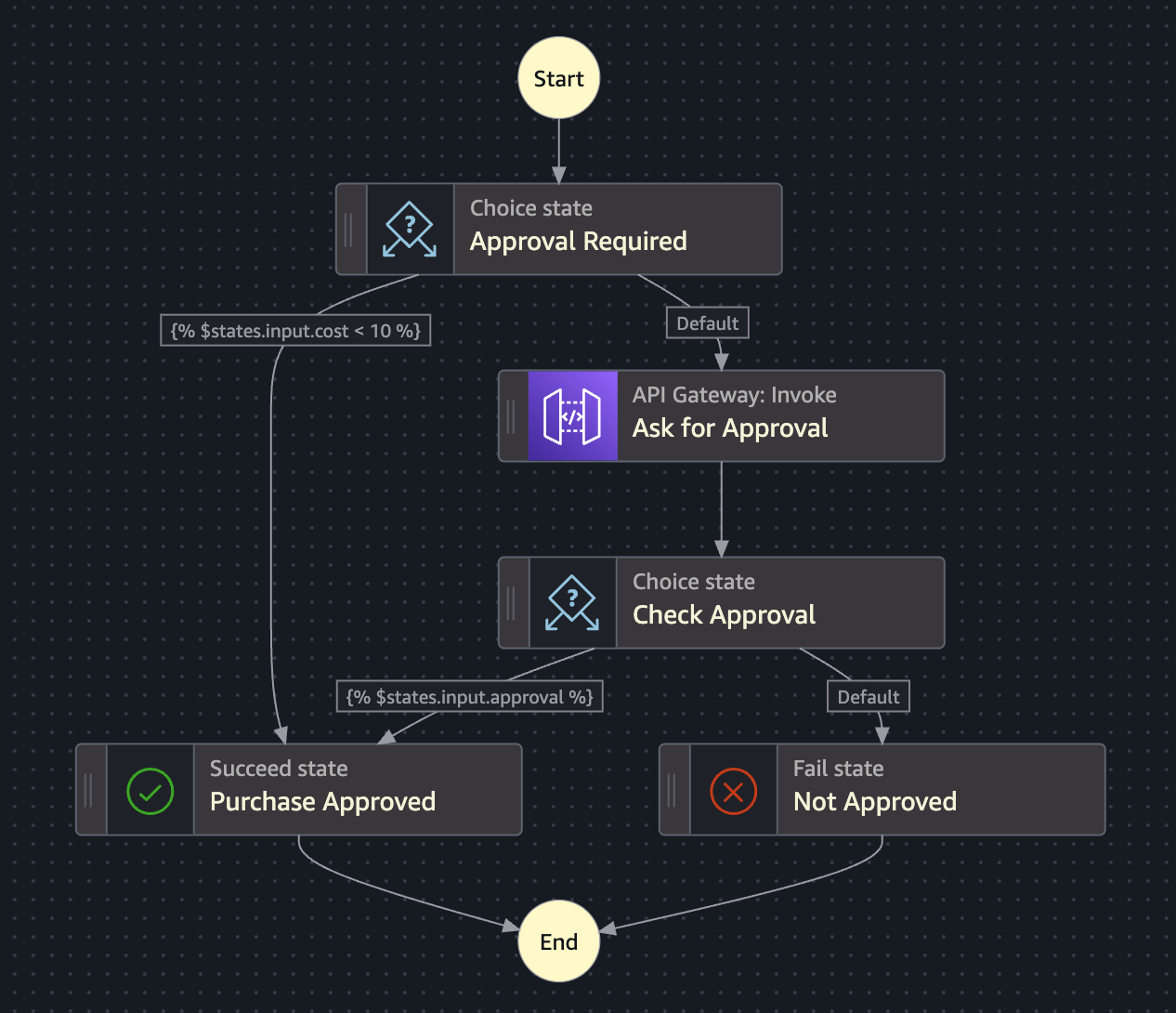
Let’s walk through an example to see how the new TestState features can be used. We’ll use an example state machine which considers whether a purchase should be approved or not. If the cost input parameter is less than $10, the purchase is immediately approved, although for more expensive items an external service makes the decision (via an API Gateway call).
Prerequisites
To use the TestState features shown in this example, you must:
- Download a version of the AWS CLI released after Nov 19th, 2025.
- Configure a
localstackentry in your.aws/configprofile containingendpoint_url = http://localhost.localstack.cloud:4566. This feature will not work if your endpoint islocalhost:4566.
Step 1 - Testing the Approval Required state
To validate whether the Approval Required state correctly approves small purchases, we test with two possible input payloads. We’ll pass in the full state machine definition, in conjunction with the name of the state to be tested.
First, we provide the cost of $9 and check the purchase is automatically approved.
Command:
$ aws --profile localstack stepfunctions test-state --definition file://./state-machine.asl.json \ --state-name "Approval Required" --input '{ "cost": 9 }'Output:
{ "output": "{ \"cost\": 9 }", "nextState": "Purchase Approved", "status": "SUCCEEDED"}Given that nextState is set to Purchase Approved, we can confirm the state machine made the correct decision for a small purchase. Next, we test the purchase of an item costing $10, to check that further approval will be required.
Command:
$ aws --profile localstack stepfunctions test-state \ --definition file://./state-machine.asl.json \ --state-name "Approval Required" \ --input '{ "cost": 10 }'Output:
{ "output": "{ \"cost\": 10 }", "nextState": "Ask for Approval", "status": "SUCCEEDED"}As expected, the state machine has transitioned into the Ask for Approval state, convincing us that the initial Approval Required state is performing correctly. Of course, there are many other test cases we could try (including a non-existent cost) but these two cases illustrate the basics.
Step 2 - Testing the Ask for Approval state
Testing the Ask for Approval state is more complicated, because it involves calling an external API endpoint. In this case, we’ll use the new mocking feature to simulate the Task result, rather than actually invoking the API. This avoids the expense of invoking a real network call, and avoids undesirable side effects (such as being billed for using the approval service).
Command:
$ aws --profile localstack stepfunctions test-state \ --definition file://./state-machine.asl.json \ --state-name "Ask for Approval" \ --input '{ "cost": 10 }' \ --mock '{ "result": "{ \"approval\": true }"}' \ --inspection-level DEBUGOutput:
{ "output": "{\"approval\":true,\"approval_code\":\"2387462\",\"approved_by\":\"Mary\"}", "inspectionData": { "input": "{ \"cost\": 10 }", "afterArguments": "{\"Method\":\"POST\",\"ApiEndpoint\":\"myapi.example.com\",\"Path\":\"/approval\",\"RequestBody\":{\"cost\":10,\"dept_id\":\"12345678\"},\"AuthType\":\"NO_AUTH\"}", "result": "{ \"approval\": true }" }, "nextState": "Check Approval", "status": "SUCCEEDED"}Note that by adding the --inspection-level flag we were given a lot more information about the actual payload that would have been passed to the API call. We can inspect any of these fields to validate the state machine is behaving correctly.
Step 3 - Testing the Check Approval state
Finally, the Check Approval state can be validated in the same way we did in our first step. In this case, no mocking is required because the decision is made entirely from the state’s input.
Command:
$ aws --profile localstack stepfunctions test-state \ --definition file://./state-machine.asl.json \ --state-name "Check Approval" \ --input '{"approval":true,"approval_code":"2387462","approved_by":"Mary"}'Output:
{ "output": "{\"approval\":true,\"approval_code\":\"2387462\",\"approved_by\":\"Mary\"}", "nextState": "Purchase Approved", "status": "SUCCEEDED"}The nextState field in the response is Purchase Approved, so the decision has been made correctly. To be complete, we should also check the status field is SUCCEEDED to ensure that no error occurred.
Putting it all together
Now that we’ve seen a few test cases for a single example state machine, you may have noticed a pattern emerging — The nextState field in each step’s output can be used as the --state-name parameter for the next step. Likewise, the output field from one step can be used as the --input parameter for the next step. By using multiple TestState API calls in a sequence, it’s possible to simulate the whole state machine execution.
To take this a step further, we could even imagine using the TestState API calls within a traditional unit test framework, such as Jest, JUnit, or PyTest. We can set up mocked values for all Task states, and then make assertions about the expected output from TestState. The unit tests would pass or fail to indicate the correctness of the state machine.
Summary
The newly improved TestState API provides a range of testability enhancements for Step Functions state machines. All state types can now be tested, and the introduction of mocking support makes it even easier to validate state behaviour. For more detail about these features, and many other quality-of-life improvements, please refer to the official Step Functions TestState documentation.
LocalStack has collaborated with the AWS Step Functions team to co-launch support for testing state machines in a local development environment. For users who are restricted from developing directly in the cloud, or are concerned about cost, testing state machines with LocalStack is an excellent alternative. You can use the enhanced TestState API by upgrading to the latest LocalStack image (using the latest tag in DockerHub).