
We all understand the merits of deploying to the cloud – and there are many – but let’s be honest: cloud pricing is incredibly opaque and complex. Whether by necessity or by design, it can often be difficult to know how much a deployment will cost until it’s already deployed and the bill arrives.
Adopting FinOps can help, and there are various tools for estimating the cost up front. However, the developer who makes a change or adds a new resource typically does not have clear insight into the associated costs.
This is why I was fascinated to learn about CloudBurn, a project that aims to help you have insight into costs and potential cost-related issues by surfacing them in CI, like any other code quality check. But what if you didn’t even have to wait until CI to get that insight? In this post, we’ll explore what CloudBurn is, how it’s typically used, and then how it fits into a local development workflow using LocalStack to catch potential cost issues before they ever reach your pipeline.
What is CloudBurn?
CloudBurn is an open-source AWS cost policy engine. It ships as a CLI and SDK that runs deterministic rules against your infrastructure, and tells you exactly what to fix and why.
It works in two modes:
scanperforms static analysis on Terraform and CloudFormation files. No AWS credentials required — it reads your IaC files and evaluates them against a library of rules covering known AWS cost anti-patterns. This makes it suitable for local development and CI pipelines.discoverscans live AWS resources via Resource Explorer after you initialize it in your account. It runs the same rule engine against what’s actually deployed, so you can find waste in resources that have already been deployed.
The rule library currently covers 80 checks across 22 AWS services as of writing the article, including EC2, EBS, RDS, S3, Lambda, ECS, EKS, CloudWatch, and more. Rules are labeled by which mode they support — 36 of the 75 currently work in IaC scan mode.
Rules follow a consistent naming convention: CLDBRN-AWS-{SERVICE}-{N}. Let’s look at a few examples to give you a sense of the types of cost-related issues the tool can catch:
CLDBRN-AWS-EBS-1— EBS volume usinggp2instead ofgp3(up to 20% cheaper, same performance)CLDBRN-AWS-S3-1— S3 bucket missing a lifecycle configuration (indefinite storage accumulation)CLDBRN-AWS-ECR-1— ECR repository missing a lifecycle policy (untagged images accumulating)CLDBRN-AWS-RDS-1— RDS instance class not in the preferred cost-efficient setCLDBRN-AWS-CLOUDWATCH-1— CloudWatch log group missing a retention policy (logs retained forever)
Each rule encodes a specific, actionable best practice, and every finding includes the resource ID, file path, line number, and a plain-English explanation of what to change and why. By default, all the provided rules and covered services are enabled, but you can easily configure which rules are enabled or disabled, or which services CloudBurn runs against.
Installing CloudBurn
CloudBurn requires Node.js 24 or later. Install it globally via npm:
npm install --global cloudburnOr run it without installing using npx:
npx cloudburn scan ./infrastructureHow CloudBurn typically works
The typical CloudBurn workflow has two stages that complement each other.
In CI, you run cloudburn scan against your IaC directory on every pull request. If findings exist, the build fails, meaning no infrastructure with known cost anti-patterns can be merged without acknowledgment.
# In your GitHub Actions or GitLab CI pipelinecloudburn scan ./infrastructure --exit-codePeriodically against live AWS, you run cloudburn discover to surface waste in already-deployed resources. This catches things that existed before scan was added to CI, or that may have slipped through.
cloudburn discoverBoth modes produce the same output format. In table mode, you get a readable terminal view. In JSON mode, you get a structured result suitable for connecting with other tooling, reporting, or for use in further processing.
For example, here’s the readable terminal output of running cloudburn scan against our serverless shipment app sample (of course, it’s likely far more readable in my terminal than in your browser):
+----------+-----------------------+--------+----------+-------------------------------------------------------+---------+------+--------+-----------------------------------------------------------------------------------------+| Provider | RuleId | Source | Service | ResourceId | Path | Line | Column | Message |+----------+-----------------------+--------+----------+-------------------------------------------------------+---------+------+--------+-----------------------------------------------------------------------------------------+| aws | CLDBRN-AWS-DYNAMODB-2 | iac | dynamodb | aws_dynamodb_table.shipment | main.tf | 43 | 3 | Provisioned-capacity DynamoDB tables should use auto-scaling. || aws | CLDBRN-AWS-S3-1 | iac | s3 | aws_s3_bucket.shipment_picture_bucket | main.tf | 33 | 1 | S3 buckets should define lifecycle management policies. || aws | CLDBRN-AWS-S3-1 | iac | s3 | aws_s3_bucket.lambda_code_bucket | main.tf | 69 | 1 | S3 buckets should define lifecycle management policies. || aws | CLDBRN-AWS-S3-3 | iac | s3 | aws_s3_bucket.shipment_picture_bucket | main.tf | 33 | 1 | S3 buckets should abort incomplete multipart uploads within 7 days. || aws | CLDBRN-AWS-S3-3 | iac | s3 | aws_s3_bucket.lambda_code_bucket | main.tf | 69 | 1 | S3 buckets should abort incomplete multipart uploads within 7 days. || aws | CLDBRN-AWS-LAMBDA-1 | iac | lambda | aws_lambda_function.shipment_picture_lambda_validator | main.tf | 85 | 1 | Lambda functions should use arm64 architecture when compatible to reduce running costs. |+----------+-----------------------+--------+----------+-------------------------------------------------------+---------+------+--------+-----------------------------------------------------------------------------------------+If you want JSON output, you just need to specify that when running the scan.
cloudburn --format json scan ./infrastructureLet’s look at an example of the JSON output structure because we’ll use it later:
{ "providers": [ { "provider": "aws", "rules": [ { "ruleId": "CLDBRN-AWS-EBS-1", "service": "ebs", "source": "iac", "message": "EBS volume is not using gp3; migrate from gp2 to save up to 20% on storage costs", "findings": [ { "resourceId": "aws_ebs_volume.main", "location": { "path": "modules/storage/main.tf", "line": 12, "column": 1 } } ] } ] } ]}Using LocalStack with CloudBurn to identify cost anti-patterns
LocalStack allows you to test IaC against a fully-functional, emulated local AWS environment without needing to access real AWS. This means you can write or update IaC code and then see exactly how it would impact a real AWS deployment without cloud costs, credential requirements, or the risk of accidentally modifying shared infrastructure.
This also makes a local development workflow using LocalStack the perfect combination with a tool like CloudBurn to test the impact of your IaC code changes. If you’re already validating that your IaC deploys correctly against LocalStack, it makes sense to also validate that it doesn’t introduce cost anti-patterns before it enters the pipeline at all.
It’s worth making cloudburn scan a natural part of your local workflow. The pattern is simple: just scan your IaC directory before you commit or deploy.
For example, if you are using Terraform, you can make a habit of running a scan alongside lstk terraform apply (in case you’re unfamiliar with lstk terraform, it’s LocalStack’s built-in Terraform proxy that ensures the destination is your local environment).
# Validate cost policy, then deploy to LocalStackcloudburn scan ./infrastructure && lstk terraform applyObviously there’s no enforcement as this is up to each developer to run, but it makes the information available at exactly the moment you’re working on changes to your infrastructure. This type of ad hoc usage can be a good starting point for understanding the potential impact of IaC changes on pricing.
Catching cost regressions before they commit
One issue I have with the above is that while the issues in the IaC would be clear, it’s less clear exactly how your changes have impacted the infrastructure – did they add new cost regressions or did they fix any? With the help of Claude, I’ve created a bash script that illustrates the issues identified by CloudBurn, including which ones are new and/or which ones were fixed.
We can even use this script to set up a local environment enforcement that uses a pre-commit hook that runs automatically when you run git commit, and blocks the commit if your changes introduce new cost violations. Basically, we want to ensure that the changes did not make things worse from a cost perspective.
To do this, we’ll scan the committed version of the IaC and your working copy, and do a diff to compare the findings.
How the diff works
The cleanest way to get the committed version of your IaC without disturbing your working copy is git show. It’s purely a read operation that writes the committed contents of a file to stdout without touching the working tree at all:
git show HEAD:infrastructure/main.tf > /tmp/baseline/infrastructure/main.tfFor a whole directory, you need to enumerate tracked IaC files with git ls-files and reconstruct the tree:
git ls-files -- '*.tf' '*.yaml' '*.yml' '*.json' | while read f; do mkdir -p "/tmp/baseline/$(dirname $f)" git show HEAD:"$f" > "/tmp/baseline/$f"doneThen you scan both the temp baseline directory and your live working copy, capture both as JSON, and diff individual findings (rule plus resource plus location). That way adding another bucket that violates the same S3 rule still shows up as a regression instead of disappearing because the rule was already firing elsewhere.
The script
You can save the below script as cloudburn.sh and run it manually, or install it as .git/hooks/pre-commit (use chmod +x on that file so Git will run it). Be sure to update the IAC_DIR with the location of your IaC directory.
The script has two modes:
- If the script is invoked as
pre-commithook or you setCLOUDBURN_USE_STAGED=1, it treats the staged index as the “current” tree: it runsgit stash push --keep-indexwhen there are unstaged edits so CloudBurn reads the same files Git will commit, then pops the stash afterward. Untracked IaC files are not stashed (-uis omitted on purpose), so they remain visible to CloudBurn on disk even in pre-commit mode. - If you run the script locally as
cloudburn.shwithout that variable, it diff-scans the working tree vsHEAD, which is friendlier for quick local checks before you stage anything.
Yes, the script looks intimidatingly long, so let’s go over what it’s doing.
- It checks whether relevant IaC paths changed (against
HEADin the working-tree case, or against the staged snapshot when pre-commit mode is on). If not, it skips the baseline-vs-current diff path but still runscloudburn scanonce on your IaC directory for a single-tree report, then exits. In pre-commit mode with unstaged edits, it stashes them with--keep-indexbefore scanning so the files on disk match the index. - It pulls the checked-in copy of the IaC from git and writes it to a temp directory using
git show. This is a done in a loop because the IaC could be a single file or a directory of files. - It runs a CloudBurn scan on the checked-in version and the current version, using the JSON formatted output.
- It outputs the violations for the checked-in copy and the current version to the console (or, if no violations are found, it outputs a message stating that).
- It fingerprints each violation (rule, resource, location) so “same rule, new bucket” counts as regression. When no fingerprints differ between scans, it reports unchanged policy.
- If there are differences, it outputs the issues that were fixed and the issues that were added in the current copy. If issues were added, it blocks the commit.
#!/bin/bashset -euo pipefail
# ── Configuration ────────────────────────────────────────────────────────────# Directory containing your IaC files, relative to repo rootIAC_DIR="${CLOUDBURN_IAC_DIR:-./infrastructure}"
# Set to 0 to warn without blocking the commitBLOCK_ON_NEW_VIOLATIONS="${CLOUDBURN_BLOCK_COMMIT:-1}"
# Set to 1 to diff staged vs HEAD even when run as cloudburn.sh (see pre-commit mode below)CLOUDBURN_USE_STAGED="${CLOUDBURN_USE_STAGED:-0}"
# ── Setup ────────────────────────────────────────────────────────────────────REPO_ROOT=$(git rev-parse --show-toplevel)BASELINE_DIR=$(mktemp -d)STASH_CREATED=0
cleanup() {  if [ "$STASH_CREATED" = "1" ]; then    if ! git stash pop --quiet; then      echo "cloudburn: could not pop temporary stash — check git stash list" >&2    fi  fi  rm -rf "$BASELINE_DIR"}trap cleanup EXIT
cd "$REPO_ROOT"
# Pre-commit mode: named pre-commit, or explicit CLOUDBURN_USE_STAGED=1USE_STAGED=0case "$(basename "$0")" in pre-commit|pre-commit.*) USE_STAGED=1 ;; esacif [ "$CLOUDBURN_USE_STAGED" = "1" ]; then USE_STAGED=1; fi
# ── Check whether any IaC files changed ──────────────────────────────────────if [ "$USE_STAGED" = "1" ]; then  _gd=(diff --cached --name-only HEAD)else  _gd=(diff --name-only HEAD)fiCHANGED=$(git "${_gd[@]}" -- '*.tf' '*.yaml' '*.yml' '*.json' 2>/dev/null || true)unset _gdif [ -z "$CHANGED" ]; then  echo "cloudburn: no IaC changes in this commit, skipping diff scan."  echo ""  cloudburn scan "$IAC_DIR"  exit 0fi
# Pre-commit: hide unstaged edits so disk matches the index while CloudBurn scansif [ "$USE_STAGED" = "1" ] && ! git diff --quiet 2>/dev/null; then  git stash push --quiet --keep-index -m "cloudburn pre-commit (keep-index)" && STASH_CREATED=1fi
CURRENT_LABEL="Working copy (your changes)"[ "$USE_STAGED" = "1" ] && CURRENT_LABEL="Staging (about to commit)"
HR='━━━━━━━━━━━━━━━━━━━━━━━━━━━━━━━━━━━━━━━━━━━━━━━━━━━━━━━━━'
cloudburn_heading() {  echo ""  echo "$HR"  echo "  CloudBurn — $1"  echo "$HR"}
show_scan_vs_head() {  cloudburn_heading "$1"  local count  count=$(echo "$2" | jq '[.providers[].rules[].findings[]] | length')  if [ "$count" -eq 0 ]; then    echo "  $4"  else    cloudburn scan "$3"  fi}
write_fp_lines() {  printf '%s\n' "$2" | jq -r '    .providers[].rules[]    | .ruleId as $rid    | (.findings // [])[]    | "\($rid)\t\(.resourceId)\t\(.location.path // "")\t\(.location.line // "")"' \    | LC_ALL=C sort > "$1"}
print_delta_block() {  local title="$1" json="$2" fps="$3" last="" msg rule_id resource_id path line  [ -z "$fps" ] && return 0  echo ""  echo "  $title"  while IFS=$'\t' read -r rule_id resource_id path line || [ -n "$rule_id" ]; do    [ -z "$rule_id" ] && continue    if [ "$rule_id" != "$last" ]; then      msg=$(printf '%s\n' "$json" | jq -r \        --arg r "$rule_id" 'first(.providers[].rules[] | select(.ruleId == $r) | .message)')      echo ""      echo "    [$rule_id] ${msg}"      last=$rule_id    fi    echo "      → $resource_id  ${path}:$line"  done <<< "$fps"}
# ── Reconstruct committed IaC tree in temp dir ───────────────────────────────git ls-files -- '*.tf' '*.yaml' '*.yml' '*.json' | while IFS= read -r f; do  mkdir -p "$BASELINE_DIR/$(dirname "$f")"  if ! git show HEAD:"$f" > "$BASELINE_DIR/$f" 2>/dev/null; then    rm -f "$BASELINE_DIR/$f"  fidone
# ── Scan both versions ───────────────────────────────────────────────────────BASELINE_JSON=$(cloudburn --format json scan "$BASELINE_DIR" 2>/dev/null)CURRENT_JSON=$(cloudburn --format json scan "$IAC_DIR" 2>/dev/null)
show_scan_vs_head "HEAD (committed)" "$BASELINE_JSON" "$BASELINE_DIR" "No violations in committed code."show_scan_vs_head "$CURRENT_LABEL" "$CURRENT_JSON" "$IAC_DIR" "No violations in current tree."
# ── Delta: fingerprint findings (rule + resource + location, not ruleId alone) ───BASELINE_FP_FILE="$BASELINE_DIR/baseline-fingerprints.tsv"CURRENT_FP_FILE="$BASELINE_DIR/current-fingerprints.tsv"write_fp_lines "$BASELINE_FP_FILE" "$BASELINE_JSON"write_fp_lines "$CURRENT_FP_FILE" "$CURRENT_JSON"
NEW_FINDINGS=$(comm -13 "$BASELINE_FP_FILE" "$CURRENT_FP_FILE")FIXED_FINDINGS=$(comm -23 "$BASELINE_FP_FILE" "$CURRENT_FP_FILE")
cloudburn_heading "Delta summary"
if [ -z "$NEW_FINDINGS" ] && [ -z "$FIXED_FINDINGS" ]; then  echo "  No change in violations. Cost policy unchanged by this commit."fi
print_delta_block "✅ Resolved by your changes:" "$BASELINE_JSON" "$FIXED_FINDINGS"print_delta_block "⚠️  Introduced by your changes:" "$CURRENT_JSON" "$NEW_FINDINGS"[ -n "$NEW_FINDINGS" ] && echo ""
# ── Block or warn ────────────────────────────────────────────────────────────if [ -n "$NEW_FINDINGS" ]; then  if [ "$BLOCK_ON_NEW_VIOLATIONS" = "1" ]; then    echo "  Commit blocked. Fix the violations above, or bypass with:"    echo "  CLOUDBURN_BLOCK_COMMIT=0 git commit  (warn only)"    echo "  git commit --no-verify               (skip hook entirely)"    echo ""    exit 1  else    echo "  ⚠️  New violations detected (CLOUDBURN_BLOCK_COMMIT=0, warning only)."  fifi
exit 0
What the output looks like
Let’s look at an example of what the output would look like. In this example, I’ve intentionally fixed one issue and introduced another (note that the IaC code in my example is in the terraform/ directory, so I adjusted the IAC_DIR variable in the shell script before running). In this scenario, the merge would be blocked if I ran this as a pre-commit hook.
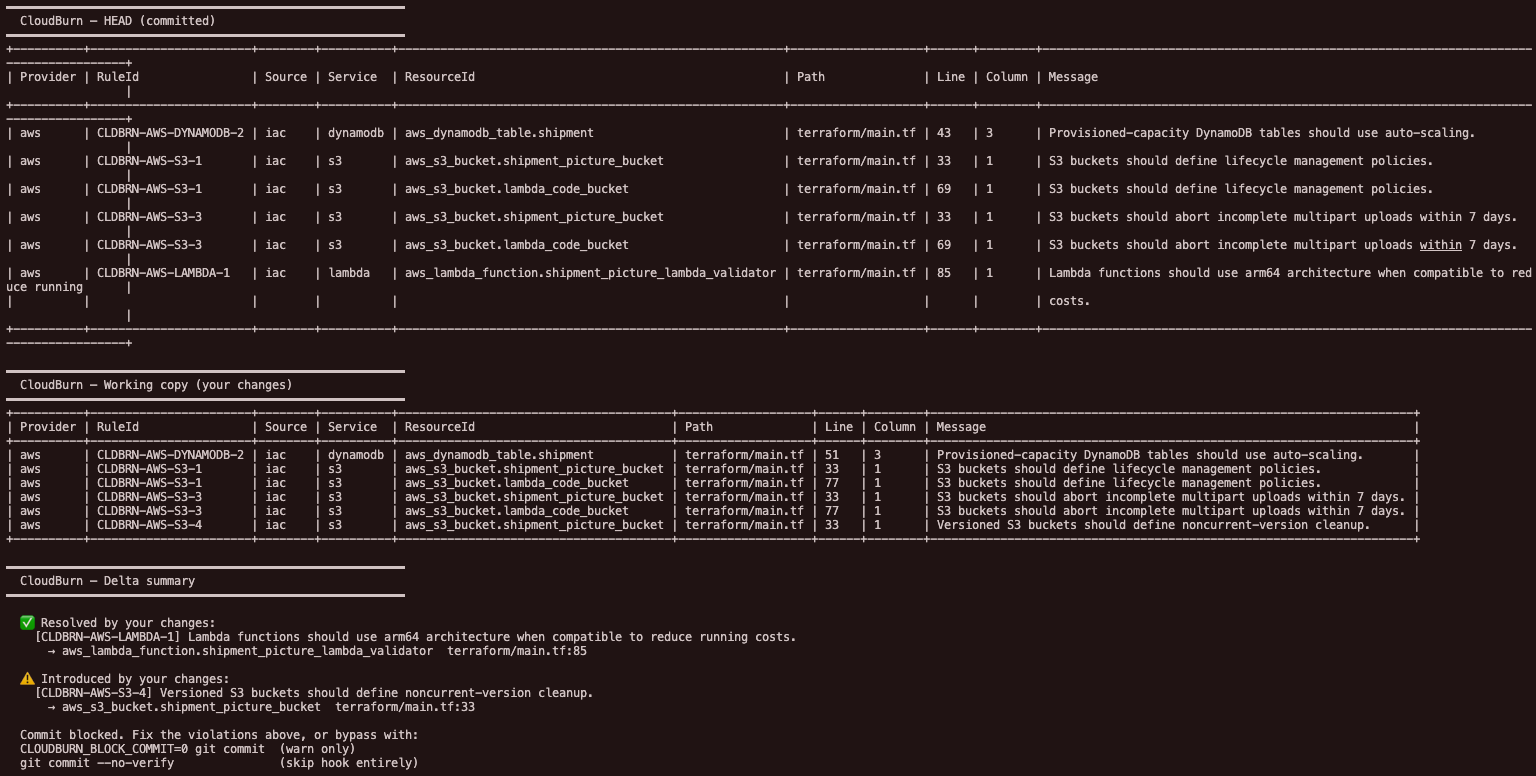
In case that’s tough to read, let me share the key part, which is the “Delta summary” section that shows the issues that were addressed and the ones that were introduced.
━━━━━━━━━━━━━━━━━━━━━━━━━━━━━━━━━━━━━━━━━━━━━━━━━━━━━━━━━  CloudBurn — Delta summary━━━━━━━━━━━━━━━━━━━━━━━━━━━━━━━━━━━━━━━━━━━━━━━━━━━━━━━━━
  ✅ Resolved by your changes:    [CLDBRN-AWS-LAMBDA-1] Lambda functions should use arm64 architecture when compatible to reduce running costs.      → aws_lambda_function.shipment_picture_lambda_validator  terraform/main.tf:85
  ⚠️  Introduced by your changes:    [CLDBRN-AWS-S3-4] Versioned S3 buckets should define noncurrent-version cleanup.      → aws_s3_bucket.shipment_picture_bucket  terraform/main.tf:33
  Commit blocked. Fix the violations above, or bypass with:  CLOUDBURN_BLOCK_COMMIT=0 git commit  (warn only)  git commit --no-verify               (skip hook entirely)
As you can see, even though I fixed the Lambda function issue, I introduced a new S3 pricing issue. I can bypass this check, so enforcement is still largely voluntary, but I do so with the full knowledge that my changes may negatively impact our costs.
Part of a process to optimize costs
A simple shell script isn’t going to solve your cost-related issues or replace the need for FinOps practices. Managing your cloud pricing is a complex topic. Tools like LocalStack and CloudBurn can definitely help, but ultimately, it will require a more holistic cross-functional approach. Nonetheless, it does demonstrate how some simple processes can potentially offer valuable and immediate insight into the impact of IaC code changes on costs – at the time they are being made! The combination of CloudBurn and local development with LocalStack can help you develop a more proactive strategy around cost optimization that starts with your developers.