
Introduction
AWS CDK ships with an integration testing framework that most teams overlook. The integ-runner CLI and @aws-cdk/integ-tests-alpha construct library let you write tests that deploy real infrastructure, run assertions against live resources, and tear everything down when done. The problem is that these tests deploy to real AWS accounts, which costs money and slows your feedback loop.
With the right environment variables, integ-runner can deploy stacks to LocalStack instead of AWS. The assertions run against LocalStack’s emulated services, and the full cycle finishes on your machine within a few minutes.
In this post, we’ll take a friend request microservice built with CDK (Lambda, API Gateway, DynamoDB Streams, and SQS) and write integration tests for it using integ-tests-alpha. We’ll cover the configuration needed to make integ-runner work with LocalStack for AWS, and how to run the integration tests locally without any AWS credentials or costs.
How do CDK integration tests work with LocalStack for AWS?
CDK integration tests differ from unit tests in that they deploy infrastructure. A unit test uses Template.fromStack() to inspect the synthesised CloudFormation template. An integration test deploys the stack, interacts with live resources, and verifies end-to-end behaviour.
To enable integration tests, the CDK team has provided two tools: integ-tests-alpha and integ-runner.
integ-tests-alpha
The @aws-cdk/integ-tests-alpha library provides the IntegTest construct. You wrap your stack in an IntegTest, and the construct creates a separate assertion stack alongside it. Inside that assertion stack, you make AWS API calls and assert on the results. The library handles IAM permissions for assertion Lambdas automatically.
The assertion API supports chaining with .next() and retrying with .waitForAssertions() until a condition is met or a timeout is reached.
integ-runner
The integ-runner CLI discovers test files matching integ.*.ts, synthesises the CDK app, deploys the stacks, executes assertions, and tears everything down. It also manages snapshots to skip unchanged tests on subsequent runs.
Recent versions of integ-runner use @aws-cdk/toolkit-lib directly rather than shelling out to the cdk CLI. You cannot simply swap cdk for lstk cdk in the command. The way to redirect integ-runner to LocalStack is through environment variables that the AWS SDK respects.
Let’s look at how we can use these tools to run integration tests locally with LocalStack for AWS.
Prerequisites
Before starting, make sure you have:
- Docker for running LocalStack and Lambda bundling
- lstk CLI with a valid LocalStack Auth Token
- Node.js 22 or above
- AWS CDK 2.177.0 or above (
npm install -g aws-cdk)
Step 1: Clone the sample application
Clone the repository and install dependencies:
git clone https://github.com/localstack-samples/sample-microservices-apigateway-lambda-dynamodb-sqs.gitcd sample-microservices-apigateway-lambda-dynamodb-sqsnpm installThe project structure:
├── bin/│ └── friend-microservices.ts # CDK app entry point├── lib/│ └── friend-microservices-stack.ts # Main stack definition├── lambda/│ ├── frontHandler.ts # Processes friend actions from SQS│ ├── requestStateHandler.ts # DynamoDB Stream → creates Pending records│ ├── acceptStateHandler.ts # DynamoDB Stream → finalises friendships│ ├── rejectStateHandler.ts # DynamoDB Stream → handles rejections│ ├── unfriendStateHandler.ts # DynamoDB Stream → handles unfriending│ └── readHandler.ts # API Gateway → reads friend data├── models/│ ├── friend.ts # Friend entity model│ └── tableDecorator.ts # DynamoDB table/key decorators├── integ-tests/│ └── integ.friend-microservices.ts # Integration test (what we'll explore)├── run-integ-tests.sh # Script to run tests against LocalStack├── package.json└── cdk.jsonStep 2: Understand the architecture
The application models a friend request system. Players can send friend requests, accept or reject them, and unfriend. The architecture is event-driven:
- A client sends a message to an SQS queue with a friend action (
Request,Accept,Reject, orUnfriend). - The
frontHandlerLambda picks up the message and writes to a DynamoDB table calledFriend. - An API Gateway with a
readHandlerLambda lets clients query friend lists. - DynamoDB Streams fire on table changes and route to the appropriate handler:
requestStateHandlerfires on INSERT where state isRequestedand creates a reversePendingrecord.acceptStateHandlerfires on MODIFY where state changes fromPendingtoFriendsand updates the original requester’s record.rejectStateHandlerandunfriendStateHandlerfire on REMOVE events and clean up records.
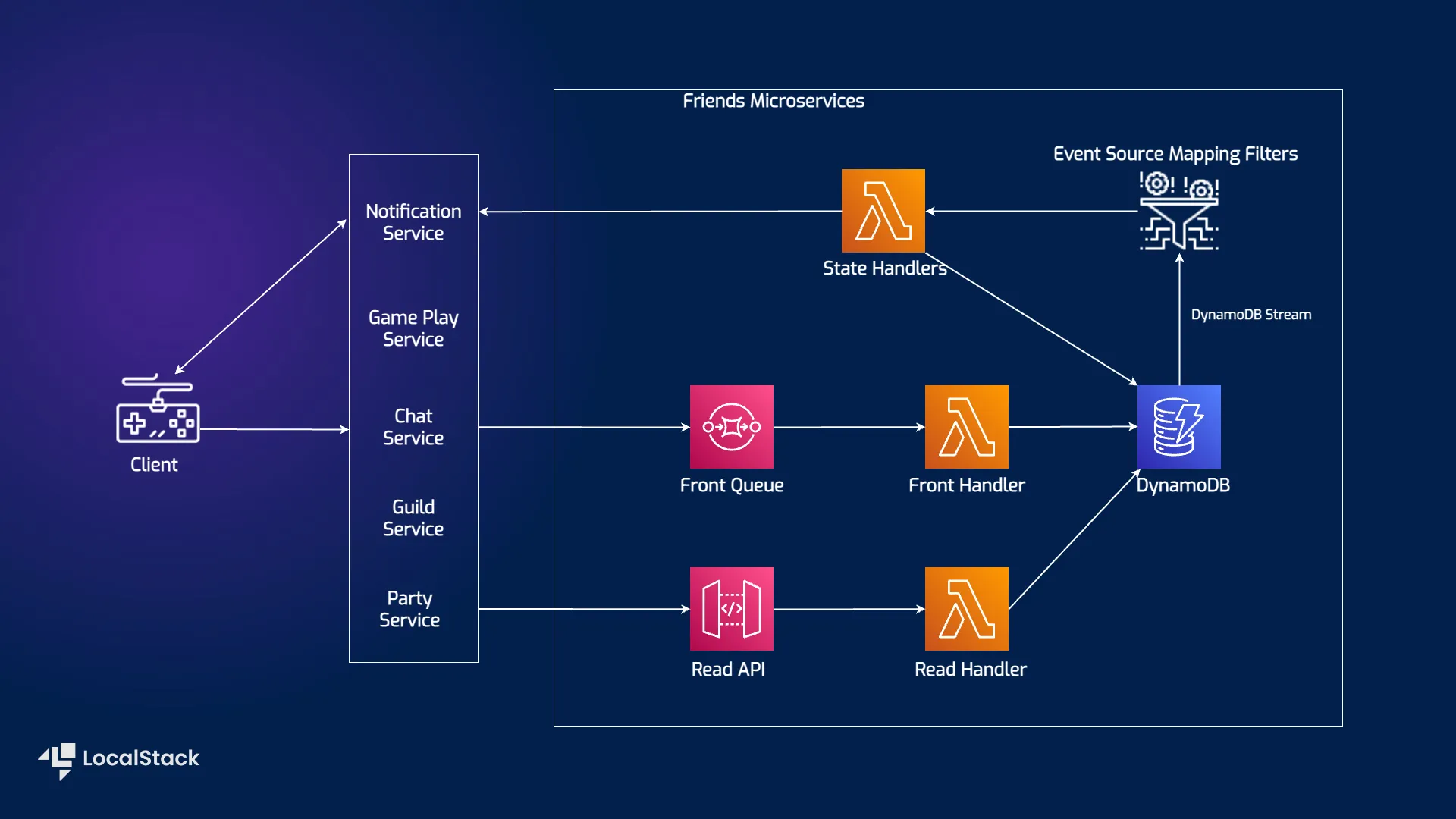
The stack exposes queueUrl, tableName, and apiUrl as public properties that the integration test references.
Step 3: Understand the integration test
Open integ-tests/integ.friend-microservices.ts.
3.1: Setup the integration test
The file creates a CDK app, instantiates the stack, and wraps it in an IntegTest:
const app = new App();
const stackUnderTest = new FriendMicroservicesStack(  app,  "FriendMicroservicesIntegStack");
const integ = new IntegTest(app, "FriendMicroservicesIntegTest", {  testCases: [stackUnderTest],  cdkCommandOptions: {    destroy: {      args: {        force: true,      },    },  },  regions: ["us-east-1"],});
We do not set an explicit env on the stack. The IntegTest construct creates its own assertion stack (DeployAssert), and both stacks must share the same account and region (i.e. CDK_DEFAULT_ACCOUNT and CDK_DEFAULT_REGION), which our wrapper script sets to LocalStack’s defaults.
3.2: Sending a request and verifying DynamoDB
The first assertion sends a friend request via SQS and waits for the record to appear in DynamoDB:
const sendFriendRequest = integ.assertions.awsApiCall("SQS", "sendMessage", {  QueueUrl: stackUnderTest.queueUrl,  MessageBody: JSON.stringify({    player_id: "player-integ-1",    friend_id: "player-integ-2",    friend_action: "Request",  }),});
const verifyDynamoDbRecord = integ.assertions  .awsApiCall("DynamoDB", "getItem", {    TableName: stackUnderTest.tableName,    Key: {      player_id: { S: "player-integ-1" },      friend_id: { S: "player-integ-2" },    },  })  .expect(    ExpectedResult.objectLike({      Item: {        player_id: { S: "player-integ-1" },        friend_id: { S: "player-integ-2" },        state: { S: "Requested" },      },    })  )  .waitForAssertions({    totalTimeout: Duration.minutes(2),    interval: Duration.seconds(10),  });
sendFriendRequest.next(verifyDynamoDbRecord);
The .waitForAssertions() retries the DynamoDB getItem every 10 seconds for up to 2 minutes, since the SQS to Lambda to DynamoDB chain is asynchronous.
3.3: Verifying the DynamoDB Stream handler
When the frontHandler writes a “Requested” record, DynamoDB Streams fires and the requestStateHandler creates a reverse “Pending” record for the receiver:
const verifyPendingRecord = integ.assertions  .awsApiCall("DynamoDB", "getItem", {    TableName: stackUnderTest.tableName,    Key: {      player_id: { S: "player-integ-2" },      friend_id: { S: "player-integ-1" },    },  })  .expect(    ExpectedResult.objectLike({      Item: {        player_id: { S: "player-integ-2" },        friend_id: { S: "player-integ-1" },        state: { S: "Pending" },      },    })  )  .waitForAssertions({    totalTimeout: Duration.minutes(2),    interval: Duration.seconds(10),  });
verifyDynamoDbRecord.next(verifyPendingRecord);
This tests the full event chain: SQS to Lambda to DynamoDB write to DynamoDB Stream to Lambda to DynamoDB write. Two Lambda invocations and two DynamoDB writes, triggered by a single SQS message.
3.4: Testing the Accept flow
The test then sends an Accept action and verifies both sides of the friendship update to “Friends”:
const sendAccept = integ.assertions.awsApiCall("SQS", "sendMessage", {  QueueUrl: stackUnderTest.queueUrl,  MessageBody: JSON.stringify({    player_id: "player-integ-2",    friend_id: "player-integ-1",    friend_action: "Accept",  }),});
// Verify player-integ-2's record is now "Friends"const verifyAcceptedRecord = integ.assertions  .awsApiCall("DynamoDB", "getItem", { /* ... */ })  .expect(ExpectedResult.objectLike({    Item: { state: { S: "Friends" } },  }))  .waitForAssertions({ /* ... */ });
// Verify the reverse record (player-integ-1) is also "Friends"const verifyReverseAccepted = integ.assertions  .awsApiCall("DynamoDB", "getItem", { /* ... */ })  .expect(ExpectedResult.objectLike({    Item: { state: { S: "Friends" } },  }))  .waitForAssertions({ /* ... */ });
verifyPendingRecord  .next(sendAccept)  .next(verifyAcceptedRecord)  .next(verifyReverseAccepted);
The full assertion chain runs sequentially: send request, verify requested, verify pending, send accept, verify accepted, verify reverse accepted.
Step 4: Run the integration tests
Now that we have the integration test setup, we can run it against LocalStack for AWS.
4.1: Start LocalStack for AWS
Start LocalStack with your Auth Token configured:
export LOCALSTACK_AUTH_TOKEN=your-auth-tokenlstk --non-interactive start4.2: Trigger the tests
The repository includes a run-integ-tests.sh script. Run it with:
./run-integ-tests.sh --force --no-cleanThe --force flag re-runs the test even if the snapshot hasn’t changed. The --no-clean flag keeps the stacks deployed after the test finishes, useful for inspecting resources.
Here is what the script does:
# Set LocalStack endpointsexport AWS_ENDPOINT_URL="http://localhost.localstack.cloud:4566"export AWS_ENDPOINT_URL_S3="http://s3.localhost.localstack.cloud:4566"export AWS_ACCESS_KEY_ID="test"export AWS_SECRET_ACCESS_KEY="test"export CDK_DEFAULT_ACCOUNT="000000000000"export CDK_DEFAULT_REGION="us-east-1"
# Bootstrap CDK on LocalStacklstk cdk bootstrap --force
# Run the testsnpx integ-runner \  --directory ./integ-tests \  --parallel-regions us-east-1 \  --update-on-failed \  --verbose
A few things about the environment variables:
AWS_ENDPOINT_URLuseslocalhost.localstack.cloudwhich resolves to127.0.0.1and supports wildcard subdomains, so virtual-hosted-style S3 URLs work.AWS_ENDPOINT_URL_S3is set separately to ensure all S3 operations go through LocalStack.CDK_DEFAULT_ACCOUNTis000000000000, the default account ID that LocalStack uses.
The first run takes longer because CDK builds Lambda packages with Docker. Subsequent runs are faster due to Docker layer caching.
After the tests are run, you should see the following output:
Running test integ-tests/integ.friend-microservices.js in us-east-1  SUCCESS    integ.friend-microservices-FriendMicroservicesIntegTest/DefaultTest 122.187s

Test Results:
Tests:    1 passed, 1 totalNot cleaning up stacks since "--no-clean" was used   --- Integration test metrics ---Profile undefined + Region us-east-1 total time: 122.188  integ-tests/integ.friend-microservices.js: 122.188
==> Integration tests completed successfully!
4.3: Inspect the deployed resources
Since we used --no-clean, the stacks are still deployed on LocalStack. Inspect them with lstk aws:
lstk aws cloudformation list-stacks --stack-status-filter CREATE_COMPLETE \ --query 'StackSummaries[].StackName' --output textYou should see two stacks: FriendMicroservicesIntegStack (the application) and FriendMicroservicesIntegTestDefaultTestDeployAssertE2413D35 (the assertion stack created by integ-tests-alpha).
Query the DynamoDB table to see the test data:
lstk aws dynamodb scan --table-name FriendYou should see the friend records with player-integ-1 and player-integ-2, both with state “Friends”.
Conclusion
Running CDK integration tests against LocalStack for AWS gives you faster feedback and no additional cloud costs. The configuration comes down to setting the right environment variables, with AWS_ENDPOINT_URL using localhost.localstack.cloud being the detail that makes everything work.
The sample application exercises a non-trivial event-driven pipeline: SQS to Lambda to DynamoDB to DynamoDB Streams to Lambda to DynamoDB. The integration test verifies the full chain, including the asynchronous state propagation through DynamoDB Streams, which is the kind of thing unit tests cannot catch.
You can find the complete source code in the localstack-samples/sample-microservices-apigateway-lambda-dynamodb-sqs repository.
Learn More
@aws-cdk/integ-tests-alphaAPI documentation: Full API reference for the IntegTest construct, assertion methods, and match utilitiesinteg-runnerCLI: Source code and documentation for the integ-runner CLI- AWS CDK on LocalStack: LocalStack’s guide on using CDK and cdklocal
- How to write and execute integration tests for AWS CDK applications: AWS’s blog post on the integration testing framework