Introduction
Traditionally, running a web framework on Lambda requires an adapter. Lambda sends an event, the adapter converts it into an HTTP request, and then converts the response back into Lambda’s format. Each environment handles only one event at a time, so concurrent requests may cause more cold starts.
AWS Lambda Web Functions, released on October 12, 2026, remove the need for an adapter. You deploy a regular HTTP server, and Lambda tells it which port to use. Lambda then forwards HTTP requests to the server. One environment can handle many requests at the same time.
LocalStack for AWS supports the Lambda Web APIs and runs your application in a local container. In this tutorial, you will use the AWS CLI to deploy a URL shortener built with Express, DynamoDB and S3. You will also inspect its container, logs and metrics.
What are Lambda Web Functions?
A web function is a Node.js HTTP server packaged as a ZIP file. The runtime starts index.js from the root of the package. The server then listens on the address provided by AWS_LAMBDA_HTTP_ENDPOINT in host:port format. That is all the integration requires.
A web function has two types of child resources:
- A revision is a fixed snapshot of the code and configuration. It includes the S3 object version, runtime, execution role, limits and environment variables. Any change creates a new revision.
- An endpoint provides access to the function through a Lambda-managed domain and TLS certificate. It also defines authentication and traffic weights. An endpoint can route traffic to up to two revisions, which supports canary rollouts. In
LatestRevisionmode, it automatically uses the newest revision. InDisabledmode, you set the traffic weights yourself.
The code must come from a versioned S3 bucket. Each environment runs on Arm64 with 2 vCPUs and 2 GB of memory. It can handle up to 128 concurrent requests and scale from zero. At launch, the only supported runtime is nodejs24.x. Endpoints are HTTPS only, and WebSockets are not supported. The runtime image does not include the AWS SDK.
LocalStack & Lambda Web Functions
LocalStack supports the lambda-web API, including functions, revisions, endpoints, resource policies, tags and account settings. It reads each revision’s package from a local S3 bucket. The first request to an endpoint starts a node:24-slim container with the same limits as AWS: 2 vCPUs, 2 GB of memory and 1,024 file descriptors. The container also uses the same AWS_LAMBDA_HTTP_ENDPOINT contract. As with Lambda event functions, LocalStack needs access to the Docker socket.
Each endpoint gets a domain like <id>-lambda-web-<region>.localhost.localstack.cloud:4566 and supports both HTTP and HTTPS. AWS uses a different format: <id>.<shard>.lambda-web.<region>.on.aws. To support both environments, read the domain from domainName instead of constructing it yourself. Like AWS, LocalStack passes the execution role’s credentials and region to the sandbox. It also sets AWS_ENDPOINT_URL so that AWS SDK requests go to LocalStack.
Traffic shifting, LatestRevision endpoints, SigV4 checks for IamAuth endpoints, scaling and throttling behave as they do on AWS. Logs and metrics also appear in the same places as they do for Lambda.
Beyond the API, LocalStack supports the AWS::Lambda::WebFunction, AWS::Lambda::WebFunctionRevision and AWS::Lambda::WebFunctionEndpoint CloudFormation resources, and it can run the sandboxes as pods with the Kubernetes executor. It also supports hot reloading: a revision can serve code straight from a directory on your machine, and LocalStack restarts the application about a second after the code changes. Hot reloading needs Docker and is not available on Kubernetes.
Some parity differences remain. MultiRegion endpoints are always served from their home region. LocalStack reads the full request body before forwarding it, and it reports account quotas without enforcing them. See the documentation for the full list of supported operations.
Prerequisites
lstkwith a LocalStack Auth Token- Docker
- AWS CLI 2.37.8 or newer, the first release with the
lambda-webcommand - Node.js 24, npm,
zipandcurl
The commands use lstk aws, which runs the AWS CLI against LocalStack with test credentials.
Step 1: Start LocalStack
lstk startStep 2: Get the sample application
2.1: Clone the repository
git clone https://github.com/localstack-samples/sample-lambda-web-functions-url-shortener.gitcd sample-lambda-web-functions-url-shortenerThe Express application is in app/, the policy documents in scripts/. There is a deploy script too, but here we run every step by hand.
2.2: How the application works
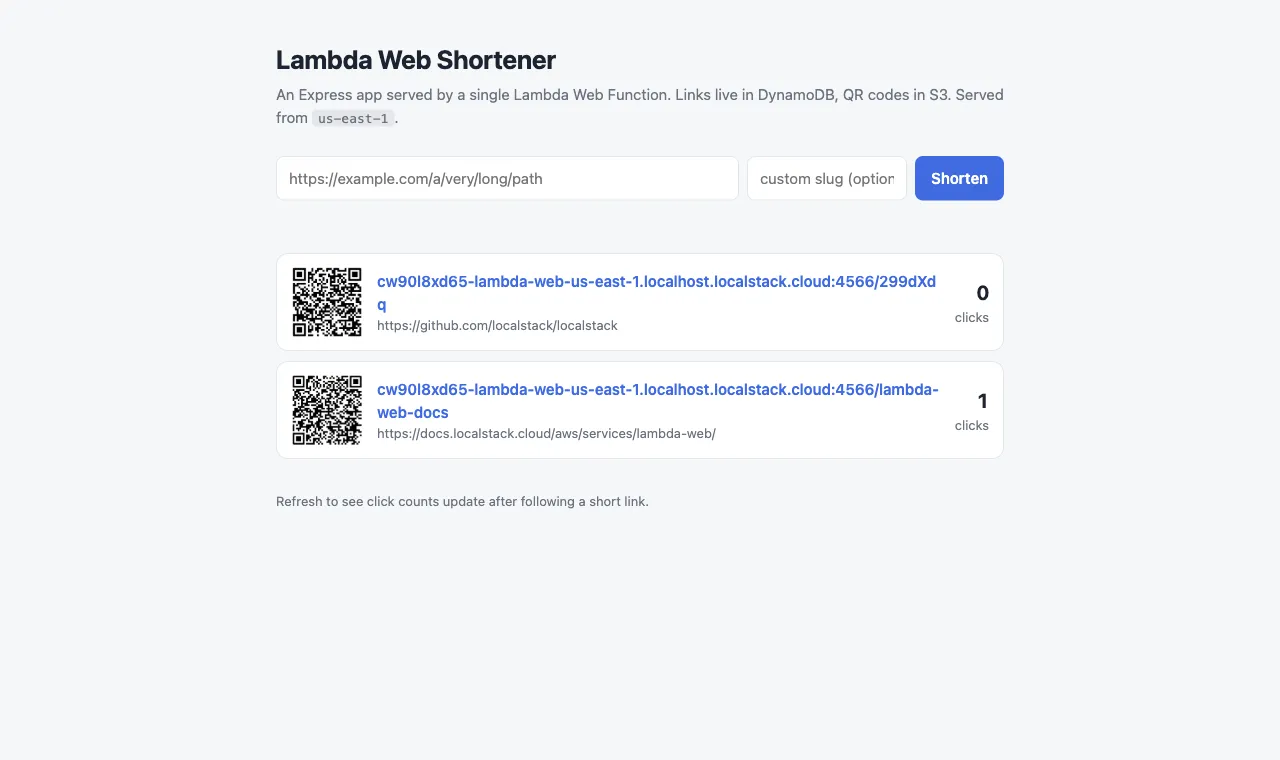
In this tutorial, we deploy a URL shortener. Each link is stored in DynamoDB with a slug, target URL and click count. When you create a link, the application generates a QR code and stores it as a PNG in S3. The same application also serves a page that lists all links. The application is a standard Express server in app/index.js. These are the parts that make it work with Lambda:
const ddb = DynamoDBDocumentClient.from(new DynamoDBClient({}));const s3 = new S3Client({ forcePathStyle: Boolean(process.env.AWS_ENDPOINT_URL) });const [host, port] = (process.env.AWS_LAMBDA_HTTP_ENDPOINT || "127.0.0.1:3000").split(":");app.listen(Number(port), host);The SDK clients get the region, credentials and endpoint from environment variables. This allows the same package to run on AWS and LocalStack. When AWS_ENDPOINT_URL is set, forcePathStyle keeps S3 requests on the LocalStack endpoint.
The redirect route uses one atomic UpdateItem call to increase the click count and return the target URL. It then sends a 302 response. The QR route streams the stored image from S3.
2.3: Package the application
The runtime image does not include the AWS SDK. Install the production dependencies and include them in the ZIP:
cd appnpm install --omit=devzip -qr ../function.zip index.js package.json package-lock.json node_modules publiccd ..Step 3: Create the supporting resources
3.1: A versioned bucket for the code
Web functions load their code from a versioned S3 bucket. Lambda accesses the object using a service principal. The bucket policy therefore grants lambda.amazonaws.com read access. An aws:SourceArn condition limits this access to revisions of our function:
lstk aws s3 mb s3://shortener-codelstk aws s3api put-bucket-versioning --bucket shortener-code \ --versioning-configuration Status=Enabledlstk aws s3api put-bucket-policy --bucket shortener-code \ --policy file://scripts/code-bucket-policy.localstack.json3.2: The QR bucket and the links table
lstk aws s3 mb s3://shortener-qr
lstk aws dynamodb create-table --table-name short-links \  --attribute-definitions AttributeName=slug,AttributeType=S \  --key-schema AttributeName=slug,KeyType=HASH \  --billing-mode PAY_PER_REQUEST
3.3: The execution role
The application uses the execution role’s credentials. The role needs permission to access DynamoDB, S3 and CloudWatch Logs. The log groups are /aws/lambda/web/shortener and its .local companion. The repository includes both policy documents:
lstk aws iam create-role --role-name shortener-role \ --assume-role-policy-document file://scripts/trust-policy.jsonlstk aws iam put-role-policy --role-name shortener-role \ --policy-name shortener-access \ --policy-document file://scripts/role-policy.localstack.jsonStep 4: Upload the package
lstk aws s3api put-object --bucket shortener-code \ --key function.zip --body function.zip --query VersionId"AaD7FxbZiCd4V4q4k_gvgHTuX4OZrGmr"Save the version ID. The revision will use this exact version of the package.
Step 5: Create the web function
5.1: Create the function, its first revision and an endpoint
One command creates the function, its first revision and an endpoint. buildConfig defines the code location and runtime. serviceConfig defines the execution role and environment variables.
The endpoint uses the HomeRegion type and LatestRevision deployment mode. ApplicationManaged means that AWS-level authentication is disabled. Replace the version ID below with the one from the previous step:
lstk aws lambda-web create-web-function --function-name shortener \ --revision-config '{ "buildConfig": { "codeConfig": {"s3Object": {"bucket": "shortener-code", "key": "function.zip", "versionId": "AaD7FxbZiCd4V4q4k_gvgHTuX4OZrGmr"}}, "runtimeConfig": {"runtime": "nodejs24.x"} }, "serviceConfig": { "executionRoleArn": "arn:aws:iam::000000000000:role/shortener-role", "environmentVariables": {"LINKS_TABLE": "short-links", "QR_BUCKET": "shortener-qr"} } }' \ --endpoint-config '{ "endpointName": "public", "endpointType": "HomeRegion", "authType": "ApplicationManaged", "autoDeploymentMode": "LatestRevision" }'{ "functionName": "shortener", "state": "Active", "revision": {"revisionId": "rev-1e7x1", "state": "Pending"}, "endpoint": {"domainName": "cw90l8xd65-lambda-web-us-east-1.localhost.localstack.cloud:4566", "state": "Pending"}}This output shows only the relevant fields. The function becomes Active immediately. The revision and endpoint remain Pending while LocalStack prepares the package and assigns the domain. They then become Active. The default timeout is 30 seconds. Each environment handles up to 64 concurrent requests by default, and maxConcurrencyPerEnvironment in serviceConfig raises that to 128.
5.2: Wait for the endpoint and read the domain
lstk aws lambda-web wait web-function-endpoint-active \  --function-name shortener --endpoint-name public
export D=http://$(lstk aws lambda-web get-web-function-endpoint \ --function-name shortener --endpoint-name public \ --query domainName --output text)echo $Dhttp://cw90l8xd65-lambda-web-us-east-1.localhost.localstack.cloud:4566The waiter finishes when the endpoint becomes active. This usually takes a few seconds. The remaining commands use $D for the endpoint URL.
Step 6: Use the application
6.1: The first request
curl -i $D/healthzHTTP/1.1 200 OKlambda-web-logstream: 2026/10/02/shortener[rev-1e7x1]e5f3b969c6b2475f90d1cd2a8240fbf8lambda-web-request-id: LI5HTBQNZ3OCCUE7X5Q6HF22XY
{"ok":true,"region":"us-east-1","endpoint":"public","requestId":"LI5HTBQNZ3OCCUE7X5Q6HF22XY","uptimeSeconds":1}The first request causes a cold start. LocalStack starts the sandbox container, waits for the server to bind to its assigned address and then forwards the request. Here, uptimeSeconds shows that the process started one second ago.
The platform adds two response headers. lambda-web-request-id identifies the request. lambda-web-logstream identifies the log stream and includes the revision ID.
6.2: Create a link and follow it
curl -X POST $D/api/links -H 'content-type: application/json' \ -d '{"url":"https://docs.localstack.cloud/aws/services/lambda-web/","slug":"lambda-web-docs"}'{"slug":"lambda-web-docs","url":"https://docs.localstack.cloud/aws/services/lambda-web/","clicks":0,"shortUrl":"http://cw90l8xd65-lambda-web-us-east-1.localhost.localstack.cloud:4566/lambda-web-docs","qr":"/api/links/lambda-web-docs/qr.png"}The request creates an item in DynamoDB and stores a PNG in the QR bucket. The application uses the execution role’s credentials and the injected AWS_ENDPOINT_URL to access both services.
Slugs are unique. Submit the same slug again, and the conditional write fails:
curl -i -X POST $D/api/links -H 'content-type: application/json' \ -d '{"url":"https://docs.localstack.cloud/aws/services/lambda-web/","slug":"lambda-web-docs"}'HTTP/1.1 409 CONFLICT
{"error":"slug lambda-web-docs is already taken"}Now follow the short link, retrieve its data and download the QR code:
curl -i $D/lambda-web-docscurl $D/api/links/lambda-web-docscurl -o qr.png $D/api/links/lambda-web-docs/qr.pngHTTP/1.1 302 FOUNDLocation: https://docs.localstack.cloud/aws/services/lambda-web/
{"clicks":1,"lastClickAt":"2026-10-02T05:32:22.898Z","slug":"lambda-web-docs", ...}The short link returns a 302 redirect, and the atomic update increases the click count. The downloaded qr.png is a 256 × 256 image streamed from S3.
6.3: Open the page
Open $D in a browser. The same Express process serves the page and loads each QR code through the function.
Step 7: Look under the hood
7.1: The sandbox
docker ps --filter name=web-fn --format '{{.Names}} {{.Image}} {{.Status}}'localstack-web-fn-shortener-rev-1e7x1-6dxbsq node:24-slim Up 1 secondEach environment runs in its own container. The container name includes the function and revision. It has 2 CPUs, 2 GB of memory and a limit of 1,024 file descriptors. LocalStack removes an environment after 5 minutes without traffic.
7.2: Logs
lstk aws logs filter-log-events --log-group-name /aws/lambda/web/shortener \ --limit 4 --query 'events[].message' --output text{"timestamp":"2026-10-02T05:32:22.188Z","level":"INFO","type":"platform.initStart","record":{"runtimeVersion":"nodejs24.x:node-24-slim","revisionId":"rev-1e7x1"}}{"timestamp":"2026-10-02T05:32:22.361Z","level":"INFO","message":"Server listening on 0.0.0.0:3000"}{"timestamp":"2026-10-02T05:32:22.364Z","level":"INFO","type":"platform.initReport","record":{"status":"success","metrics":{"totalDurationMs":177}}}{"timestamp":"2026-10-02T05:32:22.738Z","level":"INFO","message":"{\"method\":\"GET\",\"path\":\"/healthz\",\"statusCode\":200}","requestId":"LI5HTBQNZ3OCCUE7X5Q6HF22XY","endpointName":"public"}Each event is wrapped in JSON. The first records describe the cold start. The application log includes the request ID and endpoint name, so you can match it to the response header.
7.3: Metrics
lstk aws cloudwatch list-metrics --namespace AWS/Lambda/Web \ --query 'Metrics[].MetricName'[ "ExecutedRequests", "HTTPResponseStatusClass4XX"]Metrics can take a few seconds to appear, so wait a moment if the list is empty. LocalStack only publishes metrics with non-zero values, which is why HTTPResponseStatusClass5XX is missing. The 4XX count comes from the duplicate slug in step 6.2 and the browser’s favicon request.
Step 8: Clean up
LocalStack keeps no state across restarts unless you enable persistence, so stopping it removes the function, the supporting resources and the sandbox container:
lstk stopSummary
We deployed an Express application as a Lambda Web Function on LocalStack with the AWS CLI alone: a versioned bucket, a table, a role, one create-web-function call, and the endpoint was serving. The application reached DynamoDB and S3 through its execution role with no local configuration, and the sandbox, the logs and the metrics were all there to inspect.
The same package deploys to AWS with the same commands, with three differences: drop the lstk prefix, use your real account ID in the ARNs, and call the endpoint over https://, because AWS endpoints are HTTPS only. The repository’s scripts/deploy.sh handles all three for both targets. The documentation covers what this tutorial skipped: new revisions and traffic shifting between them, PerRegion and MultiRegion endpoints, IamAuth, hot reloading, and scaling and throttling.