
Introduction
Teams that adopt LocalStack for local development end up wanting the same thing in CI: a clean, ephemeral, and reproducible environment that comes up before tests run and goes away after they finish. On other CI providers there are official integrations, marketplace actions, and templates available. Jenkins is the odd one out. It requires more configuration and is typically self-hosted, which means every team’s setup looks slightly different.
This post walks through adding LocalStack to a Jenkins pipeline. The sample is a serverless quiz app built with API Gateway, Lambda, DynamoDB, SQS, Step Functions, SNS, S3, and CloudFront. We will deploy it on LocalStack from a Jenkins job, run an integration test suite against it, and tear it down, all from a single Jenkinsfile.
The goal is not to teach you Jenkins from scratch. The assumption is that you already have a running Jenkins controller and you want to add LocalStack to it without rebuilding everything.
How LocalStack runs on Jenkins
A Jenkins pipeline executes on an agent. The agent might be the controller’s built-in node, a static agent on another host, a Kubernetes pod, or a Docker container spun up for the job. Whatever it is, it runs the steps in your Jenkinsfile.
LocalStack runs as a Docker container. The LocalStack CLI wraps docker run, so the only requirement is that the agent can talk to a Docker daemon. Two ways to set this up on a Jenkins agent:
- The agent runs on a host with a Docker daemon installed, and you mount
/var/run/docker.sockinto the agent (if the agent itself is containerised). The agent uses the host’s Docker daemon to start LocalStack as a sibling container. - The agent runs Docker-in-Docker, which works but is heavier and adds caveats around storage drivers and privileged mode.
Most teams pick option 1. That is what we will use here.
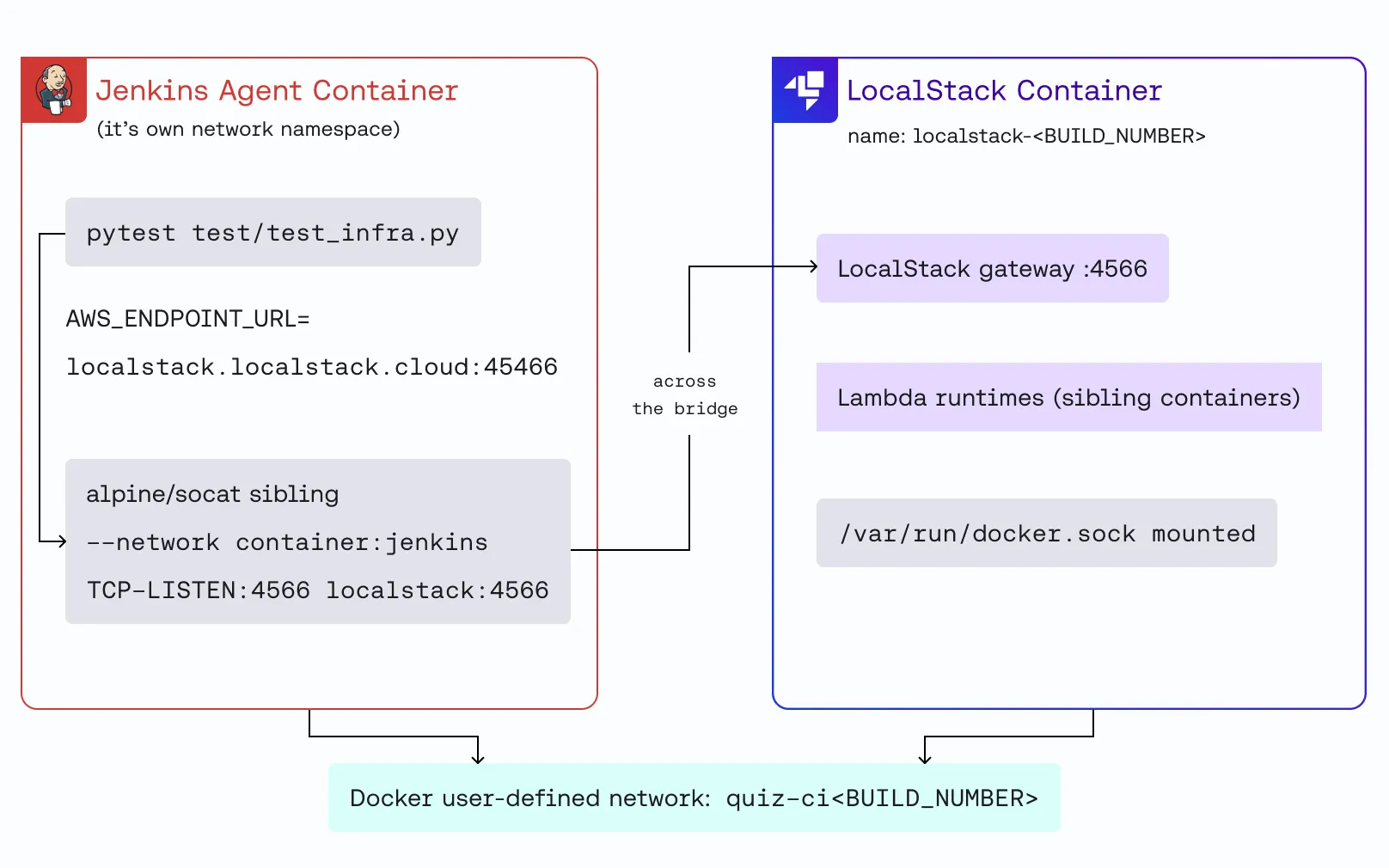
One networking detail matters. If the Jenkins agent runs in a container, LocalStack runs as a sibling on the same Docker daemon, not a child. The agent and LocalStack live in separate network namespaces by default. Most integration test suites point at localhost.localstack.cloud:4566, which resolves to 127.0.0.1.
On a containerised agent, that loopback is the agent’s loopback, not LocalStack’s, so calls do not reach the right place out of the box. To avoid rewriting the tests, the pipeline puts the agent and LocalStack on the same Docker user-defined network and starts a small socat sibling container that shares the agent’s network namespace and forwards its localhost:4566 to the LocalStack container.
AWS calls travel agent → socat → localstack over the Docker bridge, and the tests see the URL they expect.
On a bare-metal or VM agent none of that is needed: the LocalStack ports are published to the host loopback and localhost.localstack.cloud:4566 resolves correctly.
Prerequisites
- A running Jenkins instance (LTS, 2.479 or newer). The pipeline uses declarative syntax.
- A Jenkins agent that can run Docker containers. Mount
/var/run/docker.sockinto the agent if it is containerised, or install Docker on the agent host directly. - Packages on the agent: Python 3.11+,
pip, Node.js 20+,zip,jq,curl, andgit. The LocalStack CLI lands in a per-build virtualenv. The pipeline pulls analpine/socatimage at run time, so you do not needsocaton the agent. - A valid LocalStack Auth Token.
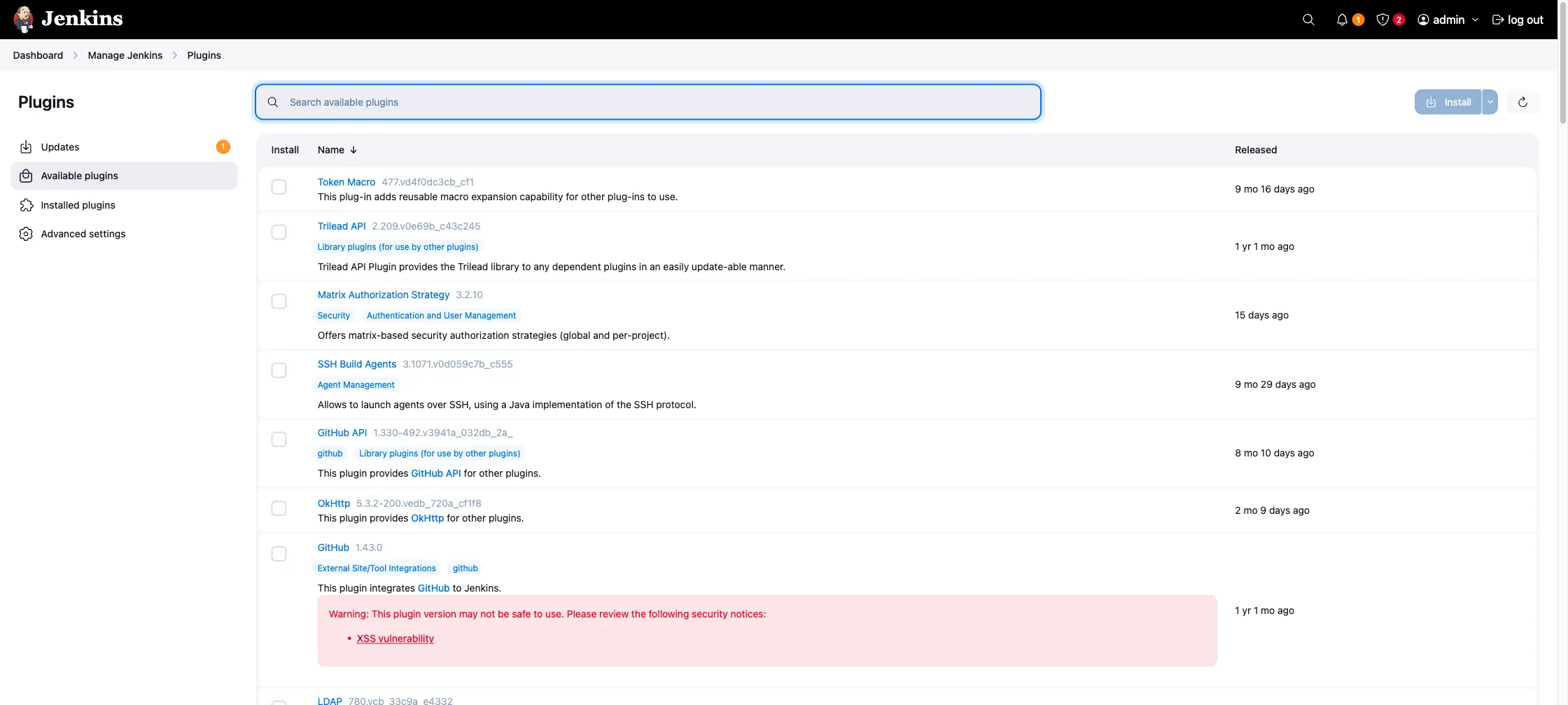
The Jenkins plugins you need are:
- Pipeline (
workflow-aggregator) for declarative pipelines. - Docker Pipeline (
docker-workflow) for thedocker.image(...).inside { }agent block. Not required for this Jenkinsfile, but useful. - Credentials Binding (
credentials-binding) to inject the LocalStack Auth Token into the build environment. - Git (
git) to check out the application’s source.
Install them through Manage Jenkins → Plugins → Available.
Step 1: Store the Auth Token as a credential
The Auth Token is the only secret the pipeline needs. Open Manage Jenkins → Credentials → System → Global credentials (unrestricted) → Add Credentials, then create a credential of kind Secret text with:
- Secret: your
ls-…token from https://app.localstack.cloud/workspace/auth-token - ID:
LOCALSTACK_AUTH_TOKEN - Description:
LocalStack Auth Token
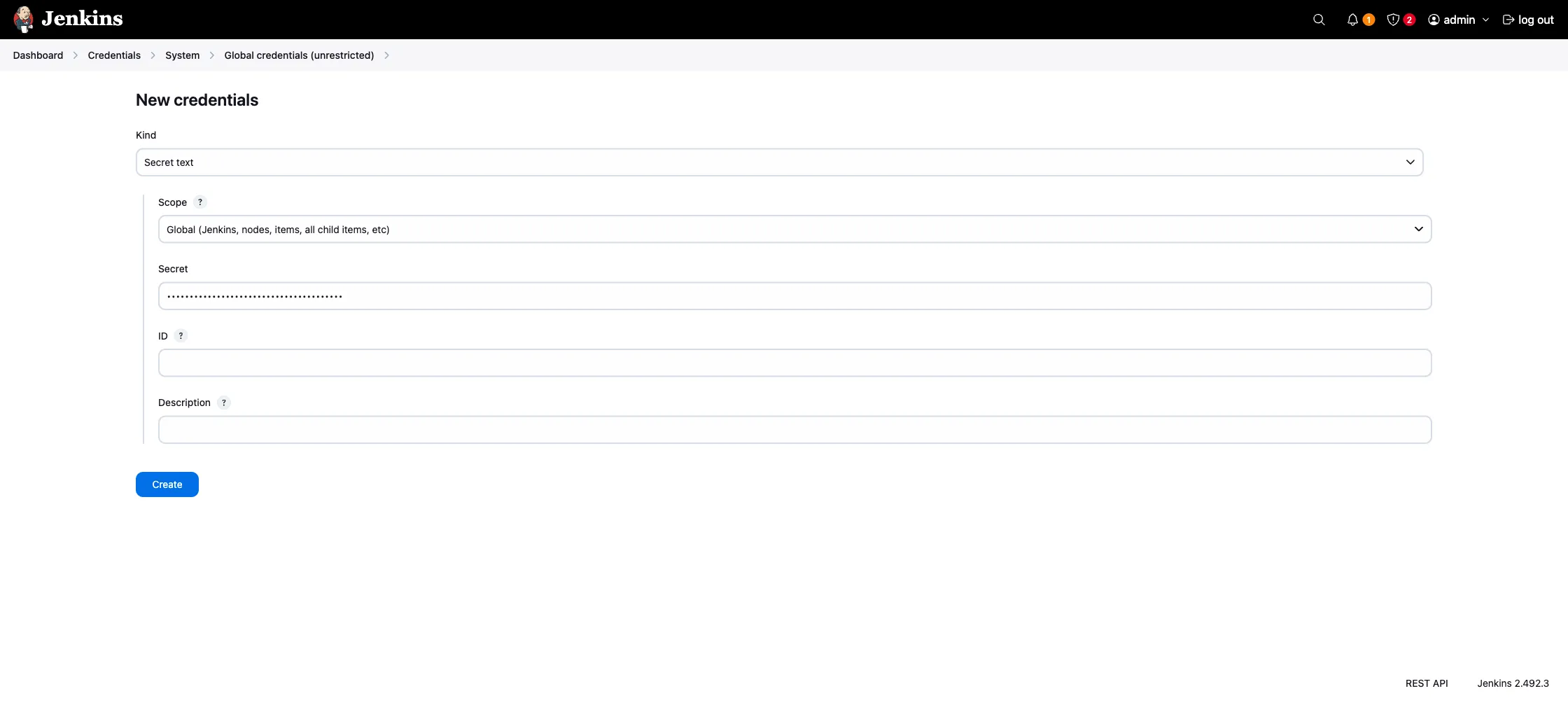
The pipeline references the credential by ID via the credentials('LOCALSTACK_AUTH_TOKEN') helper. Change one and you have to change the other.
Step 2: Prepare the agent
The agent needs the tools listed in the prerequisites. If you maintain it as a Dockerfile, this is enough:
FROM jenkins/jenkins:2.492.3-lts-jdk21
USER root
RUN apt-get update && apt-get install -y --no-install-recommends \        ca-certificates curl gnupg lsb-release \        python3 python3-pip python3-venv \        git jq zip unzip \    && install -m 0755 -d /etc/apt/keyrings \    && curl -fsSL https://download.docker.com/linux/debian/gpg \        | gpg --dearmor -o /etc/apt/keyrings/docker.gpg \    && echo "deb [arch=$(dpkg --print-architecture) signed-by=/etc/apt/keyrings/docker.gpg] \        https://download.docker.com/linux/debian $(lsb_release -cs) stable" \        > /etc/apt/sources.list.d/docker.list \    && curl -fsSL https://deb.nodesource.com/setup_22.x | bash - \    && apt-get update \    && apt-get install -y --no-install-recommends docker-ce-cli nodejs \    && pip install --break-system-packages awscli-local localstack \    && rm -rf /var/lib/apt/lists/*
USER jenkins
The Docker CLI talks to the daemon; you do not need the daemon itself on the agent because we reuse the host’s daemon through the mounted socket. On Linux hosts, the jenkins user inside the container usually needs --group-add $(stat -c '%g' /var/run/docker.sock) to read the mounted socket. On Docker Desktop and OrbStack the socket is world-readable, so you can skip that.
Step 3: Set up the sample application
You can apply the rest of this post to any application that deploys to LocalStack from a CI script. For this walkthrough we will use the serverless quiz app, which covers a wide enough surface area to be a realistic CI test: API Gateway routes, asynchronous Lambda invocations through SQS, a Step Functions state machine for email notifications, and a DynamoDB-backed leaderboard.
Fork the repository, clone it, and commit the Jenkinsfile from the next step at the root. The Jenkins job we configure in Step 5 checks out the repository and runs the pipeline on every push.
The repository is laid out like this:
sample-serverless-quiz-app/├── Jenkinsfile # the file we are about to add├── bin/│ ├── deploy.sh # awslocal-driven deployment of all resources│ └── seed.sh # writes a few sample quizzes to DynamoDB├── configurations/ # IAM trust policies, Step Functions definition├── lambdas/ # eight Python Lambda handlers├── frontend/ # React app (optional in CI)└── tests/ ├── requirements-dev.txt # pytest, boto3, requests, localstack-sdk-python └── test_infra.py # integration suite we will run in Jenkinsbin/deploy.sh uses awslocal to create DynamoDB tables, SQS queues, IAM roles, Lambda functions, an API Gateway REST API, an EventBridge Pipe, a Step Functions state machine, and a CloudFront distribution. The integration suite in tests/test_infra.py drives the deployed API: creates a quiz, lets three users submit answers, polls the leaderboard until scores settle, and checks the submission records.
Step 4: Write the Jenkinsfile
The Jenkinsfile lives at the root of the application repository, alongside bin/, tests/, and the rest of the source. Jenkins picks it up from SCM, configured in the next step.
It does four things, in order:
- Creates a Python
virtualenvand installs the LocalStack CLI and the test dependencies. - Creates a per-build Docker network, attaches the Jenkins agent to it, starts LocalStack with the LocalStack CLI, attaches LocalStack to the same network, runs an
alpine/socatsibling container that forwards the agent’slocalhost:4566to LocalStack, and polls the gateway until it answers. - Runs
bin/deploy.shto provision the stack. - Runs the pytest integration suite against the deployed API.
The post { always } block removes the socat forwarder, the LocalStack container, and the per-build network so the next build starts clean.
pipeline {    agent any
    options {        timeout(time: 30, unit: 'MINUTES')        disableConcurrentBuilds()    }
    environment {        LOCALSTACK_AUTH_TOKEN = credentials('LOCALSTACK_AUTH_TOKEN')
        LS_NETWORK    = "quiz-ci-${env.BUILD_NUMBER}"        LS_CONTAINER  = "localstack-${env.BUILD_NUMBER}"
        AWS_ACCESS_KEY_ID     = "test"        AWS_SECRET_ACCESS_KEY = "test"        AWS_DEFAULT_REGION    = "us-east-1"        AWS_REGION            = "us-east-1"        AWS_ENDPOINT_URL      = "http://localhost.localstack.cloud:4566"    }
    stages {        stage('Install dependencies') {            steps {                sh '''                    set -eu                    python3 -m venv .venv                    . .venv/bin/activate                    pip install --quiet --upgrade pip                    pip install --quiet localstack -r tests/requirements-dev.txt                '''            }        }
        stage('Start LocalStack') {            steps {                sh '''                    set -eu
                    docker network create "${LS_NETWORK}" >/dev/null                    if [ -f /.dockerenv ] && [ -n "${HOSTNAME:-}" ]; then                        docker network connect "${LS_NETWORK}" "${HOSTNAME}" || true                    fi
                    . .venv/bin/activate                    MAIN_CONTAINER_NAME="${LS_CONTAINER}" \                    LOCALSTACK_MAIN_DOCKER_NETWORK="${LS_NETWORK}" \                    LOCALSTACK_LAMBDA_DOCKER_NETWORK="${LS_NETWORK}" \                        localstack start -d
                    # Attach LocalStack to the per-build network so the agent                    # can reach it by container name.                    docker network connect "${LS_NETWORK}" "${LS_CONTAINER}"
                    # When the agent runs in Docker, start a sibling socat                    # container that shares the agent's network namespace and                    # forwards localhost:4566 to the LocalStack container.                    if [ -f /.dockerenv ] && [ -n "${HOSTNAME:-}" ]; then                        docker rm -f "socat-${BUILD_NUMBER}" >/dev/null 2>&1 || true                        docker run -d --rm \                            --name "socat-${BUILD_NUMBER}" \                            --network "container:${HOSTNAME}" \                            alpine/socat \                                TCP-LISTEN:4566,reuseaddr,fork \                                TCP:${LS_CONTAINER}:4566                        sleep 2                    fi
                    for i in $(seq 1 60); do                        if curl -fsS -m 2 "${AWS_ENDPOINT_URL}/_localstack/health" \                                >/dev/null 2>&1; then                            echo "LocalStack is ready"                            break                        fi                        sleep 2                    done                '''            }        }
        stage('Deploy quiz app') {            steps {                sh '''                    set -eu                    . .venv/bin/activate                    bash bin/deploy.sh                '''            }        }
        stage('Run integration tests') {            steps {                sh '''                    set -eu                    . .venv/bin/activate                    pytest -v tests/test_infra.py                '''            }        }    }
    post {        always {            sh '''                set +e                docker rm -f "socat-${BUILD_NUMBER}" 2>/dev/null                docker rm -f "${LS_CONTAINER}" 2>/dev/null                if [ -f /.dockerenv ] && [ -n "${HOSTNAME:-}" ]; then                    docker network disconnect "${LS_NETWORK}" "${HOSTNAME}" 2>/dev/null                fi                docker network rm "${LS_NETWORK}" 2>/dev/null                exit 0            '''        }    }}
Few things to note here:
- The network and container names both include
${env.BUILD_NUMBER}so back-to-back builds (or a re-run after a failure that left state behind) do not clash on resource names. - The
[ -f /.dockerenv ]check picks the right network strategy: when the agent runs inside Docker, attach to the per-build network and start thealpine/socatsibling; otherwise let LocalStack publish to the host loopback as it does by default. - The Docker socket the Jenkins agent mounts in is what LocalStack uses to start Lambda runtime containers when your tests invoke a function. Without it, Lambda invocations fail with errors about no runtime being available.
Step 5: Create the pipeline job
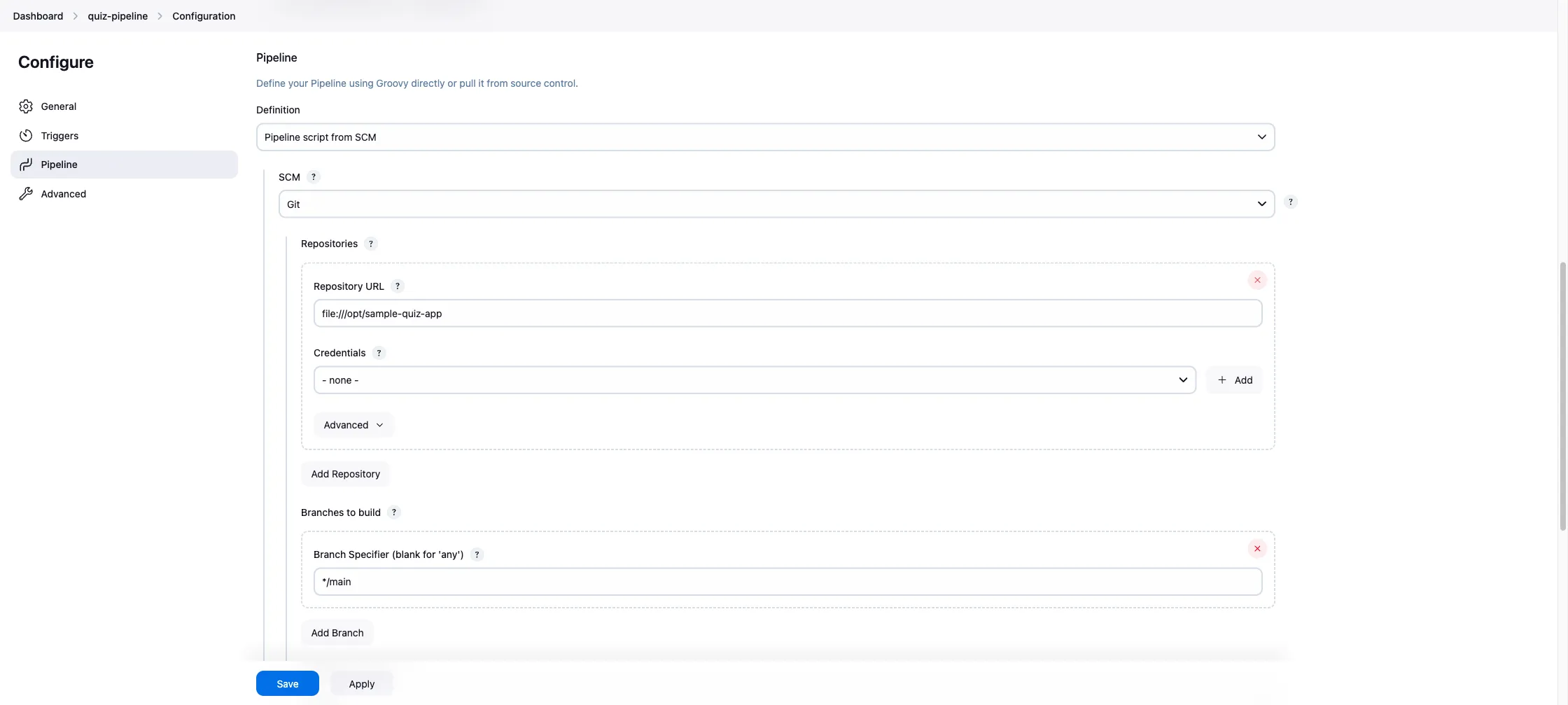
In the Jenkins UI, go to New Item, name the job (e.g. quiz-pipeline), pick Pipeline, and click OK. In the configuration page, scroll to the Pipeline section and set:
- Definition: Pipeline script from SCM
- SCM: Git
- Repository URL: your fork of the sample app
- Branch Specifier:
*/main(or whichever branch you push the Jenkinsfile to) - Script Path:
Jenkinsfile
Save and click Build Now.
Step 6: Watch it run
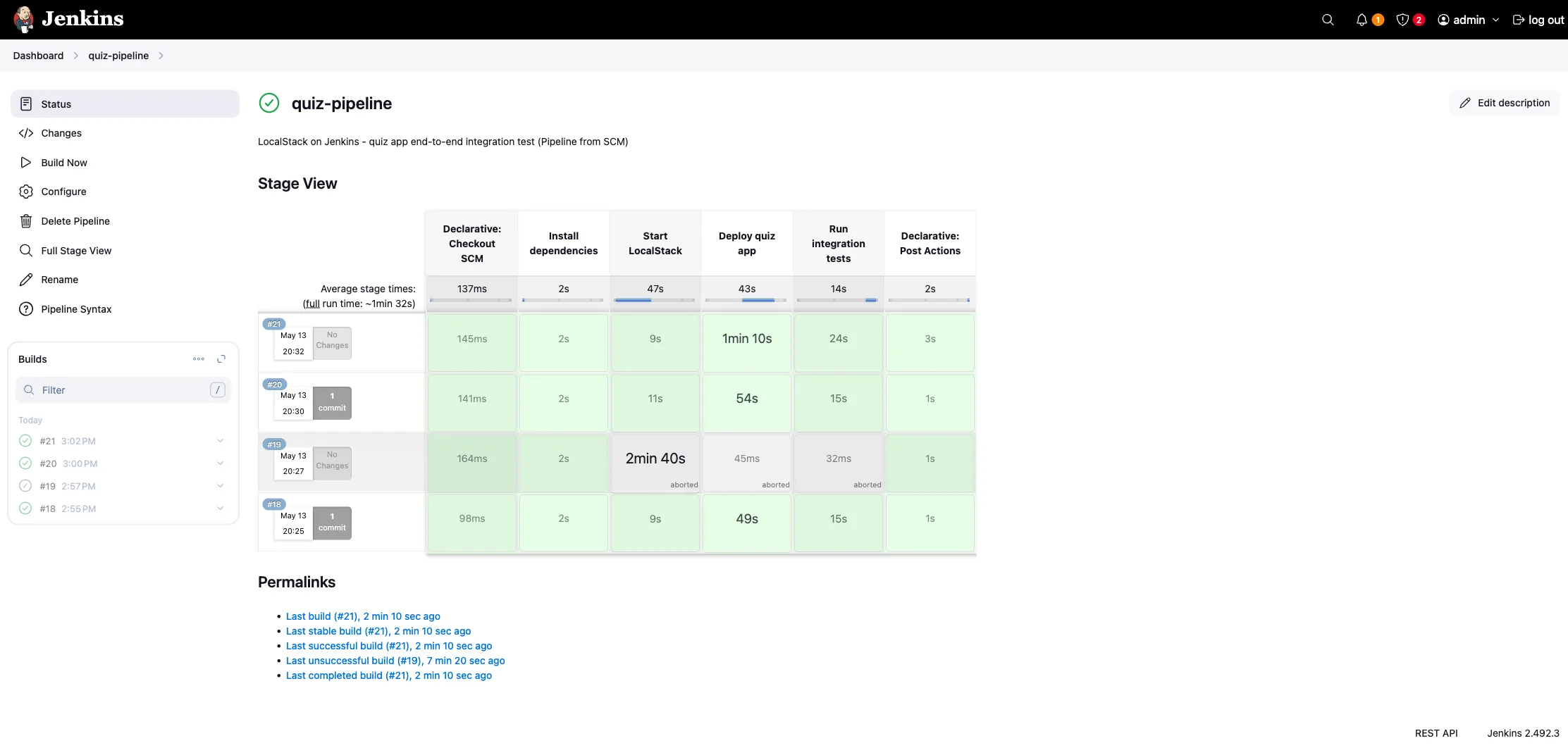
The first build is slower because Jenkins has to pull the LocalStack image and any Lambda runtime images the tests touch. The stages light up green in the Stage View as they go:
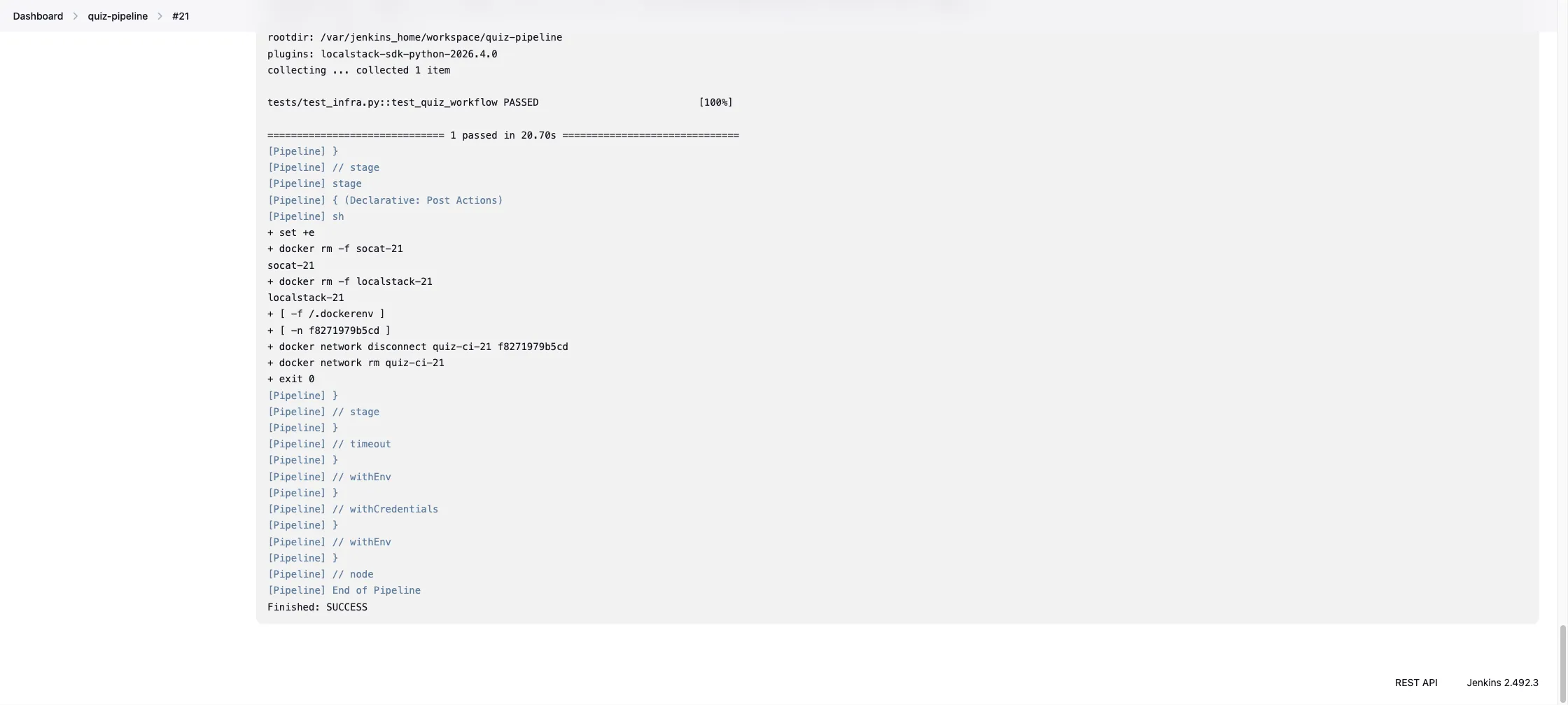
The console output ends with the deploy script summary, then the pytest assertion that the quiz workflow returns the leaderboard correctly:
If a build fails, the LocalStack container is torn down by the post { always } block, but the build log keeps every awslocal call and the pytest output. That is usually enough to tell whether the failure is in the deploy script or in the assertions.
Conclusion
Running LocalStack on Jenkins is mostly plumbing. Once the agent’s networking is sorted and the Auth Token is in a credential, the pipeline is a few sh blocks orchestrating localstack start, awslocal, and pytest. The parts that are easy to get wrong on the first try are socket access on the agent, the shared network when both Jenkins and LocalStack run as containers, and per-build resource names so builds do not collide when they queue up.
Once the manual build is green, the rest is standard Jenkins. A Multibranch Pipeline picks up branches and pull requests, the GitHub plugin triggers on webhooks instead of polling, and archiveArtifacts can pull diagnose.json.gz from LocalStack’s /_localstack/diagnose endpoint before teardown for after-the-fact debugging. The deploy step is whatever you already use for AWS (Terraform, CDK, Serverless Framework, raw aws CLI) with the endpoint pointed at LocalStack.
Learn More
- Jenkins Credentials Binding plugin: how secret injection works in declarative pipelines
- Jenkins Docker Pipeline plugin: for running stages inside ephemeral Docker images