

What’s LocalStack for Azure
If your Azure development loop is “deploy, wait, check the logs, change something, deploy again,” you already know how much time that eats up. Sometimes you just want to test a change without making it a whole cloud deployment.
That’s where LocalStack for Azure comes in. We recently launched the public preview, and I wanted to walk through what you can actually build with it. It runs supported Azure services together in a Docker container on your machine, so you can build and test how your application’s pieces work together locally. If you’ve used Azurite for Storage, think of that same idea applied to more of your stack.
You still use familiar tools: the Azure CLI, Terraform, Bicep, and Azure SDKs. You point them at the emulator and create your resources locally. You’re working with Azure APIs without needing a live subscription for every iteration.
Here’s what that gets you:
- Faster feedback: Make a change and test it without waiting for another cloud deployment.
- No Azure usage charges for local testing: Your “let me try one more thing” habit doesn’t run up your Azure bill.
- Your own environment: No wondering whether your code broke something or somebody else changed the shared dev setup.
- Integration tests in CI: Start the emulator, deploy your resources, and test how the pieces work together.
- A place to test your infrastructure changes: Try your Bicep or Terraform updates locally before deploying them to Azure.
Local testing gives you a faster way to catch problems before you move to Azure, where you can validate cloud-specific behavior and configuration.
This tutorial walks through that process with an Event Hubs payment fraud detection app. Let’s build something.
Why build Event Hubs locally
Event Hubs is a good showcase for emulation, because it is hard to test well against the cloud. Every iteration means a deploy, a wait, and a running meter for throughput units, a Function App and storage. Tests that touch partitions, checkpoints or Capture are slow and flaky, so teams often skip them.
This post walks through a real-time payment fraud detector that runs end to end against LocalStack for Azure. It uses Event Hubs, Functions, Blob Storage, Key Vault, App Service and Application Insights, all running locally, and then deploys to Azure unchanged.
By the end you will have:
- Published payments to one event hub over three protocols: AMQP, Kafka and HTTPS
- Scored them for fraud with an Event Hubs-triggered Azure Function
- Restarted the processor and watched it resume from its checkpoint
- Read the Avro archive that Event Hubs Capture wrote to Blob Storage
Prerequisites
You need a LocalStack account with Azure emulator access and these tools:
lstk, the LocalStack CLI (brew install localstack/tap/lstkornpm install -g @localstack/lstk)- Docker
- Azure CLI
- Python 3.12 or later
jqandzip- Optional: Terraform or the Bicep CLI, for the alternative deployments
Clone the samples repository and move into the sample:
git clone https://github.com/localstack/localstack-azure-samples.gitcd localstack-azure-samples/samples/eventhubs/pythonpython3 -m venv .venv && source .venv/bin/activatepip install -r src/producers/requirements.txtThe sample: real-time payment fraud detection
The eventhubs sample is a streaming platform in miniature. Payments arrive from three kinds of producer, a serverless function scores them for fraud, alerts flow onto a second stream, and Capture archives every event to Blob Storage.
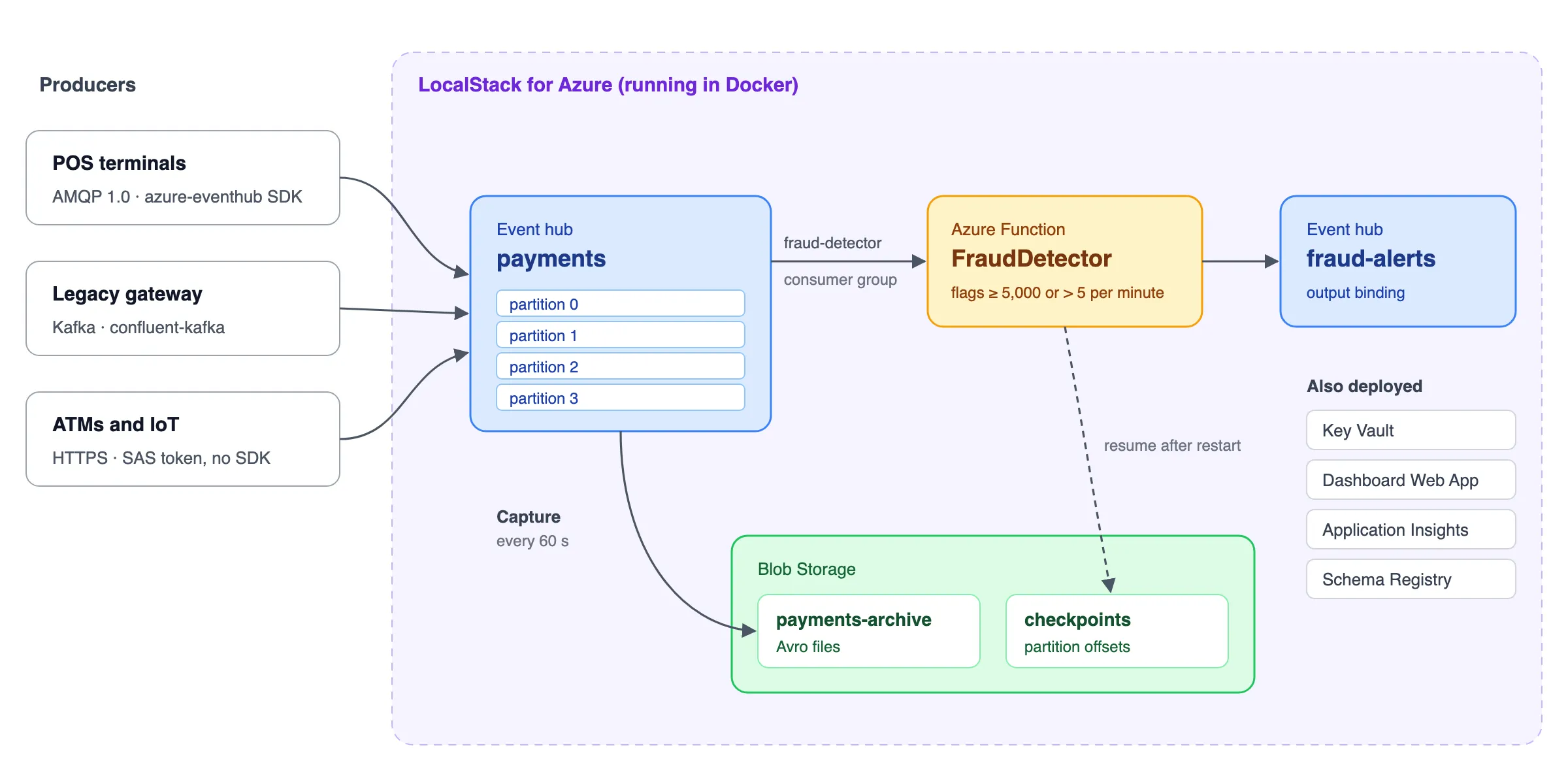
Around this core, Key Vault holds the connection strings, a Flask Web App dashboard reads the hubs and storage, and Application Insights collects telemetry. It shows off what makes Event Hubs different from a queue: one log, many protocols, many independent readers and a replayable history.
Step 1: Start LocalStack for Azure
Start the Azure emulator with lstk. It signs you in through the browser the first time, then pulls and runs the emulator container:
lstk start -t azureNext, route the Azure CLI to the emulator:
lstk az start-interceptionThis points az away from the public Azure management API and toward LocalStack. From here on, every az command in the sample creates resources locally. Run lstk az stop-interception when you want az to talk to real Azure again.
That is the only LocalStack-specific setup in the whole tutorial. Nothing in the sample’s application code knows it is running against an emulator.
Step 2: Deploy the pipeline
One script creates the full topology with plain az commands, the same ones you would run against a subscription:
bash scripts/deploy.shIt works through 12 steps: telemetry, storage, the Event Hubs namespace and hubs, consumer groups, authorization rules, the Schema Registry group, Key Vault, the Function App and the dashboard Web App. At the end it writes the connection strings to scripts/.deployment-env and prints the dashboard URL.
The heart of the deployment is the payments hub. Here is how the script creates it, with four partitions and Capture writing Avro archives to Blob Storage every 60 seconds:
az eventhubs eventhub create \ --name payments \ --namespace-name local-ehns-payments \ --resource-group local-eventhubs-rg \ --partition-count 4 \ --retention-time-in-hours 24 \ --cleanup-policy Delete \ --enable-capture true \ --capture-interval 60 \ --capture-size-limit 10485760 \ --skip-empty-archives true \ --destination-name EventHubArchive.AzureBlockBlob \ --storage-account "$STORAGE_ACCOUNT_ID" \ --blob-container payments-archive \ --archive-name-format '{Namespace}/{EventHub}/{PartitionId}/{Year}/{Month}/{Day}/{Hour}/{Minute}/{Second}'The namespace is created on the Standard tier with --enable-kafka true and auto-inflate up to 4 throughput units. Three consumer groups, fraud-detector, analytics and audit, each read the same stream at their own pace. The script also creates send-only and listen-only rules, so each workload gets only the rights it needs.
Note: The first deployment downloads the Azure Functions build image and core tools inside the emulator, which can take several minutes. Later runs reuse them.
Prefer infrastructure as code? The sample ships Bicep and Terraform versions of the same topology:
bash bicep/deploy.shbash terraform/deploy.shBoth run unchanged against LocalStack, so you can test your IaC modules locally before they ever touch a subscription.
Step 3: Stream payments and catch fraud
The quickest way to see everything work is the end-to-end script:
bash scripts/run-pipeline.shIt runs six stages in order. Each stage checks its own result and exits non-zero if the pipeline misbehaves, so a clean run is real evidence rather than a narration. The rest of this section looks at what happens in each stage and the code behind it.
Publish the contract
The script first registers an Avro PaymentEvent schema in the payments-schemas Schema Registry group, then reads it back by id, the way a serializer resolves a schema at runtime. Every consumer, in any language, can now decode the stream against one versioned contract.
Ingest over three protocols
Next, three producers write to the same payments hub, each the way a different kind of client would:
| Producer | Protocol | Client | Payments |
|---|---|---|---|
producer_amqp.py (POS terminals) |
AMQP 1.0 | azure-eventhub SDK |
40, plus a 12-payment burst on one account |
producer_kafka.py (legacy gateway) |
Kafka | confluent-kafka, no Azure SDK |
15 |
producer_http.py (ATMs, IoT) |
HTTPS | Hand-built SAS token, no SDK | 8 |
The AMQP producer keys every batch on the account id. That pins all of an account’s payments to one partition, so they are processed in order:
producer = EventHubProducerClient.from_connection_string(conn_str, eventhub_name=hub)with producer: for account_id, account_payments in by_account.items(): batch = producer.create_batch(partition_key=account_id) for payment in account_payments: batch.add(EventData(encode_payment(payment))) producer.send_batch(batch)The Kafka producer is the migration story. It is an ordinary librdkafka app: the event hub is the topic, and only the bootstrap address changes. The sample derives that address from the Event Hubs connection string, so the same code reaches LocalStack or Azure:
producer = Producer({ "bootstrap.servers": namespace_endpoint(conn_str), "client.id": "legacy-settlement-gateway",})producer.produce(hub, value=encode_payment(payment), key=payment["account_id"])producer.flush(30)After all three run, the script counts the log itself and checks it grew by all 75 payments. Three protocols, one stream.
Detect fraud
The FraudDetector function reads the fraud-detector consumer group in batches and writes alerts to the fraud-alerts hub through an output binding:
@app.function_name(name="FraudDetector")@app.event_hub_message_trigger( arg_name="events", event_hub_name="%EVENT_HUB_NAME%", connection="EVENTHUB_LISTEN_CONNECTION", consumer_group="%FRAUD_CONSUMER_GROUP%", cardinality=func.Cardinality.MANY,)@app.event_hub_output( arg_name="alerts", event_hub_name="%ALERT_HUB_NAME%", connection="EVENTHUB_SEND_CONNECTION",)def FraudDetector(events: List[func.EventHubEvent], alerts: func.Out[List[str]]) -> None: ...It applies two rules. Any payment of 5,000 or more is flagged. So is any account with more than 5 payments inside 60 seconds, the card-testing pattern that the AMQP producer’s burst triggers on purpose. The velocity rule keeps its window in memory, which is safe only because partition keys guarantee one instance sees each account’s payments in order.
Restart and resume
The script then restarts the processor by redeploying the function package, and publishes 20 more payments while it comes back. The Functions host resumes from the checkpoint it stored in Blob Storage. The script asserts that the new burst raised an alert and that the old backlog did not replay. Nothing is lost, nothing is processed twice.
Read the cold path
Finally, the script waits for a Capture window to flush, lists the Avro archives in the payments-archive container, and decodes the newest one with scripts/read_capture.py. Every payment from the run is in the data lake, and no one wrote consumer code to put it there.
Step 4: Change the code and test it in seconds
This is where a local emulator pays for itself. deploy.sh is how you ship the function, but redeploying replaces its container, so the host cold-starts each time. For the inner dev loop, run the same function_app.py with Azure Functions Core Tools against the same emulated Event Hubs and Storage.
Install Core Tools v4 if you don’t have it (brew install azure/functions/azure-functions-core-tools@4). Then write a local.settings.json from the connection strings that deploy.sh saved:
source scripts/.deployment-envcat > src/functions/local.settings.json <<EOF{ "IsEncrypted": false, "Values": { "AzureWebJobsStorage": "$STORAGE_CONNECTION_STRING", "FUNCTIONS_WORKER_RUNTIME": "python", "EVENTHUB_LISTEN_CONNECTION": "$EVENTHUB_LISTEN_CONNECTION_STRING", "EVENTHUB_SEND_CONNECTION": "$EVENTHUB_ALERT_SEND_CONNECTION_STRING", "EVENT_HUB_NAME": "$EVENT_HUB_NAME", "ALERT_HUB_NAME": "$ALERT_HUB_NAME", "FRAUD_CONSUMER_GROUP": "analytics" }}EOFThe local copy reads through the analytics consumer group, so it never competes with the deployed Function App for partitions or checkpoints. The file is gitignored because it holds live connection strings.
Start the function in a second terminal and leave it running:
cd src/functionsfunc startNow add a rule. The legacy settlement gateway has no real-time authorization, so flag any large payment that comes through it. In evaluate(), after the amount check, add:
channel = payment.get("channel", "")if channel == "settlement-batch" and amount >= 150: reasons.append(f"settlement-batch payment {amount:.2f} >= manual-review limit 150.00")Press Ctrl+C, run func start again, then send some Kafka traffic from your first terminal:
cd src/producersEVENTHUB_SEND_CONNECTION_STRING="$EVENTHUB_NAMESPACE_CONNECTION_STRING" \ python producer_kafka.py --count 8Within seconds, the func start terminal logs a FRAUD_ALERT with the new settlement-batch reason. No deploy, no container rebuild, no cloud round trip. Edit, restart, send traffic, repeat.
When you’re done, revert the edit with git checkout -- src/functions/function_app.py.
Inspect the running pipeline
Open the dashboard URL that deploy.sh printed. It is a Flask Web App, running on the emulator’s App Service, that refreshes every 5 seconds. It shows per-partition event counts for both hubs, consumer checkpoints, recent alerts, Capture archives and registered schemas. GET /api/overview returns the same snapshot as JSON.
To check every deployed capability at once, run:
bash scripts/validate.shIt makes 11 numbered checks across the control plane and data plane. They include Capture configuration, least-privilege rules, an AMQP round trip, an application group with a throttling policy and a geo-disaster recovery pairing.
A few things to know when you move this to Azure:
- The emulator serves Kafka in plaintext. Against Azure, add
security.protocol=SASL_SSL,sasl.mechanism=PLAIN,sasl.username=$ConnectionStringand the connection string assasl.password. The Kafka producer has these settings in a comment. - The emulator checks that a SAS rule exists but doesn’t enforce its rights. The send-only and listen-only rules show the deployment pattern, and they become a real boundary on Azure.
- The first Function App deployment can time out on a fresh emulator while the host downloads its extension bundle. Give it a few minutes before redeploying.
Wrapping up
You just ran a multi-protocol streaming pipeline with serverless processing, checkpoint recovery, Capture and a Schema Registry, entirely on your laptop. Because run-pipeline.sh asserts every stage, the same command works as an integration test in CI: start the emulator, run deploy.sh, then run run-pipeline.sh, and a non-zero exit fails the build.
When you’re ready for Azure, run
lstk az stop-interceptionand deploy with the same script, Bicep or Terraform. The application code doesn’t change. Clean up the local resources with:
bash scripts/cleanup.shTo go further: