
AI and agents can accelerate your development workflows, but they also require an added layer of validation to ensure that what you are deploying to production does what you expect. This is especially true when relying on cloud services where a simple mistake by an agent could become costly.
LocalStack already fits naturally into an agentic workflow and helps you test and verify your generated code without worrying about breaking the environment or incurring cloud costs. If you’re using Claude, Cursor, or any agent-enabled tool to write and test AWS applications, LocalStack is the obvious local target.
Developers have been wiring this up manually for a while now, and with the addition of our MCP server and skills, agents can go beyond just generating commands. They can actually operate LocalStack — starting it, deploying infrastructure, analyzing logs, generating IAM policies, etc.
The problem wasn’t agent capability. It was discoverability.
A Dedicated Entry Point for AI Agents
This discoverability problem is why I created a dedicated entry point for AI agents at blog.localstack.cloud/ai.
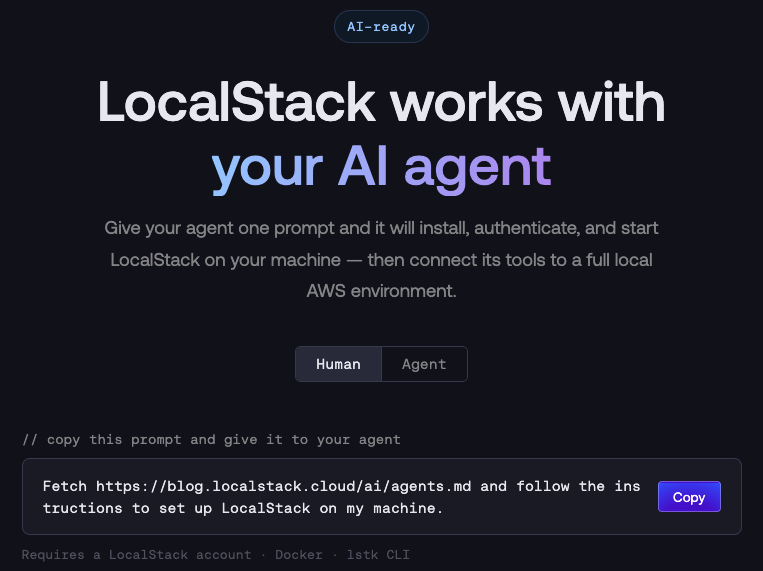
The page has two modes, switchable with a tab. The human view is what you’re reading this post to understand — an explanation of what the page does, a copyable prompt to hand to your agent, and a reference to the skills and MCP tools available. The agent view renders the raw content your agent will actually read.
To use it, copy this prompt and give it to your agent:
Fetch https://blog.localstack.cloud/ai/agents.md and follow the instructions to set up LocalStack on my machine.That’s it. Your agent takes it from there.
What the Agent Sees
The /ai/agents.md file at the other end of that URL is a plain-text Markdown document written specifically for agents, not humans. It goes straight to a step-by-step setup flow, with enough context for an agent to work through it without asking clarifying questions.
The flow opens with a Docker check, then walks through five steps:
- Install lstk — LocalStack’s new CLI that handles the Docker image, authentication, and container lifecycle in one tool (
brew install localstack/tap/lstkor via npm). - Create an account — LocalStack requires an account; the agent pauses here and asks the user to sign up, then waits for confirmation.
- Authenticate —
lstk loginopens a browser for auth, and the agent waits for the user to finish. - Start LocalStack —
lstk startpulls the image and launches the container. - Configure the MCP server — the agent asks the user for their auth token, which is required to enable the MCP server, then writes the config to the right place for whichever client they’re using.
For automated or headless runs, the doc also describes an alternative path that requests a short-lived token and starts LocalStack without a browser login.
MCP tools and skills
Once setup is complete, the agent has access to the full LocalStack toolchain.
Through the MCP server, agents get access to:
localstack-management— start, stop, restart, and monitor container status.localstack-deployer— deploy CDK, Terraform, and SAM stacks.localstack-logs-analysis— analyze logs for errors and performance issues.localstack-iam-policy-analyzer— generate least-privilege IAM policies from violations.localstack-chaos-injector— inject faults to test system resilience.localstack-cloud-pods— save and restore environment state snapshots.localstack-state-management— manage local file-based state export/import workflows.localstack-extensions— install, uninstall, list, and discover LocalStack Extensions.localstack-ephemeral-instances— spin up temporary cloud-hosted LocalStack instances.localstack-aws-client— run AWS CLI commands directly against LocalStack.localstack-aws-replicator— replicate external AWS resources into a running LocalStack instance.localstack-app-inspector— inspect application traces, spans, events, and IAM evaluations.localstack-snowflake-client— execute Snowflake SQL queries and commands against LocalStack.localstack-docs— search the LocalStack documentation.
Through the skills at github.com/localstack/skills, agents get six structured workflows covering container lifecycle, infrastructure deployment (Terraform, CDK, CloudFormation, Pulumi), state management, log analysis, IAM policy analysis, and extensions. If you want a longer look at how skills work and why they matter, the WTH Are Agent Skills? post covers the pattern in depth.
The agents.md document references both, explains what each tool does, and suggests a few things to try once LocalStack is running.
Give it a try
If you’re already working with AI agents day-to-day, give it a try. The simplest test is to open a new conversation and paste the prompt above. Watch what your agent does with it. The instructions are designed to be complete enough that the agent can run the whole setup flow.