
Introduction
Building multi-step workflows with Lambda has always involved a trade-off. You can connect functions with queues and track their state yourself. Or you can use Step Functions and split your logic across a state machine and several Lambda handlers. Both approaches work, but neither lets you keep the whole workflow in one function.
AWS Lambda Durable Functions, released in late 2025, solve this problem. A durable function is regular Lambda code that saves its progress as it runs. If a crash, timeout, waiting for a callback or another external condition interrupts it, Lambda runs the handler again and skips the steps that already finished. Your entire workflow stays in one handler, with no separate state machine to define.
Testing this behavior on AWS can be slow. Each change requires you to package, deploy, invoke, and inspect the function. Failures and outages are also hard to reproduce in a shared account. In this tutorial, you will build and test a durable order-processing workflow on your machine with LocalStack. You will deploy it with CDK, retry a failed payment step, stop the emulator during an execution, and resume the workflow with a callback.
What are Lambda Durable Functions?
A durable function is a Lambda function configured with DurableConfig. Each invocation becomes a tracked workflow called a durable execution. It has its own ARN, status, and event history. Unlike a regular Lambda invocation, it can run for up to a year.
The durable execution SDK provides the building blocks for these workflows. It is available for Python, JavaScript, Java, and .NET:
context.step()runs code and saves its result. During a replay, completed steps return the saved result instead of running again. You can also configure retries and backoff.context.wait()pauses the execution for a set time. The function exits, so you do not pay for compute while it waits.context.create_callback()creates a token for an external system. That system uses theSendDurableExecutionCallbackSuccessorSendDurableExecutionCallbackFailureAPI to resume the execution. The execution waits until it receives the callback or times out.context.parallel()andcontext.map()run several branches at the same time.
This works through checkpointing and replay. When an execution pauses for a retry, wait, or callback, the function exits. When it resumes, Lambda runs the handler again from the beginning and skips operations that already have a checkpoint. For this reason, step results must be serializable. Side effects should also stay inside steps because code outside a step runs again during every replay.
LocalStack and Lambda Durable Functions
LocalStack 2026.8.0 and later supports the full lifecycle of durable functions. You can create them with a DurableConfig through the CreateFunction API, CloudFormation, or CDK. Management APIs for inspecting, stopping, and resuming executions work as they do on AWS.
LocalStack supports the features used in this tutorial, including named idempotent executions, step retries, callbacks, parallel branches, and execution history. It also supports persistence. When persistence is enabled, an execution survives a restart of the LocalStack container and continues from where it stopped. This lets you test crash recovery on your laptop before running the workflow in an AWS account.
LocalStack runtime images require the durable execution SDK in the deployment package. This follows AWS’s recommendation for production functions: although the AWS Python and Node.js managed runtimes include the SDK for testing and development, packaging it with your function keeps the SDK version consistent and prevents runtime updates from changing its behavior. The sample uses a small script to build this production-ready package, which works unchanged on AWS.
Prerequisites
lstkCLI with a LocalStack Auth Token- Docker
- Python
- Node.js & AWS CDK CLI
- AWS CLI recent enough to know the durable execution commands (check with
aws lambda get-durable-execution help)
The commands below use lstk aws and lstk cdk, which run the AWS CLI and CDK against LocalStack. You can also use awslocal and cdklocal if you prefer.
Step 1: Set up the project
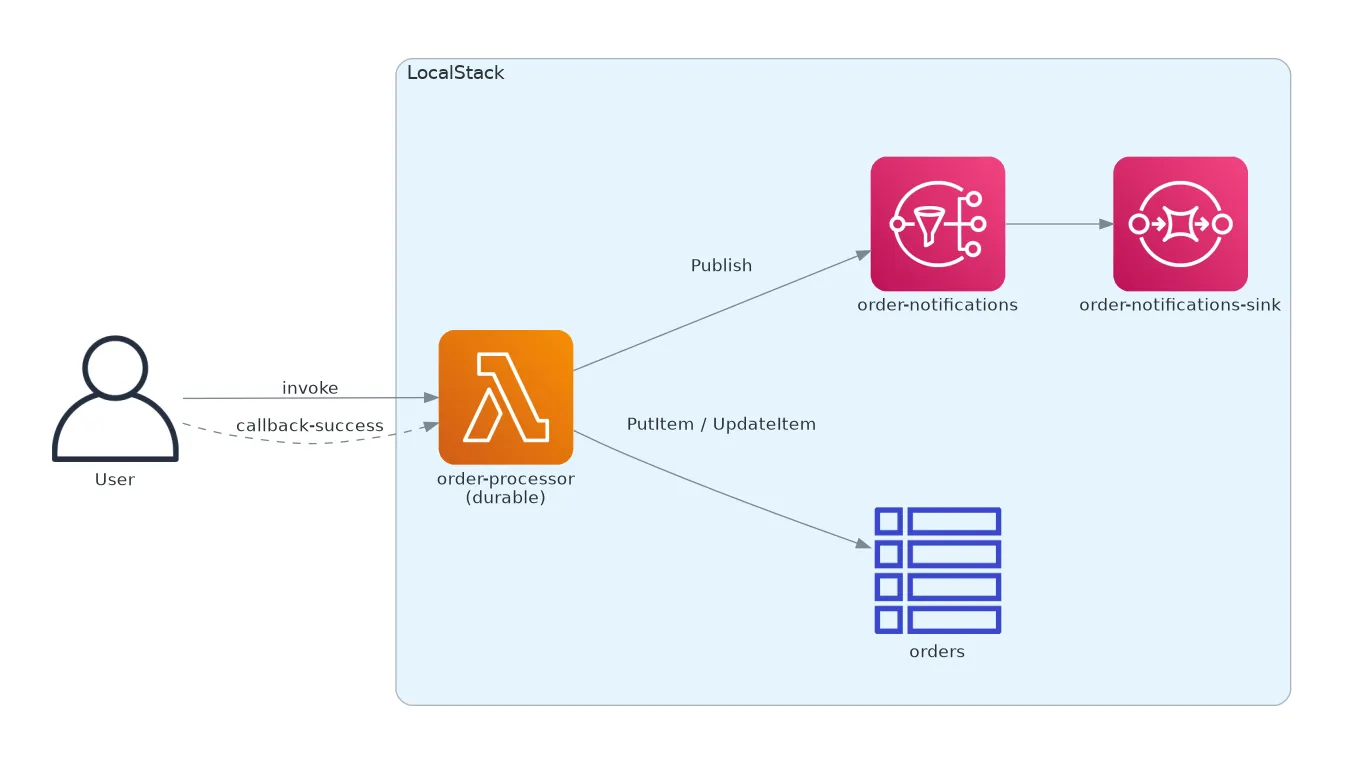
The sample application processes an order from start to finish. One durable function runs the entire workflow:
- Validate the order and calculate the total.
- Save the order to a DynamoDB table.
- Call a payment gateway that times out on the first two attempts.
- Pause until the payment provider confirms the charge through a callback.
- Send email and SMS notifications at the same time.
- Mark the order as fulfilled.
The CDK stack also creates an orders DynamoDB table, an SNS topic for notifications, and an SQS queue subscribed to the topic. We will use the queue to check which notifications were sent.
1.1: Clone the repository
To begin, clone the sample repository and create the virtual environment for CDK:
git clone https://github.com/localstack-samples/sample-durable-functions-order-processing.gitcd sample-durable-functions-order-processingpython -m venv .venv && .venv/bin/pip install -r requirements.txt1.2: Review the workflow handler
The handler in functions/order_processor/handler.py uses regular Python and the durable SDK. You can read the workflow from top to bottom:
@durable_executiondef lambda_handler(event: dict, context: DurableContext) -> dict:    order = context.step(validate_order(event), name="validate-order")    context.step(record_order(order), name="record-order")
    charge = context.step(        charge_payment(order),        name="charge-payment",        config=StepConfig(retry_strategy=payment_retry_strategy),    )
    callback = context.create_callback(        name="payment-confirmation",        config=CallbackConfig(timeout=Duration.from_hours(1)),    )    context.step(        publish_callback_id(order["order_id"], callback.callback_id),        name="publish-callback-id",    )    confirmation = json.loads(callback.result())
    context.parallel(        [            lambda ctx: ctx.step(send_notification(order, "EMAIL")),            lambda ctx: ctx.step(send_notification(order, "SMS")),        ],        name="notify-customer",    )
    context.step(mark_fulfilled(order["order_id"], charge["charge_id"]), name="mark-fulfilled")    return {        "order_id": order["order_id"],        "status": "FULFILLED",        "charge_id": charge["charge_id"],        "payment_attempts": charge["attempts"],        "confirmation": confirmation,    }
Each named step saves a checkpoint. The payment step simulates an unreliable gateway. It stores the number of attempts in DynamoDB and raises an error on the first two attempts.
@durable_stepdef charge_payment(step: StepContext, order: dict) -> dict: attempt = next_payment_attempt(order["order_id"]) if attempt < PAYMENT_SUCCEEDS_ON_ATTEMPT: raise PaymentGatewayTimeout(f"payment gateway timed out on attempt {attempt}") charge_id = f"ch_{order['order_id'].lower()}" step.logger.info(f"Charged {order['total_cents']} cents as {charge_id} on attempt {attempt}") return {"charge_id": charge_id, "attempts": attempt}The retry strategy allows up to five attempts. The delay starts at two seconds and doubles after each failure. The execution pauses between attempts. It does not call sleep() and keep the function running. Instead, the current invocation ends and Lambda starts a new one when it is time to retry.
payment_retry_strategy = create_retry_strategy( RetryStrategyConfig( max_attempts=5, initial_delay=Duration.from_seconds(2), backoff_rate=2.0, ))After the charge succeeds, the handler creates a callback and saves its ID with the order in DynamoDB. In a real application, the payment provider would receive this ID and complete the callback through a webhook. In this tutorial, we will complete it with a CLI command. callback.result() pauses the workflow until the result arrives without using compute time.
1.3: Configure the durable function with CDK
The stack in stacks/order_processing_stack.py is a standard CDK app. To make the function durable, set its durable_config property. CDK converts this setting into the DurableConfig CloudFormation property:
order_processor = lambda_.Function( self, "OrderProcessor", function_name="order-processor", runtime=lambda_.Runtime.PYTHON_3_13, handler="handler.lambda_handler", code=lambda_.Code.from_asset("functions/order_processor/build"), timeout=Duration.seconds(120), durable_config=lambda_.DurableConfig( execution_timeout=Duration.hours(1), retention_period=Duration.days(7), ), environment={ "ORDERS_TABLE": orders_table.table_name, "NOTIFICATIONS_TOPIC": notifications_topic.topic_arn, },)execution_timeout sets the maximum duration of the full workflow, including waits and callbacks. The timeout setting still limits each individual Lambda invocation. You must make a function durable when you create it. If you add this configuration to an existing function, CDK replaces the function.
1.4: Package the durable SDK
Add the durable execution SDK to the deployment package, as recommended by AWS for production functions. The build.sh script installs the SDK and copies the function into a build directory. The CDK stack deploys that directory:
./build.shLambda package ready in functions/order_processor/buildRun the script again after you change the handler.
Step 2: Deploy the stack on LocalStack
2.1: Start LocalStack and enable persistence
Start LocalStack with your Auth Token and the --persist flag. This flag saves state to a volume, allowing an execution to survive a container restart:
LOCALSTACK_AUTH_TOKEN=<YOUR_LOCALSTACK_AUTH_TOKEN> lstk start --persistThe lstk command waits for LocalStack to start and then prints its endpoint: localhost.localstack.cloud:4566.
2.2: Deploy with CDK
From the repository root, prepare the local environment and deploy the stack:
lstk cdk bootstraplstk cdk deploy --require-approval neverAfter about 30 seconds, CDK prints the resources we will use:
Outputs:OrderProcessingStack.NotificationsSinkUrl = http://sqs.us-east-1.localhost.localstack.cloud:4566/000000000000/order-notifications-sinkOrderProcessingStack.OrderProcessorName = order-processorOrderProcessingStack.OrdersTableName = ordersStep 3: Run an order through the workflow
3.1: Start a durable execution
The sample includes an order in events/order.json:
{ "order_id": "ORD-1001", "customer_email": "jane@example.com", "items": [ { "sku": "KB-MECH-87", "quantity": 1, "unit_price_cents": 8900 }, { "sku": "MOUSE-TRK-2", "quantity": 2, "unit_price_cents": 2450 } ]}Invoke the function asynchronously and give the execution a name. This name also acts as an idempotency key. If you invoke the function again with order-1001, Lambda returns the same execution instead of charging the customer twice.
ARN=$(lstk aws lambda invoke \ --function-name order-processor \ --qualifier '$LATEST' \ --invocation-type Event \ --durable-execution-name order-1001 \ --payload fileb://events/order.json \ response.json --query DurableExecutionArn --output text)echo $ARNThe command returns the execution ARN immediately:
arn:aws:lambda:us-east-1:000000000000:function:order-processor:$LATEST/durable-execution/order-1001/89de6d1a-aa9d-30a7-ab66-586274bb9e223.2: Watch the payment retries
Wait about ten seconds for the payment retries, then get the execution history:
lstk aws lambda get-durable-execution-history \ --durable-execution-arn "$ARN" \ --query 'Events[].EventType'[ "ExecutionStarted", "StepStarted", "StepSucceeded", "StepStarted", "StepSucceeded", "StepStarted", "StepFailed", "InvocationCompleted", "StepStarted", "StepFailed", "InvocationCompleted", "StepStarted", "StepSucceeded", "CallbackStarted", "StepStarted", "StepSucceeded", "InvocationCompleted"]The first two steps, validate-order and record-order, succeed. The charge-payment step then fails twice. Each StepFailed event is followed by InvocationCompleted, which shows that the function exits between retries. Each retry starts a new invocation, replays the handler, and skips the completed steps. The third payment attempt succeeds. The workflow then creates the callback and pauses without leaving an invocation running.
The order in DynamoDB shows the same result:
lstk aws dynamodb get-item --table-name orders \ --key '{"order_id":{"S":"ORD-1001"}}' \ --query 'Item.{status:order_status.S,attempts:payment_attempts.N,callback:callback_id.S}'{ "status": "AWAITING_CONFIRMATION", "attempts": "3", "callback": "YXJuOmF3czpsYW1iZGE6dXMtZWFzdC0xOjAwMDAwMDAwMDAwMDpmdW5jdGlvbjpvcmRlci1wcm9jZXNzb3I6..."}Step 4: Restart LocalStack mid-execution
The execution is now waiting for the callback. Restart LocalStack:
lstk restartThis replaces the LocalStack container. In-memory state is lost, but the persisted volume remains. When LocalStack is ready, check the execution:
lstk aws lambda get-durable-execution \ --durable-execution-arn "$ARN" \ --query '{Name:DurableExecutionName,Status:Status}'{ "Name": "order-1001", "Status": "RUNNING"}The execution is still running. Its checkpoints and callback deadline survived the restart. This is the same recovery behavior that protects workflows from interruptions on AWS. With LocalStack, you can test it safely on your machine.
Step 5: Confirm the payment and verify the result
5.1: Send the callback
Get the callback ID stored with the order. Then send a small JSON response, as a payment provider’s webhook would:
CB=$(lstk aws dynamodb get-item --table-name orders \  --key '{"order_id":{"S":"ORD-1001"}}' \  --query 'Item.callback_id.S' --output text)
lstk aws lambda send-durable-execution-callback-success \  --callback-id "$CB" \  --result '{"payment_status": "captured", "gateway_ref": "pg-91c7"}'
The execution resumes and replays the handler. It skips every completed step, sends the email and SMS notifications in parallel, and marks the order as fulfilled.
5.2: Check the execution result
After a few seconds, the execution succeeds and returns the final result:
lstk aws lambda get-durable-execution \ --durable-execution-arn "$ARN" --query 'Result' --output text{ "order_id": "ORD-1001", "status": "FULFILLED", "charge_id": "ch_ord-1001", "payment_attempts": 3, "confirmation": {"payment_status": "captured", "gateway_ref": "pg-91c7"}}5.3: Verify the side effects
The workflow publishes one email notification and one SMS notification to SNS. The subscribed SQS queue receives both:
lstk aws sqs receive-message \ --queue-url http://sqs.us-east-1.localhost.localstack.cloud:4566/000000000000/order-notifications-sink \ --max-number-of-messages 10 --query 'Messages[].Body'[ "[EMAIL] Your order ORD-1001 is confirmed and paid.", "[SMS] Your order ORD-1001 is confirmed and paid."]The order in DynamoDB also shows the final state:
lstk aws dynamodb get-item --table-name orders \ --key '{"order_id":{"S":"ORD-1001"}}' \ --query 'Item.{status:order_status.S,charge:charge_id.S}'{ "status": "FULFILLED", "charge": "ch_ord-1001"}The full execution history now ends with the parallel steps and ExecutionSucceeded. The workflow handled two payment failures, a container restart, and an external confirmation without adding recovery logic to the handler.
Summary
We built an order-processing workflow as a single Lambda Durable Function. We tested step retries, callbacks, parallel notifications, and recovery after a LocalStack restart. The same CDK stack and deployment package also work on AWS. Deploy with cdk instead of lstk cdk to run the workflow in your AWS account.
Next, you can try the following:
- Make every payment attempt fail by setting
PAYMENT_SUCCEEDS_ON_ATTEMPThigher thanmax_attempts, then inspect the errors in the execution history. - Let the callback time out and update the handler to cancel the order.
- Use
context.map()to send notifications to a list of channels. - Stop an execution with
lstk aws lambda stop-durable-execution, then inspect its history.
See the LocalStack Lambda documentation for supported features and current limitations. See the AWS Durable Functions documentation for more information about the SDK.