Introduction
A local AWS environment is more than its code. After you deploy the stack and the app starts saving data, the emulator holds valuable state. A small change can destroy that state during the next deploy, even when the deploy succeeds.
We gave Claude Code access to the LocalStack MCP server and a CDK application. The agent deployed the stack and saved its state as a Cloud Pod, a remote snapshot on the LocalStack platform. We then made a small change. The deploy succeeded, but all records were gone. The agent detected the data loss and restored the environment from the Cloud Pod. Once the data was back, we fixed the change, redeployed, and saved a new snapshot.
The MCP server handled every step: deployment, rollback, and snapshots. Here is what happened and how you can try it.
How the Cloud Pods tool works
A snapshot copies the emulator at a specific point in time. It includes its resources and data. You can store it in three ways:
- Persistence saves it to disk automatically and restores it after a restart.
- Snapshot files are checkpoints stored on your machine.
- Cloud Pods are versioned snapshots stored on the LocalStack platform. You can share them with your organization and load them on any machine running LocalStack.
The LocalStack MCP server lets your agent control the emulator. This post uses the following tools:
localstack-managementstarts, stops, restarts, and checks the LocalStack container.localstack-deployerdeploys and removes infrastructure built with CDK, Terraform, SAM, or CloudFormation.localstack-aws-clientruns AWS CLI commands against LocalStack to inspect its state.localstack-cloud-podssaves, loads, and deletes Cloud Pods. It provides the safety net for this example.
You can also use localstack-state-management to export and import state as a local file. Local snapshots work well for backups on one machine, while Cloud Pods are great for sharing snapshots or loading them on other machines.
This post uses Cloud Pods because you can load them on any machine. Loading one replaces the current state and removes resources created after the snapshot. This provides a clean rollback instead of merging old and new state.
Prerequisites
- Docker installed and running.
- A valid
LOCALSTACK_AUTH_TOKENfrom a LocalStack account. Cloud Pods require a plan or trial that includes them. - Node.js 22+ to build the CDK app and run the MCP server with
npx. - Claude Code or another MCP client.
Step 1: Set up the MCP server
Run the setup wizard to configure your MCP client:
npx -y @localstack/localstack-mcp-server initThe wizard checks Docker, reads LOCALSTACK_AUTH_TOKEN, and finds your installed MCP clients. Select the clients you want to configure, then restart your agent to access the LocalStack tools.
Step 2: Get the sample app
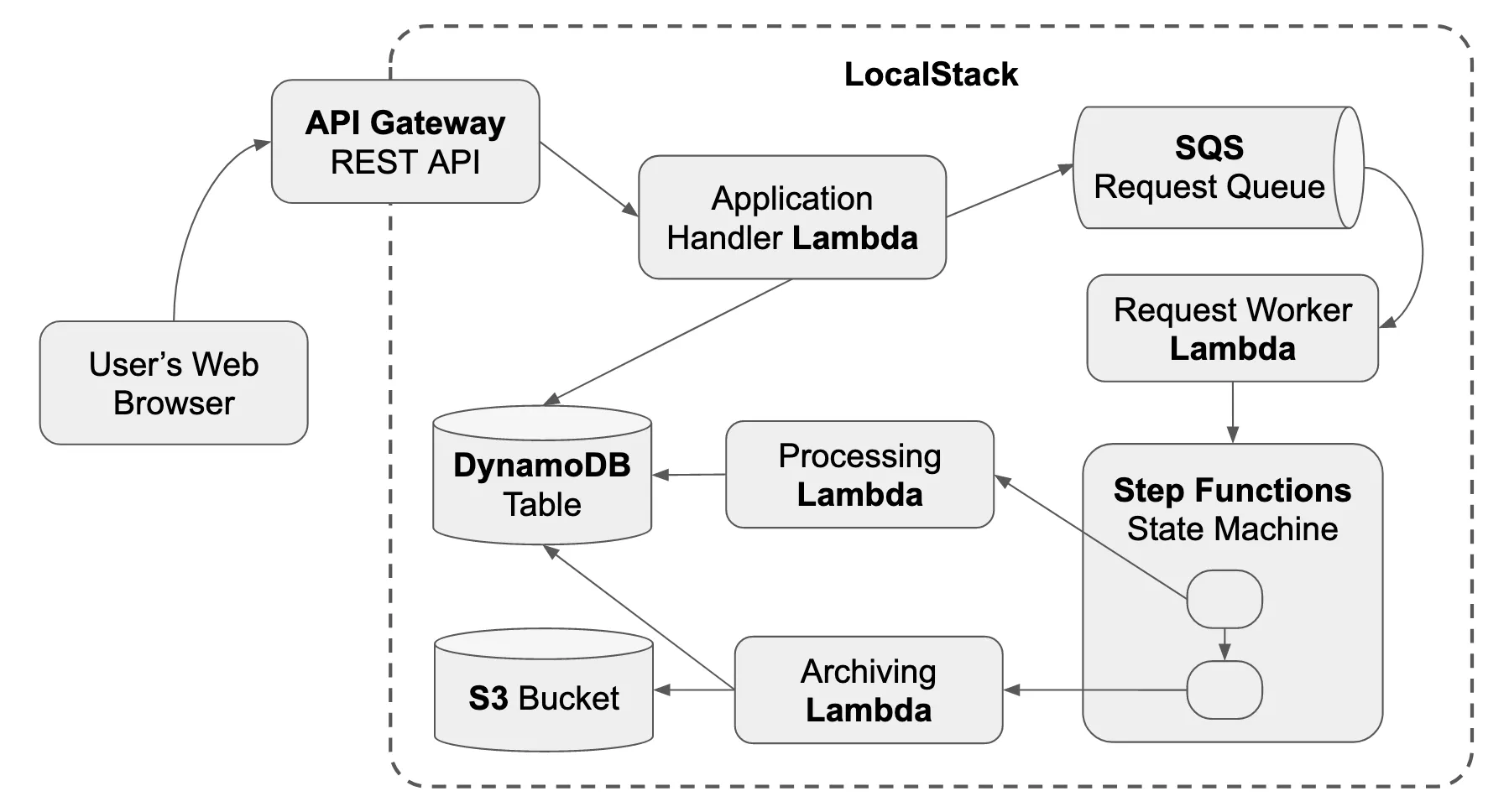
We use localstack-demo, a sample AWS CDK app. POST /requests saves a request to the appRequests DynamoDB table and queues it for background processing. GET /requests lists the saved requests. The stack also includes Lambda functions, an SQS queue, a Step Functions state machine, and a REST API Gateway.
Clone the repository and install its dependencies:
git clone https://github.com/localstack-samples/localstack-demo.gitcd localstack-demomake install # CDK dependenciesmake bundle-node # Node.js Lambda dependenciesYou do not need to start LocalStack or deploy the app. The agent does both in the next step.
Step 3: Deploy the app and checkpoint it
Open Claude Code in the localstack-demo folder and select a model. Ask it to deploy the app, add sample data, and save the working state:
Working through the LocalStack MCP server:
1. Make sure LocalStack is running.2. Deploy this CDK app to LocalStack using the deployer tool. The project   directory is ./cdk.3. Once it's up, send a dozen sample requests to the POST /requests endpoint so   the appRequests table has some data, and tell me the item count.4. Save the current state as a Cloud Pod named demo-baseline so I can restore it   later.
The agent deployed the stack, added the sample data, and saved the Cloud Pod:
● localstack-deployer(action: "deploy", directory: "./cdk", projectType: "cdk")  ⎿ 🥾 Bootstrapping CDK for LocalStack... ✅ bootstrapped     🚀 Deploying CDK Stack...     LocalstackDemoStack | 36/36 | CREATE_COMPLETE   (15.1s)     ApiEndpoint = https://irwtzymlvm.execute-api.localhost.localstack.cloud:4566/local/
● localstack-aws-client(command: "dynamodb scan --table-name appRequests --select COUNT")  ⎿ { "Count": 12 }
● localstack-cloud-pods(action: "save", pod_name: "demo-baseline")  ⎿ ✅ Cloud Pod 'demo-baseline' was saved successfully.
The deployer bootstrapped CDK and created all 36 resources in one call. The working state is now safely stored on the LocalStack platform.
Step 4: Make a change that breaks it
Now make a risky change: rename the DynamoDB table. It takes only one line in the CDK stack:
tableName: 'appRequests',tableName: 'requests',The change looks harmless. Ask the agent to deploy it, check the data, and roll back if needed:
I renamed the DynamoDB table from appRequests to requests. Deploy the change,then confirm that GET /requests still returns 12 records. If the app breaks orloses data, restore the demo-baseline Cloud Pod and explain what happened.The deploy succeeded, but the API returned no records. The agent detected the data loss and restored the Cloud Pod:
● localstack-deployer(action: "deploy", directory: "./cdk", projectType: "cdk")  ⎿ LocalstackDemoStack | UPDATE_COMPLETE     AWS::DynamoDB::Table AppRequests: created 'requests', then DELETE_COMPLETE on the old table     ✅ deployed successfully
● Bash(curl .../local/requests)  ⎿ { "result": [] }                            # was 12, now empty
● localstack-aws-client(command: "dynamodb list-tables")  ⎿ { "TableNames": ["requests"] }              # appRequests is gone
● localstack-cloud-pods(action: "load", pod_name: "demo-baseline")  ⎿ ✅ Cloud Pod 'demo-baseline' was loaded.     Your LocalStack instance has been restored to this snapshot.
● localstack-aws-client(command: "dynamodb scan --table-name appRequests --select COUNT")  ⎿ { "Count": 12 }                             # data is back
CloudFormation cannot rename a resource in place because tableName is a physical name. Instead, it created the new requests table, connected the Lambda functions to it, and deleted the old appRequests table. Because the old table used removalPolicy: DESTROY, it also deleted its 12 records.
The successful deploy and 200 response did not reveal the data loss. The record count did. Loading the demo-baseline Cloud Pod restored the table, its data, the CloudFormation stack, and the API at the original endpoint.
Step 5: Fix the code and save a new checkpoint
The environment works again, but the code still contains the bad change. Revert the rename and set the table’s removal policy to RETAIN. This protects the old table if a future update replaces it.
tableName: 'requests',tableName: 'appRequests',removalPolicy: cdk.RemovalPolicy.DESTROY,removalPolicy: cdk.RemovalPolicy.RETAIN,Ask the agent to deploy the fix, check the data, and save a new checkpoint:
I reverted the rename and set the table's removalPolicy to RETAIN. Deploy the fix,confirm all 12 records are still served, then save a new Cloud Pod calleddemo-hardened.● localstack-deployer(action: "deploy", directory: "./cdk", projectType: "cdk") ⎿ LocalstackDemoStack | UPDATE_COMPLETE # in-place update, no table replacement
● localstack-aws-client(command: "dynamodb scan --table-name appRequests --select COUNT") ⎿ { "Count": 12 } # nothing lost
● localstack-aws-client(command: "cloudformation get-template ... AppRequests") ⎿ "DeletionPolicy": "Retain", "UpdateReplacePolicy": "Retain"
● localstack-cloud-pods(action: "save", pod_name: "demo-hardened") ⎿ ✅ Cloud Pod 'demo-hardened' was saved successfully.This deploy updated the stack without replacing the table, so all 12 records remained. The agent also checked the deployed template to confirm the fix.
RemovalPolicy.RETAIN sets both DeletionPolicy and UpdateReplacePolicy to Retain. The second setting protects against this failure: if another update replaces the table, CloudFormation keeps the old one instead of deleting it. The agent saved the fixed environment as demo-hardened alongside demo-baseline.
What it cost
The three prompts used claude-opus-5 and cost about $2.44 total. The initial deployment cost the most.
| Prompt | What the agent did | Cost | Time |
|---|---|---|---|
| Deploy and checkpoint | Deployed 36 resources, added data, and saved demo-baseline |
$1.17 | 3m 25s |
| Break and recover | Deployed the rename, detected data loss, and restored demo-baseline |
$0.62 | 2m 31s |
| Fix and checkpoint | Deployed the fix, checked the data, and saved demo-hardened |
$0.65 | 2m 15s |
The rename deleted local data without causing a deployment error. Without the checkpoint, those records would have been lost. Loading the Cloud Pod restored the infrastructure and data together. The agent handled the deployment, found the problem, and completed the rollback.
Conclusion
Cloud Pods are more than a personal undo button. Because they run on the LocalStack platform, your team and CI jobs can load the same working environment without redeploying the stack or re-adding test data. Each save creates a new version, so the shared baseline can grow with your app. You can inspect these versions from the CLI or the LocalStack web app.
The LocalStack MCP server lets an agent manage this safety net. It can deploy a stack, save a checkpoint before a risky change, detect data loss, and restore the full environment. After you fix the problem, it can deploy again and save a new checkpoint.
A successful deployment is not always a safe one. A change can pass CloudFormation and return 200 while deleting data. A restorable checkpoint turns that failure into a quick rollback instead of a rebuild from scratch.
Learn More
- LocalStack Snapshots: persistence, snapshot files, and Cloud Pods.
- Cloud Pods: saving, loading, and versioning remote snapshots.
- LocalStack MCP server: the server, its tools, and setup.
- localstack-demo: the sample AWS CDK app used in this post.
- LocalStack Slack Community: join for questions and discussion.