AI coding agents are getting very good at building things on AWS. For example, you can open Cursor or Claude Code, type something like:
Build me a serverless API using API Gateway, Lambda, and DynamoDB.
A few minutes later, you’ve got infrastructure code, application code, and maybe even tests. Cool! Everything seems to be going smoothly, but then you spend the next ten minutes saying things like:
Use Terraform.
Test it locally first.
We’re using LocalStack.
No, don’t deploy that yet.
Please stop trying to touch my actual AWS account.
At some point, you have to ask yourself whether you’re using an AI coding agent or onboarding a very fast junior developer with absolutely no fear of production.
The problem isn’t necessarily the model. It’s the environment we’ve given it. A prompt often just tells an agent what to build, but for an agent to actually behave like an expert AWS developer, it needs more than just a really detailed prompt:
- It needs rules for how your project works.
- It needs knowledge about AWS.
- It needs tools that let it take action.
- And, maybe most importantly, it needs somewhere to safely experiment.
That’s where things like Cursor Rules, Claude plugins and skills, AWS’s MCP Server, and LocalStack start getting interesting. Instead of writing increasingly elaborate prompts, we can build an entire AI-native AWS development environment around the agent.
Let’s build one.
The problem with “just ask the agent”
The first generation of AI-assisted development was mostly about generation.
Write this function.
Explain this error.
Generate this Terraform.
Refactor this code.
Agentic development is different. We’re increasingly asking agents to complete entire workflows:
Understand the task ↓Write the code ↓Create infrastructure ↓Deploy it ↓Test it ↓Inspect failures ↓Fix them ↓Try againAWS has been moving in this direction too. The Agent Toolkit for AWS combines an AWS MCP Server, agent skills, plugins, and rules files specifically to give coding agents the knowledge, guidance, and tools they need to work with AWS. It supports agents including Claude Code, Cursor, Codex, and Kiro.
That changes what our AI assistant is capable of doing.
It also changes what we should be thinking about as developers. If an agent can create resources, invoke APIs, deploy applications, inspect logs, and make changes based on what it finds, then we’re not just asking whether the model can write good AWS code. We also need to ask where we’re letting it run that code.
Before we get there, though, let’s build the system around it.
Rules + Knowledge + Tools + Environment
I like to think about an agentic AWS development environment as four layers:
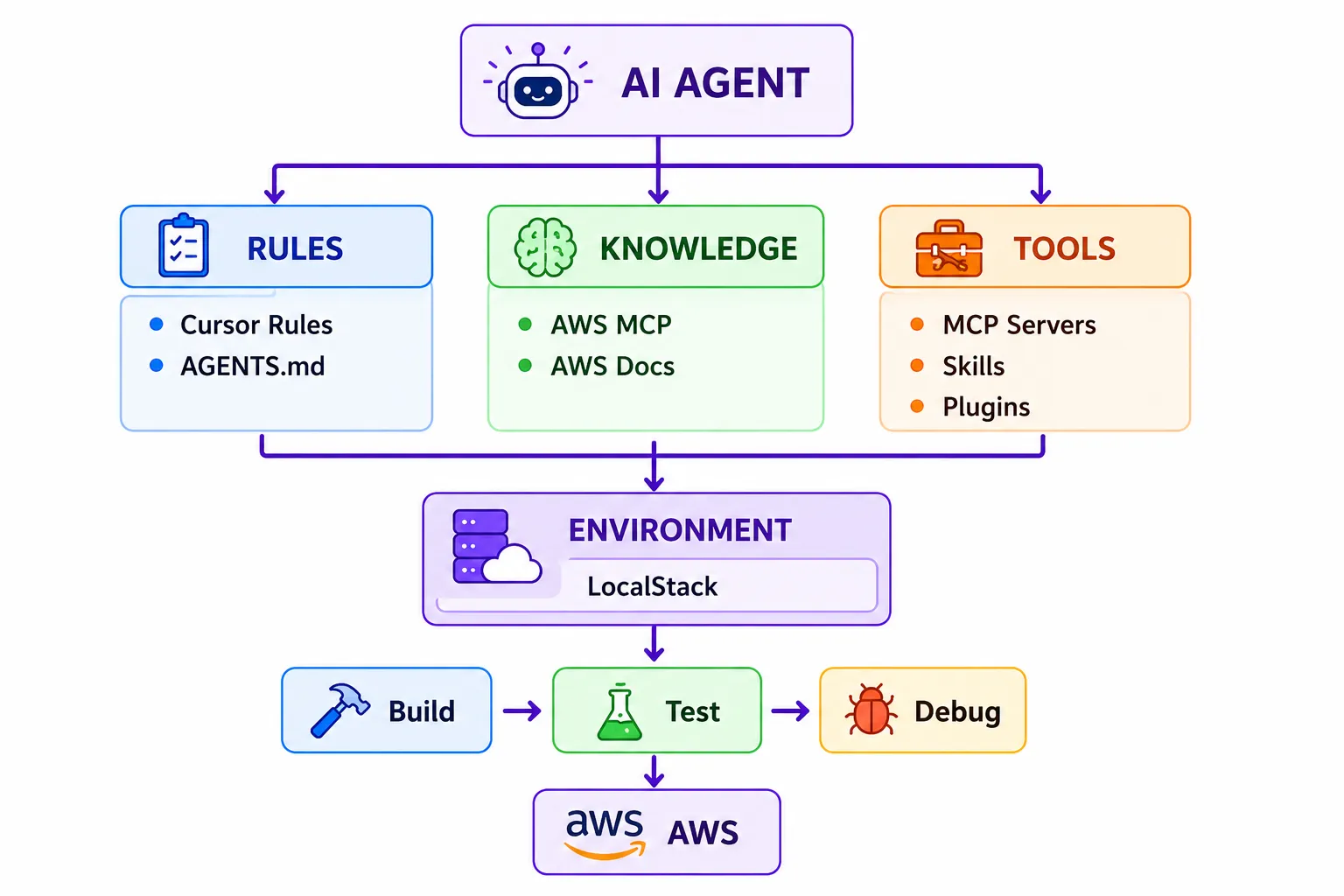
Each solves a different problem.
Rules tell the agent how we want it to behave. Knowledge helps it understand AWS and get current information. Tools let it actually do things. And the environment gives it somewhere to do those things.
Once those pieces work together, our prompt can get a whole lot smaller.
Layer 1: Use Cursor Rules to stop repeating yourself
Let’s start with something simple.
Most projects have conventions that developers are expected to follow. Maybe you use Terraform instead of CloudFormation. Maybe all infrastructure changes need tests. Maybe the team develops against LocalStack before deploying to AWS.
Humans eventually learn those conventions. Your AI agent needs them written down.
Cursor supports project rules that provide persistent instructions to its Agent. AWS’s Agent Toolkit takes a similar approach with rules files, recommending persistent instructions that tell agents things like when to use the AWS MCP Server, when to look for available skills, and when to prefer infrastructure as code.
For our project, we might create a rule that looks something like this:
---description: AWS development workflowalwaysApply: true---
# AWS Development
All AWS development follows a local-first workflow.
## Infrastructure
- Use Terraform for infrastructure.- Develop and test AWS resources against LocalStack first.- Do not deploy infrastructure to AWS without explicit approval.
## Testing
After modifying application or infrastructure code, deploy toLocalStack, verify the expected resources exist, and run theintegration tests. Do not consider the task complete until they pass.
## AWS commands
Use LocalStack-compatible tooling when working locally.
Never use production AWS credentials unless explicitly instructed.
Nothing particularly magical happened here. That’s the point. We took information that would normally live in our heads, a README, Slack, or the same prompt we’ve typed 47 times, and turned it into part of the agent’s environment.
Now instead of saying:
Build an orders API using Terraform, make sure you use LocalStack, don’t deploy it to AWS, run the tests…
We can eventually get much closer to:
Build the orders API.
That’s the goal.
Layer 2: Give the agent actual AWS knowledge with MCP
Rules can tell our agent how we work, but they don’t magically make everything it knows about AWS correct or current.
Enter MCP.
The Model Context Protocol gives AI applications a standardized way to connect to external tools and data sources.
AWS now provides a managed AWS MCP Server as part of the Agent Toolkit for AWS. It can give compatible agents access to current AWS documentation and service information, and, once authenticated, it can execute AWS API calls, run scripts, and use curated AWS skills.
That’s a meaningful difference.
Without that connection, our workflow can look something like:
Developer ↓Agent ↓"I think this is how AWS works."With AWS MCP:
Developer ↓Agent ↓"Let me check how AWS actually works." ↓AWSIf you’re using Claude Code, AWS has made the setup pretty simple through its aws-core plugin:
/plugin install aws-core@claude-plugins-official/reload-pluginsThe plugin bundles the AWS MCP Server configuration with AWS’s default agent skills. There’s also now an AWS CLI setup flow:
aws configure agent-toolkitThe CLI can detect supported coding agents, including Cursor and Claude Code, install the default AWS skills, and configure the MCP Server connection. So now our agent has rules about our project and access to knowledge about AWS. But knowing things and doing things are two very different capabilities.
Layer 3: Skills and plugins turn instructions into workflows
This is the part I find especially interesting.
A prompt describes what we want right now. A rule establishes persistent behavior. A skill encodes how to perform a repeatable task.
AWS describes its agent skills as packages of instructions, scripts, and reference material that agents can load when they’re relevant to a task. Plugins package those skills together with MCP configuration so developers don’t have to wire everything together individually.
Think about how often we give coding agents instructions like:
Start the environment.
Deploy the infrastructure.
Run the tests.
Check the logs if something fails.
Fix the problem.
Redeploy it.
Run everything again.
That’s not really a prompt anymore. That’s a process. And processes are exactly the kind of thing we should stop manually explaining every time. For example, imagine an AWS development skill that effectively tells the agent:
When validating an AWS application:
- Verify LocalStack is running.
- Deploy the infrastructure locally.
- Confirm that the expected resources exist.
- Run the application’s integration tests.
- Inspect logs for failures.
- Diagnose the failure.
- Modify the application or infrastructure.
- Redeploy.
- Run the complete test suite again.
- Report the final state.
Now we’re starting to move away from prompt engineering and toward something that looks a lot more like workflow engineering.
Layer 4: Give the agent somewhere to experiment
Now we get to the slightly spicy part.
Once an agent has rules, AWS knowledge, skills, and tools, it can do quite a bit. That includes making AWS API calls.
AWS uses your existing IAM roles and policies to control what an agent connected through the AWS MCP Server can access, and AWS explicitly recommends restricting the agent to the minimum permissions required for its task. API calls are also logged through CloudTrail.
Absolutely do that.
But there’s another option for the development part of the workflow: don’t start in AWS. Start locally.
LocalStack gives AI coding assistants an AWS-compatible environment where they can create infrastructure, deploy applications, inspect logs, query resources, and test changes before touching a real cloud account.
Setting up the LocalStack MCP Server
That environment gets a lot more useful once the agent can drive it directly. The LocalStack MCP Server connects any MCP-compatible client (Claude Code, Cursor, VS Code, and others) to your LocalStack instance, so the agent can manage the whole local cloud lifecycle through natural language.
Before you wire it up, make sure you have:
- Node.js v22+, so your client can run the server via
npx. - Docker, to run the LocalStack container.
- A LocalStack Auth Token, set as
LOCALSTACK_AUTH_TOKEN. Every MCP tool requires it, and you can grab yours from the LocalStack Web App. - Optionally,
tflocal,cdklocal, orsamlocalif you want the agent to deploy infrastructure as code.
The fastest path is the interactive wizard, which detects your installed clients and writes the configuration for you:
npx -y @localstack/localstack-mcp-server initIf you’d rather configure it by hand, add the server to your client’s MCP config. For Claude Code and Cursor, that’s an mcpServers block:
{ "mcpServers": { "localstack-mcp-server": { "command": "npx", "args": ["-y", "@localstack/localstack-mcp-server"], "env": { "LOCALSTACK_AUTH_TOKEN": "<YOUR_TOKEN>" } } }}Restart your client, and the agent gains a set of tools for driving LocalStack directly: starting and stopping the container, deploying CDK, Terraform, SAM, or CloudFormation projects, running awslocal AWS CLI commands, analyzing logs, injecting chaos faults, and saving or restoring state with Cloud Pods.
By default the server talks to LocalStack at http://localhost:4566. If yours runs somewhere else, set LOCALSTACK_HOSTNAME and LOCALSTACK_PORT in the same env block.
Why local-first matters even more for agents
A developer might deploy something, test it, stare at the error for five minutes, question their career choices, Google something, fix it, and deploy again. An agent doesn’t need the existential crisis portion of that workflow. It can iterate very quickly and confidently – that’s its superpower – but sometimes it can move too fast and be overconfident.
That’s exactly why we probably don’t want every single iteration creating and changing real AWS resources.
In our previous experiment with AWS’s official MCP servers, we pointed the AWS tooling at LocalStack and let Claude build a serverless webhook application, validate its CloudFormation, deploy it, test it, and eventually attack its own implementation.
The interesting part wasn’t that the agent successfully deployed the application. It was what happened when things didn’t work.
The agent generated 30 adversarial tests. Nine initially produced unexpected results. One exposed a bug that could cause a valid SQS message in the same batch as an invalid message to eventually be dropped. The agent inspected the Lambda logs, identified the problem, changed the handler, redeployed the application, and reran the tests. All 30 then produced the expected result.
That’s the workflow we want to enable.
Let’s build an agentic AWS application
Let’s put all of this together.
We’ll give our agent a fairly normal serverless architecture:
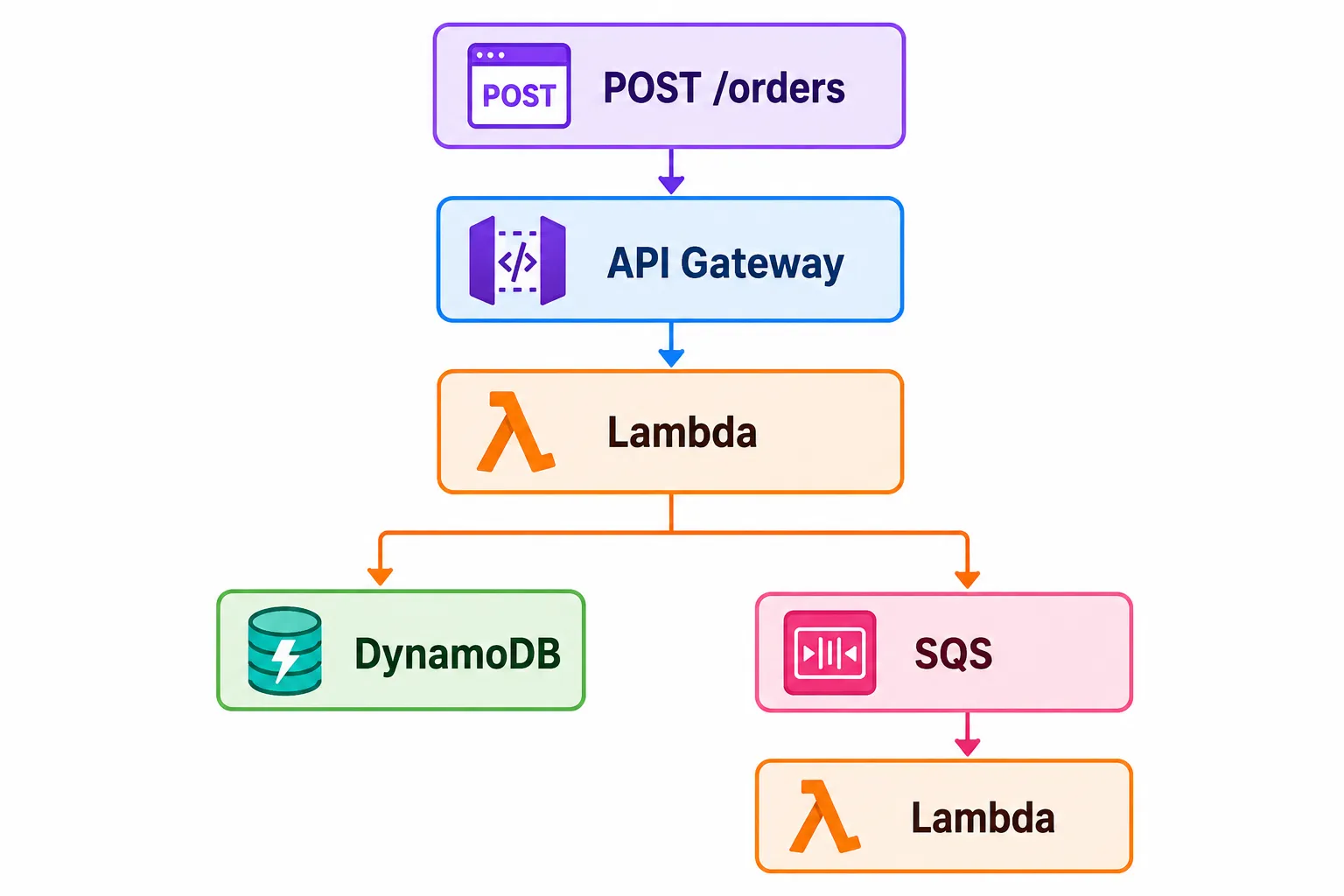
The API accepts an order. The first Lambda validates it, stores the order in DynamoDB, and sends a message to SQS. A second Lambda processes the order asynchronously.
Nothing groundbreaking. What is different is the instruction we give our agent.
Build an order processing API using AWS.
Orders should be persisted and asynchronously processed.
Make sure the application works before you’re done.
That’s it. Notice what’s missing?
We didn’t tell it to use LocalStack. We didn’t remind it to run tests. We didn’t explain how to debug failures. We didn’t tell it not to deploy to AWS.
Those aren’t requirements for this particular task anymore. They’re part of the development system.
Our rules establish that AWS development happens locally first. Our AWS tooling gives the agent access to current AWS information. Our skills define the repeatable development and testing process. And LocalStack gives the agent somewhere to actually execute it.
Now let the agent cook
This is where the workflow becomes much more interesting than code generation.
The agent can determine the infrastructure it needs, generate the IaC, and deploy it into LocalStack. Then it can query the environment and confirm that the expected resources actually exist.
API Gateway ✓Lambda ✓DynamoDB ✓SQS ✓Worker Lambda ✓Then it can invoke the API. If the request succeeds, great. If it doesn’t, the task isn’t finished. The agent can inspect the application logs, identify the failure, change the implementation, redeploy, and test again.
And because all of this is happening against LocalStack, we can let the agent be aggressive about iteration.
Break it. Inspect it. Fix it. Try again.
No awkward conversation tomorrow about why our AI assistant created 37 mystery resources in us-east-1.
AWS MCP and LocalStack MCP aren’t the same thing
This distinction is worth making because it’s easy to look at two things with “MCP” in the name and assume we’re choosing between them.
We’re not. They solve different problems.
The AWS MCP Server gives an agent AWS-specific knowledge and authenticated capabilities. The LocalStack MCP Server connects the agent to the local AWS environment itself: the tools we set up earlier for starting the container, deploying infrastructure, running AWS CLI commands, and inspecting what’s actually running.
A useful mental model is:
AWS MCP   │   └── "How does AWS work?"
Rules / Skills   │   └── "How should I work?"
LocalStack MCP   │   └── "Let me actually do it."
LocalStack   │   └── "Here's somewhere to do it."
Put them together and the agent has context, instructions, capabilities, and an environment. That’s a much more useful system than simply handing an LLM AWS credentials and wishing it the best.
Prompt vs. Rules vs. Skills vs. MCP
There’s a lot of terminology flying around right now, so here’s the cheat sheet.
| Tool | What it does | Example |
|---|---|---|
| Prompt | Defines the current task | “Build an orders API.” |
| Cursor Rules / rules files | Defines persistent project behavior | “Always develop against LocalStack first.” |
| Claude/AWS plugins | Packages MCP configuration and skills | Install an AWS development toolset |
| Agent skills | Encodes repeatable processes and domain guidance | Deploy and validate a serverless app |
| AWS MCP Server | Gives agents AWS knowledge and authenticated capabilities | Search AWS docs or perform an AWS operation |
| LocalStack MCP Server | Gives agents tools for controlling and inspecting their local cloud | Deploy, query resources, inspect logs |
| LocalStack | Provides the AWS-compatible development environment | Lambda, SQS, DynamoDB, API Gateway |
The important part isn’t picking one. It’s understanding how they fit together.
The AWS development loop is changing
We’ve spent the last few years talking about how AI can help developers write code faster. That’s already becoming the boring part.
The more interesting question is what happens when the AI can participate in the rest of the software development lifecycle. Not just Developer → AI → Code, but:
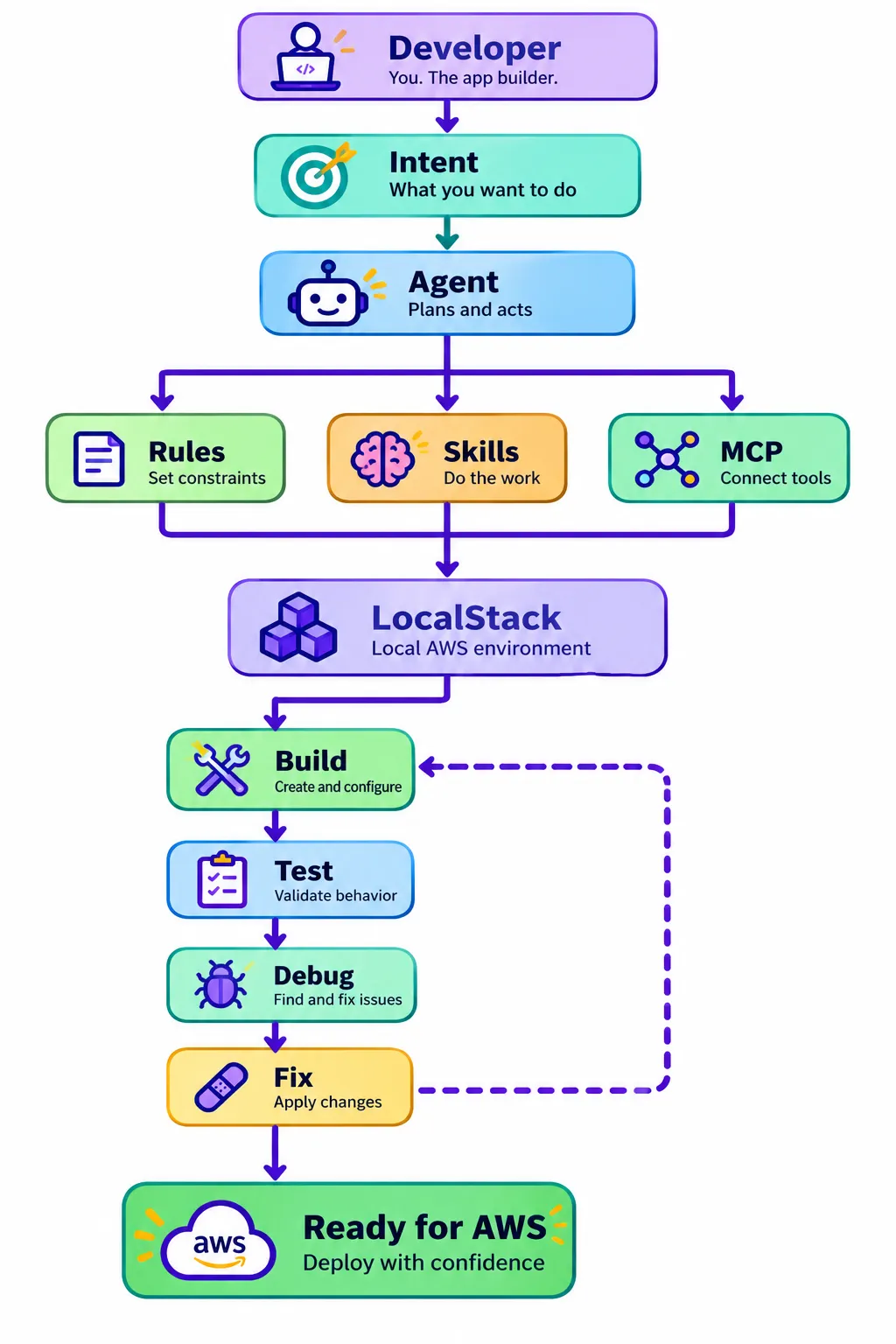
The developer’s job doesn’t disappear in that model. It changes.
We’re defining intent. We’re defining architecture. We’re defining constraints. We’re deciding what the agent is allowed to touch. And we’re reviewing what ultimately leaves the local environment. The agent handles more of the mechanical loop in between.
Stop writing bigger prompts
The interesting part of AI-powered AWS development isn’t that Claude or Cursor can write a Lambda function. We’ve been generating code for a while. What’s changing is everything we’re putting around the model.
Rules give the agent boundaries. Skills give it repeatable processes. MCP gives it knowledge and tools. LocalStack gives it an AWS environment where it can actually use those capabilities without making every experiment somebody’s cloud bill.
That’s the shift. We’re moving from:
Write this AWS code for me.
to:
Build this AWS application and prove that it works.
And if we’re going to give agents that much autonomy, giving them their own cloud playground seems like a pretty good place to start.