There has been increasing chatter about AT Protocol (aka ATproto) recently. Perhaps you’ve wondered what the fuss is about. Many developers are at least aware of ATproto’s association with the social media site Bluesky and that it’s some sort of open standard. However, unless you’ve really spent time digging into it, that’s likely the extent of your knowledge.
That was me until recently. I was personally fascinated by the idea of an open standard for the social web, but I mistakenly thought it would have little practical impact on me beyond (maybe) implementing Bluesky as an auth/login option.
The truth is, AT Protocol is much more than just Bluesky, and it was purpose-built to accommodate countless use cases beyond short-form social media. In this post, we’ll explore what AT Protocol is, why you should care, and how to implement a basic workflow to consume the AT Protocol firehose within AWS by building and testing it on LocalStack.
What Is AT Protocol?
AT Protocol was originally created by the team at Bluesky, which explains the close association those of us who are aware of it have between the two. As Paul Frazee explains, the original goal was to create a protocol that Twitter could adopt – something that could handle the scale of Twitter in 2022, when the work on what became AT Protocol began.
But the team had aspirations that were bigger than just the Twitter use-case. Thus, AT Protocol was ultimately built to support a wide range of data related to the social internet, not just Twitter clones like Bluesky. For instance, here are just a few non-Bluesky apps built on ATproto:
- Looking to host your blog or newsletter? Try Leaflet.
- Or how about hosting your open source projects and code? Try Tangled.
- Maybe an algorithm-free replacement for TikTok? Look into Spark.
The point is that ATproto supports a ton of potential use cases. The network of sites that all run on ATproto is generally referred to as the Atmosphere.
Why Should You Care?
If you’re building applications that contain social aspects, it’s worth considering ATproto as a core part of your project. There are two ways you can utilize ATproto: putting your social data into ATproto or just consuming public ATproto data.
ATproto was built around data sovereignty in the social web. It’s designed to make it easy for users to choose to move their accounts and data to a new provider. This puts the onus on the application to provide a compelling experience to retain the user, as they can freely move to another alternative built on ATproto (or export their data and close their account). This benefit works both ways, though, meaning the freedom to leave is also a draw to join and, assuming you have a better offering than your competitor, they could move to you without losing their data. It’s important to note, though, that when considering AT Protocol, any records on the public firehose are openly readable, which means consuming them doesn’t require OAuth or per-user consent (although a recent public preview added private spaces).
Consuming ATproto data obviously takes a much smaller commitment. As mentioned, the records that appear on the public firehose are openly readable. Perhaps you want to pull social posts from sites like Bluesky, Blacksky, and others. Or maybe you want to consume events from atmo.rsvp or OpenMeet. There are so many interesting and useful streams that may be relevant to your use case. Unfortunately, I am not aware of any single source of truth for applications built with ATproto, but there is definitely a broadening ecosystem developing that you can tap into.
It’s worth noting that this post will focus on consuming data from ATproto.
The Demo App
To make all of this concrete, I built a small demo that ingests an event stream into AWS and fans it out to a handful of independent consumers. The goal was to build something you could point at any ATproto stream (or really any similar open, continuous, community-run event stream) and reuse almost unchanged.
You can find the full code of this demo app on GitHub.
Before we dive into code, though, we should cover some terminology. Every ATproto account is connected to a personal data server (PDS) that contains the account’s repository, identified by a DID (decentralized identifier). When something happens in that repo, whether it’s a post, a comment, etc., that change is recorded as a commit.
A commit is a signed revision to the repo describing what changed. Each commit carries one or more record operations — a create, update, or delete — and every record belongs to a collection, which is basically its record type (for example, app.bsky.feed.post). The firehose is the continuous, real-time stream of commits a relay service observes across the network.
Bluesky runs a service called Jetstream that exposes this firehose as JSON over a WebSocket, instead of the protocol’s native CBOR-encoded sync events (which are much more painful to consume than Jetstream’s JSON). Jetstream v2 wraps each event in a typed JSON envelope; a commit’s collection, operation, and record are in the envelope’s payload, alongside a monotonic sequence number. This is what the demo consumes. If you’ve ever consumed a Kinesis stream or subscribed to an SNS topic, the firehose is essentially the same concept: an unbounded stream of events arriving at a pace we don’t control.
The fact that we don’t control the pace presents the primary design problem. Whatever sits at the edge of your AWS account has to handle a stream where activity may go quiet for minutes or spike hard unpredictably. We need to be able to consume these events without dropping any.
As you’ll see, we handle this in two ways depending on which suits your use case, but both have the same shape:
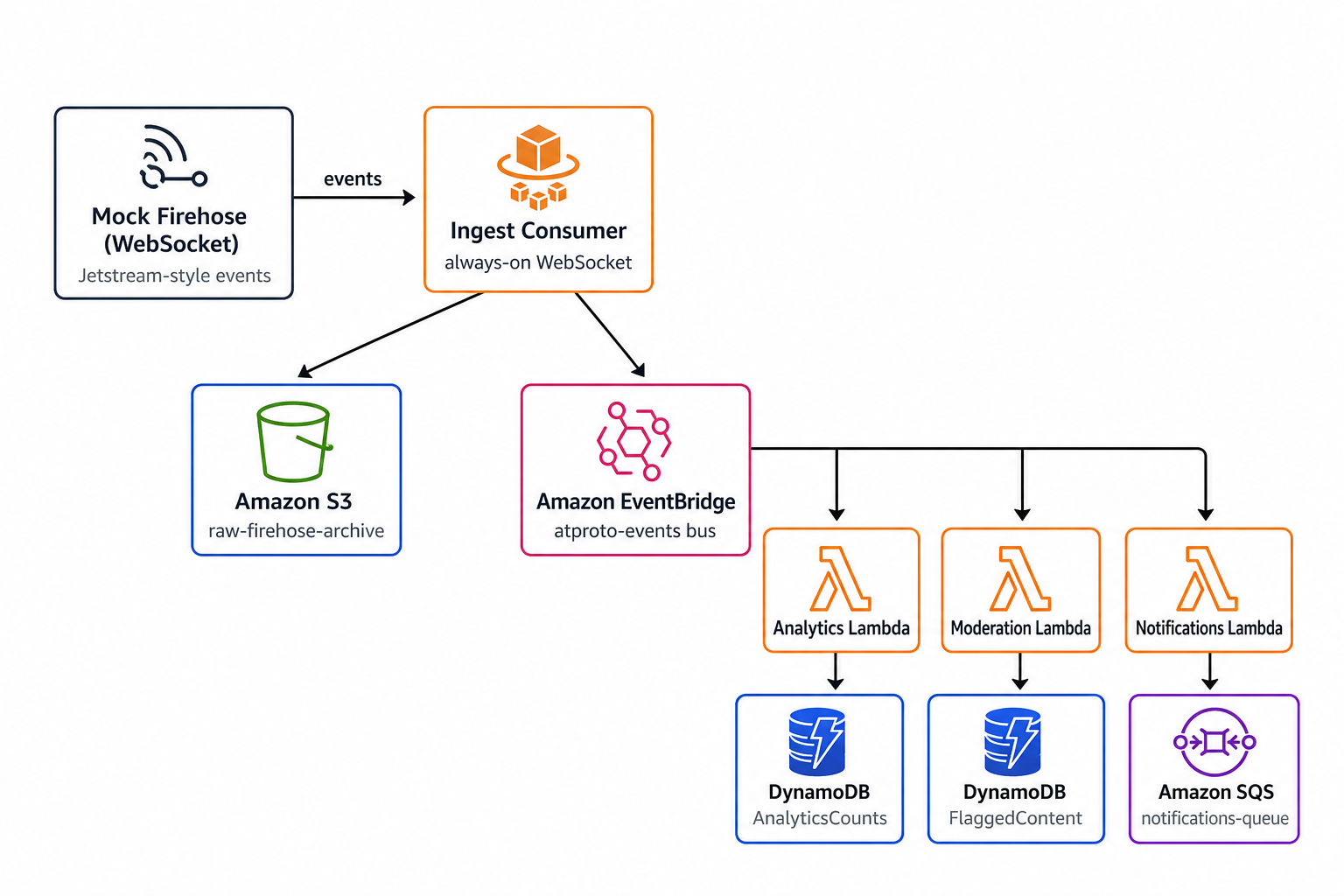
- Whatever’s listening to the firehose has two jobs: publish a normalized copy to an Amazon EventBridge bus and maintain a raw S3 archive. The poller archives its drained batch before publishing it. The Fargate consumer buffers S3 writes and can publish to EventBridge before an archive flush completes.
- Three independent, single-purpose Lambdas subscribe to that bus: analytics counts events by type and source event hour, moderation flags comments matching a keyword list, and notifications alerts on new subscribers to a watchlist.
The normalized event each Lambda receives looks like this:
export interface AtprotoEventDetail {  did: string; // repo owner — the user whose account emitted this commit  cursor: number; // Jetstream v2's monotonic sequence number  time: string; // event timestamp in RFC 3339 format  collection: string; // record type, e.g. "app.bsky.feed.post"  operation: string; // "create" | "delete" | "update"  record: any; // the actual payload; shape depends on collection}
// Wrapper EventBridge adds around every published event (what Lambdas receive).export interface AtprotoEvent {  source: string; // always "atproto.ingest" in this demo  'detail-type': string; // e.g. "post.created", "follow.created"  detail: AtprotoEventDetail;}
As soon as a commit crosses into EventBridge, it’s just an event with a detail-type and a detail payload, meaning that it’s the same design you’d create for any event-driven system, ATproto or not.
The fan-out itself is plain EventBridge content filtering, which allows the consumers to be independent of each other and of whatever’s doing the ingesting. It also includes two failure stages: EventBridge needs a target DLQ for when it fails to hand an event to Lambda, while a Lambda that accepts the asynchronous invocation but later times out or throws an error needs its own failure destination:
const targetDeliveryFailures = new sqs.Queue(this, 'TargetDeliveryFailures', {  retentionPeriod: Duration.days(14),});const analyticsProcessingFailures = new sqs.Queue(this, 'AnalyticsProcessingFailures', {  retentionPeriod: Duration.days(14),});const moderationProcessingFailures = new sqs.Queue(this, 'ModerationProcessingFailures', {  retentionPeriod: Duration.days(14),});const notificationsProcessingFailures = new sqs.Queue(this, 'NotificationsProcessingFailures', {  retentionPeriod: Duration.days(14),});
function downstreamTarget(handler: lambda.IFunction, processingFailures: sqs.IQueue) {  handler.configureAsyncInvoke({    onFailure: new lambdaDestinations.SqsDestination(processingFailures),  });  return new targets.LambdaFunction(handler, {    deadLetterQueue: targetDeliveryFailures,  });}
const analyticsTarget = downstreamTarget(analyticsFn, analyticsProcessingFailures);const moderationTarget = downstreamTarget(moderationFn, moderationProcessingFailures);const notificationsTarget = downstreamTarget(  notificationsFn,  notificationsProcessingFailures,);
// Rule 1: all events → analyticsnew events.Rule(this, 'AnalyticsRule', {  eventBus,  eventPattern: { source: ['atproto.ingest'] },  targets: [analyticsTarget],});
// Rule 2: comment.created + keyword in plaintext → moderationMODERATION_KEYWORDS.forEach((keyword, i) => {  new events.Rule(this, `ModerationRule${i}`, {    eventBus,    eventPattern: {      source: ['atproto.ingest'],      detailType: ['comment.created'],      detail: {        record: { plaintext: [{ wildcard: `*${keyword}*` }] },      },    },    targets: [moderationTarget],  });});
// Rule 3: subscription.created + watched publication → notificationsnew events.Rule(this, 'NotificationsRule', {  eventBus,  eventPattern: {    source: ['atproto.ingest'],    detailType: ['subscription.created'],    detail: { record: { publication: NOTIFICATION_WATCHLIST_PUBLICATIONS } },  },  targets: [notificationsTarget],});
There is one rule per keyword because combining several *keyword* patterns can exceed EventBridge’s wildcard-pattern complexity limit. That means a comment containing more than one keyword can invoke the same Lambda more than once. EventBridge targets are also delivered at least once, so the moderation Lambda uses the stable Jetstream cursor as its DynamoDB key rather than generating a new ID. Multiple matching rules or a retry then overwrite the same flag instead of creating duplicates:
await ddb.send(new PutCommand({ TableName: TABLE_NAME, Item: { id: String(event.detail.cursor), did: event.detail.did, plaintext: event.detail.record.plaintext, flaggedAt: new Date().toISOString(), },}));Because all of the pieces are loosely coupled, meaning none of them knows about the others, you could, for instance, delete the moderation Lambda and its rule entirely, and neither the ingest side nor the other two consumers would notice.
Some Small Demo Caveats
There are a couple of notes worth calling out before diving into the two ingestion options.
First, to simplify running the demo locally, events come from a mock Jetstream server rather than the live ATproto network. The mock replays a canned set of sample events over a plain WebSocket and contains an endpoint to temporarily burst the emit rate so that you can watch the pipeline handle a spike.
Second, when the demo points to the real network, it intentionally filters to the Leaflet collection rather than the full app.bsky.* firehose. The unfiltered Bluesky firehose includes every post, like, and follow across the entire network, which is far more volume than this demo’s infrastructure can handle. In addition, LocalStack running on your local laptop using Docker naturally cannot scale the same as AWS, so this scopes it to a sample bandwidth LocalStack’s Lambda/ECS emulation can comfortably keep up with. The Jetstream v2 subscribeEvents endpoint is filtered with kinds=commit and repeated collections query parameters, so this is a config change, not a code change.
Next, let’s look at how events get from the firehose onto that EventBridge bus. The demo has two interchangeable options.
Option 1: Real-time Data
The firehose is a WebSocket, meaning that it’s a long-lived connection that needs to stay open indefinitely and catch events as they happen. Lambda is built for short invocations, not for maintaining and monitoring an open socket for hours, so this option runs the ingest logic as an always-on ECS Fargate task instead.
Jetstream v2 sends a typed envelope. The helper below accepts only commit messages and extracts the fields this pipeline wants. The kinds=commit URL filter normally means no other message types arrive.
type JetstreamCommit = {  seq: number;  did: string;  time: string;  operation: string;  collection: string;  record?: unknown;};
function parseCommit(raw: unknown): JetstreamCommit | undefined {  if (typeof raw !== 'object' || raw === null) return;  const message = raw as { $type?: unknown; payload?: unknown };  if (message.$type !== 'message' || typeof message.payload !== 'object' || !message.payload) return;
  const payload = message.payload as Record<string, unknown>;  if (    payload.$type !== 'network.bsky.jetstream.subscribeEvents#commit' ||    typeof payload.seq !== 'number' ||    typeof payload.did !== 'string' ||    typeof payload.time !== 'string' ||    typeof payload.operation !== 'string' ||    typeof payload.collection !== 'string'  ) return;
  return {    seq: payload.seq,    did: payload.did,    time: payload.time,    operation: payload.operation,    collection: payload.collection,    record: payload.record,  };}
The core of it is a connect() function that opens the WebSocket, buffers incoming events, and reconnects automatically if the connection drops. Before connecting, it reads the last successfully published Jetstream sequence number from DynamoDB; because Jetstream replays that cursor inclusively, a restart is at-least-once rather than a gap in the stream:
const CURSOR_KEY = 'fargate';
async function getCursor(): Promise<number> {  const result = await ddb.send(    new GetCommand({ TableName: CURSOR_TABLE_NAME, Key: { id: CURSOR_KEY } }),  );  return result.Item?.cursor ?? 0;}
async function saveCursor(cursor: number) {  await ddb.send(new PutCommand({    TableName: CURSOR_TABLE_NAME,    Item: { id: CURSOR_KEY, cursor },  }));}
function start() {  void connect().catch((err) => {    console.error('failed to connect to firehose:', err);    setTimeout(start, 2000);  });}
async function connect() {  const cursor = await getCursor();  const wsUrl = new URL(FIREHOSE_URL);  if (cursor > 0) wsUrl.searchParams.set('cursor', String(cursor));  const ws = new WebSocket(wsUrl.toString());  let stopped = false;  let processing = Promise.resolve();
  ws.on('open', () => console.log(`connected to firehose at ${wsUrl}`));
  ws.on('message', (data) => {    if (stopped) return;    processing = processing.then(async () => {      const line = data.toString();      const commit = parseCommit(JSON.parse(line));      if (!commit) return; // ignore non-commit control messages
      buffer.push(line);      if (buffer.length >= FLUSH_MAX_EVENTS) flushToS3().catch(console.error);      await publishToEventBridge(commit);      await saveCursor(commit.seq); // advance only after a successful publish    }).catch((err) => {      stopped = true;      console.error('failed to process firehose event:', err);      ws.terminate();    });  });
  // Wait for queued processing, then resume from the durable cursor.  ws.on('close', () => {    console.log('firehose connection closed, reconnecting in 2s');    void processing.finally(() => setTimeout(start, 2000));  });  ws.on('error', (err) =>    console.error('firehose connection error:', err.message),  );}
start();
Every message gets pushed onto an in-memory buffer that flushes to S3 on whichever comes first, a count threshold or a timer. Writing one S3 object per event would be wasteful, so events get batched into NDJSON files partitioned by hour:
async function flushToS3() {  if (buffer.length === 0) return;  const batch = buffer;  buffer = [];
  const now = new Date();  const prefix = [    now.getUTCFullYear(),    String(now.getUTCMonth() + 1).padStart(2, '0'),    String(now.getUTCDate()).padStart(2, '0'),    String(now.getUTCHours()).padStart(2, '0'),  ].join('/');  const key = `raw/${prefix}/${crypto.randomUUID()}.ndjson`; // e.g. raw/2026/07/28/14/<uuid>.ndjson
  await s3.send(    new PutObjectCommand({      Bucket: S3_BUCKET,      Key: key,      Body: batch.join('\n') + '\n',      ContentType: 'application/x-ndjson',    }),  );}
The S3 flush is intentionally independent of the EventBridge publish. The consumer starts an archive flush when the buffer reaches its threshold, then publishes the event and advances its cursor after that publish succeeds. A crash or failed S3 upload can therefore leave the archive behind EventBridge. This keeps the example focused on the near-real-time path, but means the Fargate archive is not a transactional source of truth.
Separately, every event also gets normalized and published to EventBridge. The interesting bit here is the mapping from ATproto’s collection field to a plain EventBridge detail-type, which is what lets the fan-out rules you saw above filter on event kind without knowing anything about ATproto’s data model:
const DETAIL_TYPE_BY_COLLECTION: Record<string, string> = {  'pub.leaflet.document': 'document.created',  'pub.leaflet.comment': 'comment.created',  'pub.leaflet.graph.subscription': 'subscription.created',};
async function publishToEventBridge(commit: JetstreamCommit) {  const detailType = DETAIL_TYPE_BY_COLLECTION[commit.collection];  if (!detailType) return; // ignore collections this demo doesn't route
  const result = await eventBridge.send(    new PutEventsCommand({      Entries: [        {          EventBusName: EVENT_BUS_NAME,          Source: 'atproto.ingest',          DetailType: detailType,          Detail: JSON.stringify({            did: commit.did,            cursor: commit.seq,            time: commit.time,            collection: commit.collection,            operation: commit.operation,            record: commit.record,          }),        },      ],    }),  );
  // A request can succeed while EventBridge rejects its individual entry.  // Do not advance the Jetstream cursor in that case.  if (result.FailedEntryCount) {    const failedEntry = result.Entries?.find((entry) => entry.ErrorCode);    throw new Error(      `EventBridge rejected event: ${failedEntry?.ErrorCode ?? 'unknown error'}`,    );  }}
On the infrastructure side, this whole thing runs as a single Fargate task behind an ECS service with a minimal VPC, a cluster, and a task definition whose container image gets built and pushed via CDK:
const vpc = new ec2.Vpc(this, 'IngestVpc', { maxAzs: 1, natGateways: 0 });const cluster = new ecs.Cluster(this, 'IngestCluster', { vpc });const ingestCursor = new dynamodb.Table(this, 'IngestCursor', {  partitionKey: { name: 'id', type: dynamodb.AttributeType.STRING },  billingMode: dynamodb.BillingMode.PAY_PER_REQUEST,});
const taskDefinition = new ecs.FargateTaskDefinition(this, 'IngestTaskDef', {  cpu: 256,  memoryLimitMiB: 512,});
taskDefinition.addContainer('IngestContainer', {  image: ecs.ContainerImage.fromAsset(    path.join(__dirname, '../../ingest-consumer'),    { platform: ecrAssets.Platform.LINUX_AMD64 },  ),  environment: {    FIREHOSE_URL: process.env.FIREHOSE_URL ?? 'ws://host.docker.internal:8080',    S3_BUCKET: rawArchiveBucket.bucketName,    EVENT_BUS_NAME: eventBus.eventBusName,    CURSOR_TABLE_NAME: ingestCursor.tableName,  },});
rawArchiveBucket.grantWrite(taskDefinition.taskRole);eventBus.grantPutEventsTo(taskDefinition.taskRole);ingestCursor.grantReadWriteData(taskDefinition.taskRole);
new ecs.FargateService(this, 'IngestService', {  cluster,  taskDefinition,  desiredCount: 1,  assignPublicIp: true,  vpcSubnets: { subnetType: ec2.SubnetType.PUBLIC },});
The grantWrite, grantPutEventsTo, and grantReadWriteData calls attach the IAM permissions to write to the archive bucket, publish to the bus, and persist the ingest cursor.
That natGateways: 0 is worth digging into, because the task genuinely needs outbound internet. It needs to reach Jetstream’s WebSocket, pull its own image from ECR, and call the S3 and EventBridge APIs. What makes it work is the pairing of assignPublicIp with a public subnet, which routes that traffic out through the VPC’s internet gateway rather than a NAT gateway, at no hourly cost. (CDK would select public subnets by default here once assignPublicIp is set, but we’re being explicit for the sake of example.) The task’s security group allows no inbound traffic, so nothing can reach it from the outside. If your own compliance posture requires the task to sit in private subnets instead, budget for a NAT gateway.
This option offers near-real-time delivery of ATproto events (events land in EventBridge roughly a second after they hit the firehose), at the cost of a container running around the clock and the VPC it needs to live in.
Testing on LocalStack
Because the ingest consumer is just a container talking to a WebSocket and calling S3, EventBridge, and DynamoDB APIs, the entire pipeline runs on LocalStack without needing to touch a real AWS account.
Let’s first start LocalStack up using the new lstk CLI (you’ll be asked to open a browser to authenticate if this is your first time using lstk) and deploy the stack. CDK builds the ingest consumer’s Docker image and pushes it to LocalStack’s ECR emulation:
LOCALSTACK_ECR_ENDPOINT_STRATEGY=off lstkcd infra-fargate && lstk cdk bootstrap && lstk cdk deploy --require-approval neverECR_ENDPOINT_STRATEGY=off is there because of the image push. By default, LocalStack hands back a per-account ECR repository URI (<account>.dkr.ecr.<region>.localhost.localstack.cloud), and some DNS resolvers (macOS Docker Desktop in particular) won’t resolve that subdomain. Turning the strategy off yields a plain URI instead. Skip it and the deploy may fail at docker login with a timeout or a 404. The demo’s README covers this and a couple of other environment tweaks in more detail.
In a separate terminal, start the mock firehose.
cd firehose-mock && npm startGive Fargate a few seconds to pull the image and connect once it’s up, then run the following commands to watch events flow:
# ingest consumer logs: connecting, flushing NDJSON batches to S3lstk aws logs tail /atproto-demo/ingest-consumer --follow
# live per-type, per-hour counterslstk aws dynamodb scan --table-name AnalyticsCounts
# comments flagged for moderationlstk aws dynamodb scan --table-name FlaggedContent
As you’re following the logs, try triggering a spike and watching the fan-out keep up in real time:
curl -X POST http://localhost:8080/spikeThis collapses the mock firehose’s event delay for 15 seconds to simulate, for example, a news event suddenly going viral on Bluesky. Re-run the AnalyticsCounts scan before and after, and the counters jump noticeably. Every downstream consumer keeps pace without any of them being aware a spike even happened.
Option 2: Polling Updates
Instead of holding a connection open, this option wakes up on a schedule, connects just long enough to catch up on what’s new, and exits. It purposefully trades delivery latency for a much simpler footprint that has no VPC and no container running between polls, which should reduce costs.
To make this work, a cursor is stored in DynamoDB containing a single row indicating the Jetstream sequence number of the last event this Lambda successfully processed. The poller uses the same helper pattern as the Fargate consumer, with its own cursor key (poller) so the two deployment options remain independent:
async function getCursor(): Promise<number> {  const result = await ddb.send(    new GetCommand({ TableName: CURSOR_TABLE_NAME, Key: { id: CURSOR_KEY } }),  );  return result.Item?.cursor ?? 0; // no saved cursor = begin at the live tail}
async function saveCursor(cursor: number) {  await ddb.send(    new PutCommand({      TableName: CURSOR_TABLE_NAME,      Item: { id: CURSOR_KEY, cursor },    }),  );}
Jetstream v2’s /xrpc/network.bsky.jetstream.subscribeEvents endpoint supports resuming a subscription with a ?cursor=<seq> query parameter, replaying from that sequence number. A fresh poller has no cursor and therefore starts at the live tail. Each later invocation reads its saved cursor, reconnects with it, and pulls whatever the firehose sends back within a fixed window before deliberately closing the connection. Connection and protocol failures reject the invocation rather than being treated as an empty poll, keeping the cursor in place for retry:
function drainFirehose(cursor: number): Promise<JetstreamCommit[]> {  return new Promise((resolve, reject) => {    const collected: JetstreamCommit[] = [];    const wsUrl = new URL(FIREHOSE_URL);    if (cursor > 0) wsUrl.searchParams.set('cursor', String(cursor));    const ws = new WebSocket(wsUrl.toString(), { handshakeTimeout: 8_000 });
    let finished = false;    const finish = (reason: string) => {      if (finished) return;      finished = true;      clearTimeout(timer);      ws.removeAllListeners();      ws.terminate();      resolve(collected);    };
    const fail = (error: Error) => {      if (finished) return;      finished = true;      clearTimeout(timer);      ws.removeAllListeners();      ws.terminate();      reject(error);    };
    const timer = setTimeout(() => finish('timeout'), POLL_WINDOW_MS);    ws.on('message', (data) => {      try {        const commit = parseCommit(JSON.parse(data.toString()));        if (commit) collected.push(commit);      } catch (error) {        fail(new Error('firehose sent invalid JSON', { cause: error }));      }    });    ws.on('error', (err) => fail(new Error(`firehose connection error: ${err.message}`)));    ws.on('close', () =>      fail(new Error('firehose connection closed before the poll window ended')),    );  });}
Whatever comes back gets archived to S3 and published to EventBridge in one batch, and only then does the cursor advance. Saving the cursor last means that a poll that fails anywhere before that point gets retried against the same range next time, rather than silently skipping events. This means that ordering is at-least-once delivery, not exactly-once, but be aware that a failure occurring after some events have already been published will publish those events a second time on the retry, so anything downstream needs to tolerate duplicates (see Next Steps for Production). This strategy was chosen because I felt that losing events is a harder problem to recover from than the chance of duplicates.
PutEvents accepts at most 10 entries per call, so a batch has to be chunked before publishing:
const chunks: any[][] = [];for (let i = 0; i < events.length; i += 10)  chunks.push(events.slice(i, i + 10));
await Promise.all(  chunks.map((chunk) => {    const entries = chunk      .filter((commit) => DETAIL_TYPE_BY_COLLECTION[commit.collection])      .map((commit) => ({        EventBusName: EVENT_BUS_NAME,        Source: 'atproto.ingest',        DetailType: DETAIL_TYPE_BY_COLLECTION[commit.collection],        Detail: JSON.stringify({          /* same normalized shape as Option 1 */        }),      }));
    if (entries.length === 0) return Promise.resolve();
    return eventBridge.send(new PutEventsCommand({ Entries: entries }))      .then((result) => {        // A successful request can still reject individual entries.        if (result.FailedEntryCount) {          throw new Error('EventBridge rejected one or more entries');        }      });  }),);
Jetstream’s WebSocket replay window is finite (36 hours by default). If a saved sequence ages out, v2 rejects the subscription with CursorTooOld. This demo reports that failure and leaves the cursor unchanged rather than silently advancing past the gap. Recovering an older gap requires Jetstream’s archive-backfill APIs, which are outside the scope of this example.
Scheduling the polling is done via another EventBridge rule:
const POLL_INTERVAL = Duration.minutes(2);
new events.Rule(this, 'IngestPollerSchedule', {  schedule: events.Schedule.rate(POLL_INTERVAL),  targets: [new targets.LambdaFunction(pollerFn)],});
Everything downstream of EventBridge, including the bus, the three fan-out rules, and the analytics/moderation/notifications Lambdas, is identical to Option 1. The only difference in the stack is this scheduled Lambda and the extra IngestCursor DynamoDB table it depends on. Delivery latency depends on how often you set POLL_INTERVAL to run.
Testing on LocalStack
If you’ve already deployed the Fargate stack above, reset LocalStack first, since both stacks provision identically-named resources on purpose, so only one can exist at a time:
lstk resetNext, deploy the resources for the poller via CDK.
cd infra-poller && lstk cdk bootstrap && lstk cdk deploy --require-approval neverIf you aren’t already running the mock firehose, start it within another terminal:
cd ../firehose-mock && npm startThe schedule fires every couple of minutes, but you can instead invoke the Lambda directly to trigger a poll on demand and then grab the logs to see the result:
lstk aws lambda invoke --function-name atproto-ingest-poller /dev/stdoutlstk aws logs tail /aws/lambda/atproto-ingest-pollerThe same verification commands from Option 1 all work identically here. The spike demo looks different in this option, though. Try running a spike:
curl -X POST http://localhost:8080/spikeUnlike the Fargate path, nothing happens immediately because, after the first poll has saved a cursor, the burst of activity piles up in the mock firehose’s rolling history buffer. Invoke the poller again and it catches up in a single pass.
Next Steps for Production
There are some items you should be aware of and might want to improve should you choose to take this code into production.
- General
- The EventBridge wildcard filtering on
record.plaintextis set to match the Leaflet comment shape and would need to be modified depending on the specific collection you wish to consume. - The failure queues retain undelivered events, but this demo does not configure CloudWatch alarms or an automatic redrive workflow. These are necessary operational pieces if you plan to rely on this pipeline in production.
- The EventBridge wildcard filtering on
- Option 1
- Jetstream resumes from the saved sequence cursor inclusively, so a crash or disconnect can replay the last successfully processed event. Consumers should be idempotent, using a stable key such as the Jetstream cursor.
- Publishes to EventBridge happen immediately, but writes to S3 are batched. A crash mid-batch or failed S3 upload can leave the archive behind the bus.
DETAIL_TYPE_BY_COLLECTIONmaps collection →document.createdetc., regardless ofoperation. Deletes will still appear as*.created-style types unless you extend the mapping.
- Option 2
- Delivery is at-least-once, per the cursor ordering described earlier. Because the cursor only advances after a successful publish, any failure in between, such as a partial
PutEventsfailure, or the Lambda hitting its timeout mid-run, replays the whole range on the next poll and re-publishes whatever already got through. Make the consumers idempotent, keying off something stable likedidpluscursor. - The WebSocket cursor lookback is finite (36 hours by default). A new poller begins at the live tail, and an expired cursor needs an archive backfill rather than a normal WebSocket reconnect. This demo detects the failure but does not implement that backfill.
- Delivery is at-least-once, per the cursor ordering described earlier. Because the cursor only advances after a successful publish, any failure in between, such as a partial
Conclusion
ATproto offers a rapidly growing ecosystem of applications worth exploring, either by building upon ATproto for your social components or by tapping into the many streams of data collection within the Atmosphere.
Consuming data from ATproto on AWS is just a matter of figuring out how to take an external, continuous, unpredictable event stream you don’t control and turn it into something you can process reliably. The ATproto-specific pieces, such as the DIDs, commits, and collections, are just field names on this particular stream. The same pattern used here can apply just as well to any other event source that you don’t control the pace of.
Whether Fargate or a scheduled Lambda makes more sense for your use case comes down to how much delivery latency your use case can tolerate. If a couple of minutes of lag is fine, a scheduled poll is cheaper and has far less complexity to operate.
If you want to go further, the demo is structured so that pointing it at the real ATproto network is an environment variable change rather than a code change. Swap FIREHOSE_URL to point at Jetstream, filtered to whichever collections you care about, and the same code that processed mock events starts processing real ones.
I look forward to seeing what you build on top of the Atmosphere.