One modern CLI for running, managing, and automating LocalStack across local development and CI/CD workflows.
We’re introducing lstk, the recommended command-line experience for LocalStack.
lstk brings core LocalStack workflows into a single CLI, including environment management, sessions, state, and snapshots. Instead of installing and switching between a growing set of separate command-line tools, you get one installation, a consistent interface, and simpler authentication across local development and CI/CD workflows.
Starting September 8, 2026, lstk will become the focus of our command-line investment. The existing localstack CLI will continue to work, so there’s no forced migration at launch. Your existing scripts and pipelines can keep running as they do today.
For new workflows, and for teams looking to standardize how they work with LocalStack from the command line, we recommend starting with lstk.
Why we built lstk
The existing LocalStack CLI has supported a growing range of workflows over the years, from environment management and state operations to chaos engineering and more. But it was not originally designed to be the single command-line interface for everything LocalStack supports today.
As LocalStack adoption expanded across individual developers, platform teams, automated workflows, and enterprise environments, the command-line experience expanded with it. Over time, that meant different tools, dependencies, authentication methods, and setup paths for different workflows.
Depending on how they use LocalStack, teams may be managing some combination of:
- The existing
localstackCLI awslocalcdklocal- Python-based dependencies
- Manually configured authentication tokens
- Different setup instructions across environments
For platform and DevOps teams standardizing LocalStack across dozens or hundreds of developer machines, that fragmentation creates real operational overhead. Every additional tool introduces another installation to manage, another version to track, and another place for developer environments to become inconsistent.
lstk gives us a single foundation for simplifying that experience.
What lstk gives you
One CLI to install and standardize on
Instead of maintaining multiple LocalStack-specific tools and dependencies, teams can install lstk once and use it as the primary command-line interface for supported LocalStack workflows.
That means fewer installations to manage, fewer versions to track, and less tooling-related troubleshooting across development teams.
A more intuitive command experience
lstk is designed to make common LocalStack workflows easier to discover, understand, and use. It provides a more consistent command structure across workflows, including local environment management, sessions, state, and snapshots.
For example, getting started with LocalStack for AWS previously required installing Python, installing the localstack CLI and awslocal, configuring your auth token, starting LocalStack, and then using awslocal to interact with AWS services.
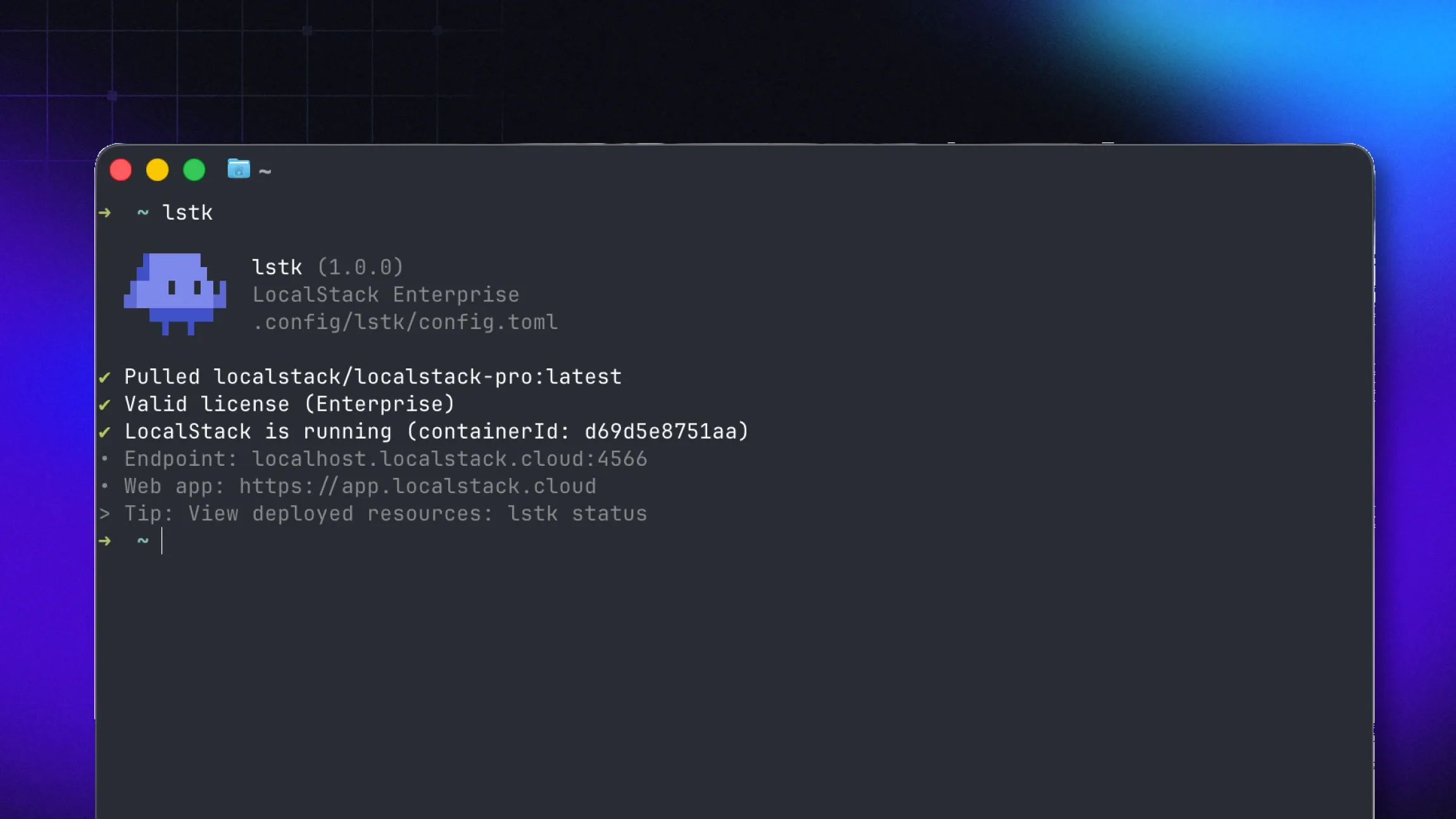
With lstk, the setup is simpler. After installing lstk with Homebrew or npm, you can start LocalStack with:
lstkAnd interact with AWS services using:
lstk awsSnapshot management is also consolidated into a single workflow. Previously, local state files were managed with state export and state import, while remote state files were managed separately with pod. With lstk, the snapshot command provides one place to manage state files, with an intuitive storage path and top-level save and load aliases for the most common operations.
Less authentication friction
lstk reduces the manual authentication setup required to get started with LocalStack.
For local development, lstk handles authentication through a browser-based login flow and securely stores your credentials for future sessions. Instead of finding, copying, and manually configuring an auth token before starting LocalStack, developers can authenticate as part of the lstk experience.
For CI/CD workflows, teams can provide a workspace-managed CI Auth Token through the LOCALSTACK_AUTH_TOKEN environment variable. This creates a clearer authentication path for both interactive development and automated workflows, making it easier for platform teams to document and standardize how developers and pipelines access LocalStack.
lstk is designed to reduce the amount of manual authentication setup required to use LocalStack.
For developers, that means less time spent configuring credentials before getting started. For platform teams, it creates a clearer authentication path to document and standardize across their organization.
A more consistent foundation for automation
lstk provides a consistent command-line experience across local development and automated workflows, including CI.
The setup follows the same simple model in CI: no Python dependencies, a straightforward npm installation, then add your CI token and run lstk. This helps teams use the same CLI concepts across developer environments and pipelines instead of maintaining separate tooling and instructions.
Configuration is also easier to understand and maintain. lstk manages configuration, including environment variables through TOML configuration files, giving teams a consistent place to define and manage settings across workflows.
One place for future investment
Moving forward, lstk will be the focus of our command-line investment.
Concentrating that work in one CLI gives us a stronger foundation for improving the LocalStack developer experience without continuing to add complexity across separate tools.
For teams, that means a clearer path forward: fewer LocalStack-specific tools to learn, manage, and standardize over time.
What happens to the existing CLI?
There’s no immediate change to the existing localstack CLI. Your current scripts, workflows, and pipelines will continue to work - you do not have to switch to lstk right away. We encourage you to begin transitioning when it makes sense for your team.
You also do not need to uninstall the existing localstack CLI to start using lstk. The two can be installed and used side by side without interfering with each other, making it easier to evaluate and adopt lstk gradually.
We expect the existing CLI to remain usable for the near future while teams transition. However, lstk will be the focus of our command-line investment going forward, so we recommend planning your transition rather than treating the existing CLI as the long-term standard.
A gradual path looks like this:
- Identify where your team currently uses the existing CLI and related tools.
- Install
lstkalongside your existing setup and validate a basic local workflow. - Map the commands your team uses today to their
lstkequivalents. - Test authentication, configuration, and state-management workflows.
- Validate
lstkin a CI pipeline before updating shared automation. - Update internal documentation and onboarding once your team is ready to standardize.
We’ll publish migration documentation and support resources to help with each step.
How to get started
Getting started with lstk takes about two minutes. You can install it alongside the existing localstack CLI, authenticate, and start using it without disrupting your current setup.
You don’t need to migrate everything at once. Start with the workflows that make sense for your team, validate your command mappings and configuration, and expand adoption as you’re ready to standardize on lstk.