
Introduction
Building containerized apps on AWS with services like ECS and Fargate often involves a cumbersome development loop. A standard workflow requires building a Docker image, pushing it to ECR, updating a task definition, and waiting for a deployment just to test one code change. This slow feedback cycle makes it difficult to iterate quickly and catch bugs.
LocalStack solves this by providing a high-fidelity AWS cloud emulator running on your local machine. It lets you deploy and test container workloads, including Fargate tasks with service integrations like SQS and DynamoDB, using the same IaC tools and AWS SDKs/APIs as production.
This tutorial will show you how to deploy and test a message-driven Fargate app locally with LocalStack. The sample app processes messages from an SQS queue and writes them to a DynamoDB table, giving you a fast end-to-end feedback loop without leaving your development environment.
How LocalStack works with Fargate
LocalStack provides the AWS API surface locally, letting you use tools like the AWS CDK and AWS CLI to provision and manage resources within a local container. For AWS container workloads, it emulates ECS APIs and the Fargate compute engine using Docker.
When you deploy a Fargate task, LocalStack’s ECS processes the request and runs the Docker container on your local Docker daemon (lstk mounts the Docker socket for you). ECS tasks join the same Docker network as LocalStack, and LocalStack injects AWS_ENDPOINT_URL (and LOCALSTACK_HOSTNAME) into the task. The application can then use a standard AWS SDK to call SQS, DynamoDB, and other emulated services, just as it would in the cloud.
This local-first workflow is enabled by lstk cdk and lstk aws, which route CDK and AWS CLI calls to the LocalStack container. You can use the same IaC to provision the full stack without a separate Docker Compose file or custom mocks, avoiding configuration drift and testing the app against emulated infrastructure before deploying to AWS.
Prerequisites
Step 1: Setup the project
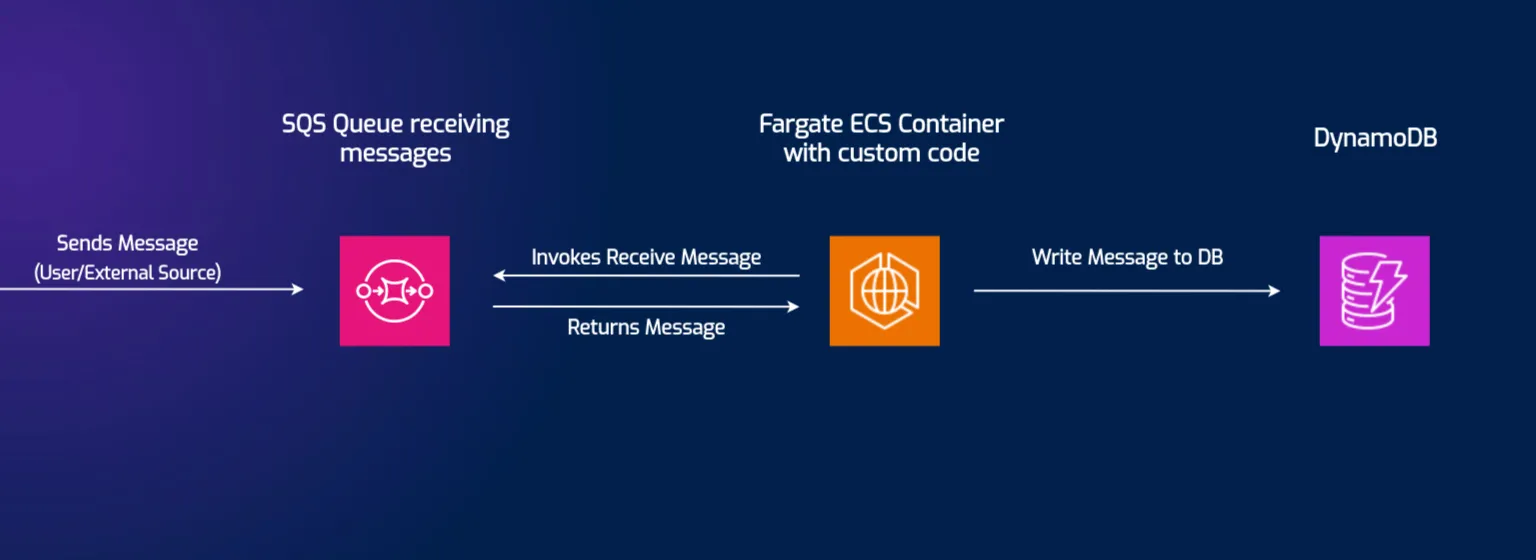
The sample app showcases a message-processing pattern. The architecture has three main components:
- SQS Queue for incoming messages.
- ECS on Fargate to run a containerized Go app that processes messages from the queue.
- DynamoDB to store the processed messages.
1.1: Clone the repository
To begin, clone the sample repository from GitHub and navigate into the project directory:
git clone https://github.com/localstack-samples/sample-cdk-sqs-fargate-dynamodb.gitcd sample-cdk-sqs-fargate-dynamodb1.2: Install CDK dependencies
Next, navigate to the cdk directory and install the Node.js dependencies:
cd cdknpm installThe Go worker is built from the Dockerfile at the repo root. CDK’s DockerImageAsset builds that image and publishes it to the local ECR repository during deploy, so you do not need a separate docker build step.
Step 2: Deploying the CDK stack on LocalStack
Next, we will deploy the entire application stack to our local environment using LocalStack.
2.1: Start LocalStack
Start LocalStack with your Auth Token. ECS/Fargate is a licensed feature, so a valid token is required:
# Ensure your Auth Token to use Pro features (like ECS)LOCALSTACK_AUTH_TOKEN=<YOUR_LOCALSTACK_AUTH_TOKEN> lstk --non-interactive startlstk waits until the emulator is ready, mounts the Docker socket, and prints the endpoint (localhost.localstack.cloud:4566).
2.2: Deploy the infrastructure
With LocalStack running, deploy the AWS resources using CDK. lstk cdk is a wrapper that directs CDK commands to LocalStack instead of AWS.
From the cdk directory:
lstk cdk bootstraplstk cdk deploy --require-approval neverCDK will build the Go container image, then provision the SQS queue, DynamoDB table, and the ECS/Fargate service inside LocalStack. After a minute, the deployment will complete.
Step 3: Testing the Application End-to-End
With the full stack running locally, we can now test the end-to-end workflow by sending a message and verifying it’s processed correctly.
3.1: Send a Message to SQS
Now, send a message to the SQS queue to trigger the app. The Fargate task is long-polling the queue and will pick up the message once it arrives.
lstk aws sqs send-message \ --queue-url http://sqs.us-east-1.localhost.localstack.cloud:4566/000000000000/sqs-fargate-queue \ --message-body '{"message": "hello from localstack"}'3.2: Verify the Message in DynamoDB
After sending the message, wait a few seconds for the Fargate container to process it. Then scan the DynamoDB table to confirm the message was saved.
lstk aws dynamodb scan --table-name sqs-fargate-ddb-tableThe output should show the item written by the container, confirming the entire workflow functioned correctly:
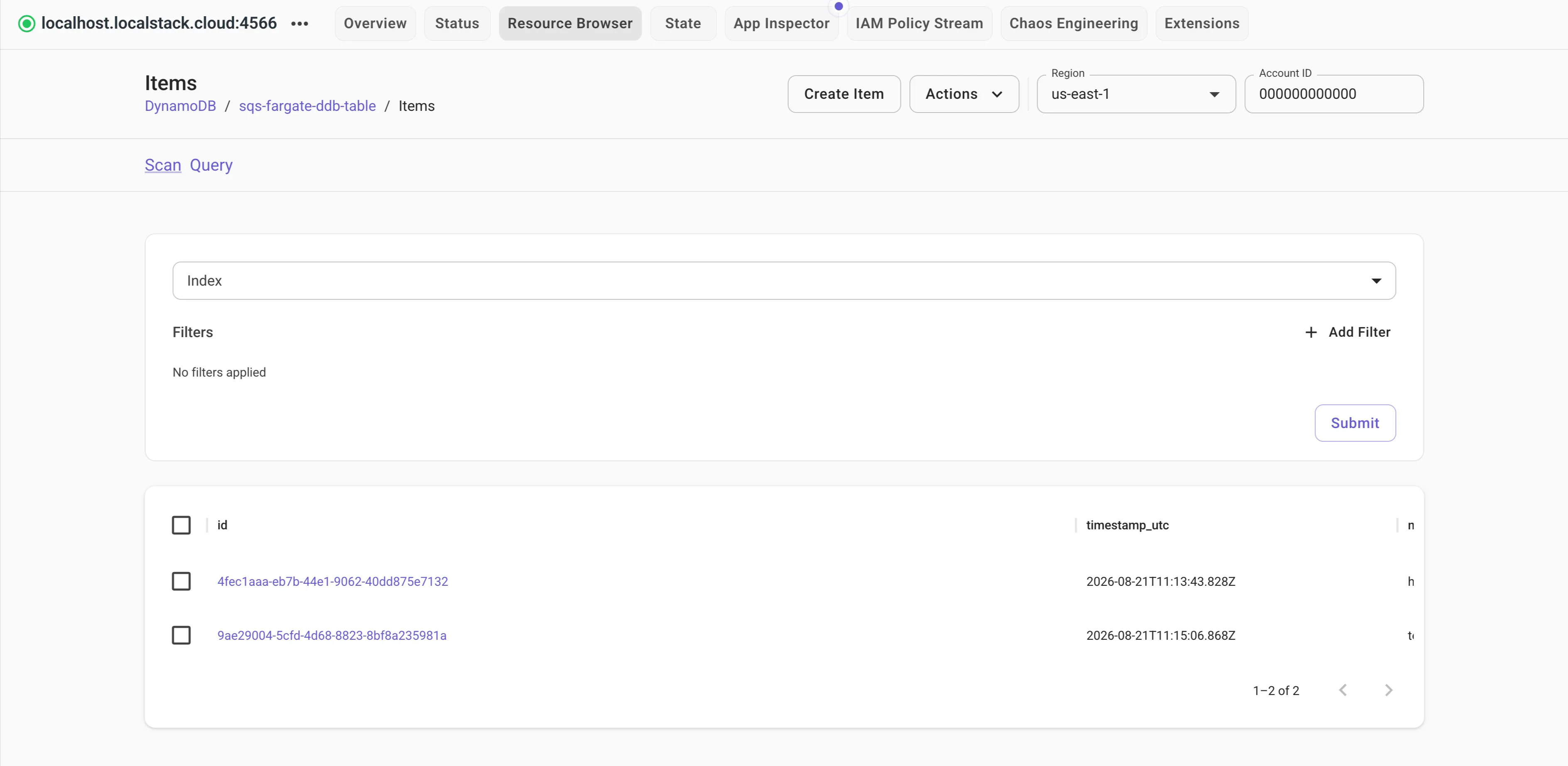
{ "Items": [ { "timestamp_utc": { "S": "2026-08-21T11:13:43.828Z" }, "message": { "S": "hello from localstack" }, "id": { "S": "4fec1aaa-eb7b-44e1-9062-40dd875e7132" } } ], "Count": 1, "ScannedCount": 1, "ConsumedCapacity": null}You can also use the LocalStack Web Application to query the items directly via the DynamoDB resource browser.
3.3: Automate the Integration Tests
Manually running lstk aws commands works for initial checks, but the real value is in automating the end-to-end workflow. By writing an integration test, you can validate the entire stack programmatically and make it repeatable in your CI/CD pipeline.
Here, we use Jest and the AWS SDK for JavaScript v3 to create a simple integration test in the cdk directory.
3.3.1: Install test dependencies
Install the necessary development dependencies to get started:
npm install --save-dev \ jest \ ts-jest \ @types/jest \ @aws-sdk/client-sqs \ @aws-sdk/client-dynamodb3.3.2: Create test configuration
Create a jest.config.js file in the cdk directory to configure Jest for handling TypeScript files.
module.exports = { preset: 'ts-jest', testEnvironment: 'node', testTimeout: 30000,};3.3.3: Create the Integration Test
Create a new test directory inside the cdk directory, and add a file named integration.test.ts.
import { SQSClient, SendMessageCommand } from "@aws-sdk/client-sqs";import { DynamoDBClient, ScanCommand } from "@aws-sdk/client-dynamodb";
// Test Configurationconst TEST_TIMEOUT = 20000;const POLL_INTERVAL = 2000;const SQS_QUEUE_URL = 'http://sqs.us-east-1.localhost.localstack.cloud:4566/000000000000/sqs-fargate-queue';const DYNAMODB_TABLE_NAME = 'sqs-fargate-ddb-table';
// AWS Clientsconst sqsClient = new SQSClient({  endpoint: 'http://localhost:4566',  region: 'us-east-1',  credentials: { accessKeyId: 'test', secretAccessKey: 'test' },});
const dynamoDbClient = new DynamoDBClient({  endpoint: 'http://localhost:4566',  region: 'us-east-1',  credentials: { accessKeyId: 'test', secretAccessKey: 'test' },});
const sleep = (ms: number) => new Promise(resolve => setTimeout(resolve, ms));
describe('SQS to Fargate to DynamoDB Integration Test', () => {
  it('should process an SQS message and store it correctly in DynamoDB', async () => {    // Create a message to send    const uniqueMessage = `test-message-${Date.now()}`;    const messageBody = JSON.stringify({ message: uniqueMessage });
    // Send the message to the SQS queue    await sqsClient.send(new SendMessageCommand({      QueueUrl: SQS_QUEUE_URL,      MessageBody: messageBody,    }));
    // Poll & Assert    let itemFound = false;    const startTime = Date.now();
    while (Date.now() - startTime < TEST_TIMEOUT) {      const scanResult = await dynamoDbClient.send(new ScanCommand({        TableName: DYNAMODB_TABLE_NAME,        FilterExpression: '#msg = :msg_val',        ExpressionAttributeNames: { '#msg': 'message' },        ExpressionAttributeValues: { ':msg_val': { S: uniqueMessage } },      }));
      if (scanResult.Items && scanResult.Items.length > 0) {        expect(scanResult.Items[0].message.S).toBe(uniqueMessage);        itemFound = true;        break;      }
      await sleep(POLL_INTERVAL);    }
    expect(itemFound).toBe(true);  });});
3.3.4: Run the Test
Finally, add a test script to your package.json in the cdk directory.
"scripts": { // ... other scripts "test": "jest"},Run the automated integration test from the cdk directory with a single command:
npm testJest runs the test by sending a unique message to the local SQS queue, polling the local DynamoDB table until the item appears, and checking that the content matches.
> cdk@0.1.0 test> jest
PASS test/integration.test.ts  SQS to Fargate to DynamoDB Integration Test    ✓ should process an SQS message and store it correctly in DynamoDB (201 ms)
Test Suites: 1 passed, 1 totalTests:       1 passed, 1 totalSnapshots:   0 totalTime:        2.302 sRan all test suites.
Conclusion
You have deployed and tested a multi-service, message-driven container application locally. By emulating AWS services like Fargate, SQS, and DynamoDB, LocalStack removes the slow cloud deployment cycle for development and testing.
This local-first approach offers key benefits:
- No AWS costs for development or CI/CD infrastructure.
- Development loop drops from minutes to seconds, enabling faster iteration.
- You use real AWS APIs and integrations, catching configuration or permission issues early.
- The same IaC (CDK) and code run locally and in the cloud, reducing “works on my machine” issues.
By integrating LocalStack into your workflow, you can build, test, and debug complex AWS container applications with greater speed and confidence.