
The agent shipped to prod. Nobody told it not to.
Picture this: you give an AI coding agent a task. Provision an S3 bucket, wire up a Lambda, write some data to DynamoDB. The agent does exactly what you asked. It generates the code, executes it, and moves on.
Against real AWS.
The bill shows up two days later. Or you catch it sooner, when a misconfigured IAM policy quietly opens a bucket to the public, or a runaway retry loop hammers a production table you forgot to restrict. The agent didn’t make a mistake. It had no reason to think it was doing anything wrong. Nobody put guardrails in place and gave it a sandbox to work in.
This is the moment a lot of engineering teams are walking into right now. AI coding agents and autonomous agents with tool use are getting genuinely capable, capable enough to provision infrastructure, call cloud services, and execute code that has real-world consequences. And most of the conversation about “safe AI development” is focused on the model layer, not the infrastructure layer.
That’s the gap this post is about.
Not all sandboxes are the same
When people talk about sandboxing AI systems, they usually mean one of a few different things. The terms get used interchangeably, but they’re solving different problems, and confusing them leads to coverage gaps that look like security until they aren’t.
Here’s a working taxonomy:
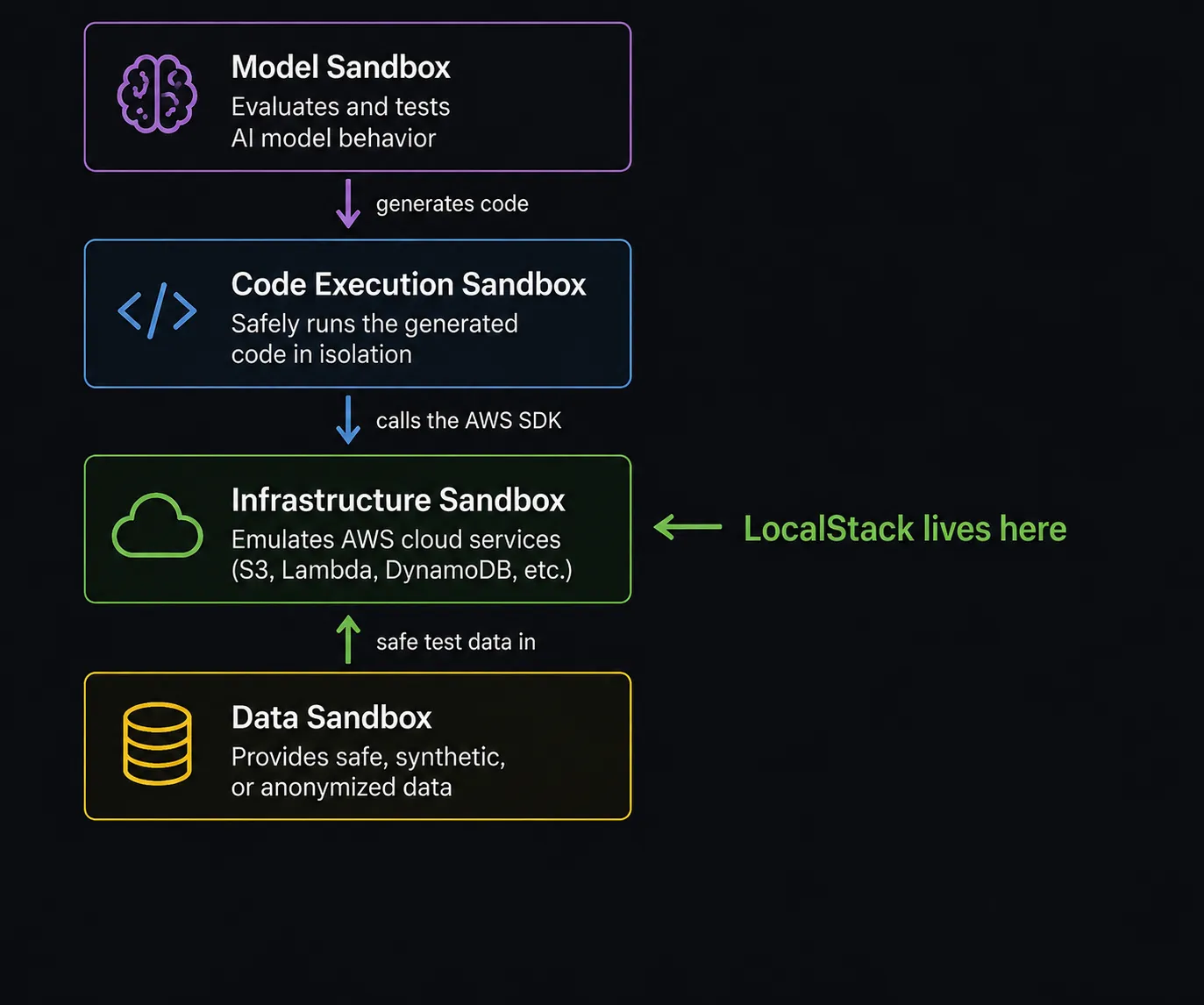
Four different layers, four different jobs. A gap in any one of them doesn’t show up until an agent hits it.
AI Code Execution Sandboxes
Tools like E2B, Modal, and Daytona fall into this category. They give AI agents an isolated runtime environment to execute generated code without it touching the host system. You get process isolation, resource limits, and a contained blast radius if the code does something unexpected.
These are genuinely useful, but they have a hard boundary. They sandbox the execution environment, not the services the code calls. If an agent running inside E2B generates code that calls the AWS SDK and you’ve got real credentials in scope, that code is calling real AWS. The sandbox doesn’t know or care.
Model Sandboxes
Tools like LangSmith, Langfuse, and PromptLayer sit here. They give you controlled environments for evaluating, testing, and iterating on model behavior: prompt versioning, output comparison, regression testing across model versions.
Valuable for LLM development, but this layer is about what the model says, not what happens when the code it generates gets run. These tools aren’t in the execution path at all.
Data Sandboxes
Synthetic data generators, anonymized dataset pipelines, tools like Faker, Mimesis, or Tonic.ai. The goal here is safe inputs, giving AI systems realistic data to work with during development without exposing real user records or production state.
Again, useful, but entirely separate from the question of what happens when the code executes and calls a cloud service.
Infrastructure / Cloud Sandboxes
This is the layer most teams are missing, and it’s the layer where LocalStack lives.
An infrastructure sandbox emulates the cloud services your code calls: S3, Lambda, DynamoDB, SQS, IAM, and more, all running locally without touching real AWS. When AI-generated code runs against LocalStack, it’s hitting a realistic, fully functional replica of the AWS surface. Buckets get created. Functions get invoked. Data gets written. Errors surface exactly as they would in a real environment.
None of it leaves your machine.
The coverage gap in plain language
A code execution sandbox stops the code from damaging your host. A cloud infrastructure sandbox stops the code from damaging your cloud. Most teams have the first one. Almost nobody has the second one, until something goes wrong.
What actually goes wrong without a cloud sandbox
The failure modes aren’t hypothetical. They’re predictable consequences of giving agents access to real cloud credentials without a safety layer in between.
Cost
AI agents don’t self-limit. They don’t see a bill accumulating. A coding agent tasked with “test this Lambda function” can invoke it hundreds of times in a loop without any awareness of what that costs. An autonomous agent retrying a failed S3 upload might spin up new buckets on each attempt. At scale, these aren’t edge cases. They’re the expected behavior of a system optimizing for task completion, not cost efficiency.
Lambda invocations and S3 buckets are the cheap version of this problem. Point the same agent at an RDS instance, an MSK cluster, an OpenSearch domain, or an EC2 fleet sized for “just testing,” and the same blind iteration turns into a bill that’s actually painful.
Security
AI-generated IAM policies are a specific category of risk. Models trained on the open internet have seen a lot of overly permissive IAM examples. They tend to reach for broad permissions when more specific ones would require more context. An agent generating and applying its own IAM policies against a real AWS account, without review and without a sandbox, is a meaningful attack surface. Misconfigured bucket policies, wildcard resource ARNs, publicly accessible endpoints: these are exactly the kinds of things agents produce when they’re optimizing for “make it work” rather than “make it secure.”
Data
This one is easy to overlook. An agent writing to a DynamoDB table, triggering an SQS queue, or invoking a Lambda that kicks off a downstream pipeline can corrupt real state in ways that are hard to detect and harder to reverse. If the agent is iterating, trying multiple approaches to get something right, that’s potentially dozens of writes to production data before anyone notices.
Isolation
This one shows up as the number of agents you’re running climbs. A single agent against a shared environment is a cost and security problem. A dozen agents against that same shared environment is also a collision problem: two agents racing to write the same S3 key, one agent deleting a queue another agent still expects to exist, an IAM policy update from one run clobbering the scoped-down policy another run just wrote. Nobody planned for it, it’s just what happens when independent agents share state with no boundary between them.
Where LocalStack fits in the stack
LocalStack isn’t a replacement for code execution sandboxes. You can run them together, and for AI agent workloads, you probably should.
The mental model is layered coverage:
- Code execution sandbox (E2B, Modal, Daytona): contains the process. The agent’s code can’t escape the runtime.
- Infrastructure sandbox (LocalStack): contains the cloud calls. The agent’s AWS interactions can’t escape to real services. Together, they close the loop. The agent can generate code, run it, call AWS services, observe results, and iterate, all within a fully contained local environment.
What makes LocalStack particularly well-suited to AI agent workloads is the realism. This isn’t a stub or a mock that returns fake responses. LocalStack emulates actual AWS service behavior: the same APIs, the same error codes, the same response shapes. When an agent’s generated code fails, it fails the same way it would fail in real AWS. That signal matters. The agent can observe a real error, reason about it, and try again without that iteration cycle costing anything or touching anything real.
It also solves the isolation problem from the section above. Ephemeral Instances spin up a short-lived, self-contained LocalStack environment per run, so instead of a fleet of agents sharing one instance and hoping they stay out of each other’s way, each one gets its own AWS surface to work against.
Realistic failure is only half of it. LocalStack also gives the agent tools to actively find and diagnose the problem instead of just hitting it blind. App Inspector sits on top of the emulator and streams every API call, IAM policy evaluation, and request/response payload as it happens. When an agent has MCP access to localstack-app-inspector and localstack-iam-policy-analyzer, it isn’t just reasoning about a stack trace, it can see the exact permission that was denied and which policy statement matched, or the exact payload a downstream service actually received. That turns a sandbox that merely contains the blast radius into one that helps the agent identify and fix the issue before it ever reaches a real account.
That’s what “fail forward safely” actually looks like in practice.
LocalStack’s role in the AI agent stack
LocalStack gives AI-generated code a realistic, secure environment to run in. Not a mock. Not a stub. A fully functional local AWS environment where agents can provision, invoke, read, write, and fail with zero prod impact and zero cloud spend.
See it in action: Claude Code + LocalStack + App Inspector
The best way to make this concrete is to watch it happen. Here’s a walkthrough of Claude Code building a serverless file processing pipeline, entirely locally, while App Inspector maps the service graph in real time.
The setup
Before anything else, start LocalStack and pull up App Inspector. The graph will be empty. That’s your baseline.
LOCALSTACK_ENFORCE_IAM=1 lstkOne command, plus one flag that matters for this demo. lstk authenticates you, pulls the image if you don’t already have it, starts the container, and waits until it’s ready, no separate wait step needed. LOCALSTACK_ENFORCE_IAM=1 is the part to not skip: by default LocalStack tracks IAM policy violations without rejecting the call, so an under-permissioned Lambda would look like it works. With enforcement on, AccessDenied is real, same as it would be in production AWS.
App Inspector ships built into LocalStack, there’s no separate flag to set or service to turn on for it. Open it in the web UI under the App Inspector tab. Leave it visible. You’ll watch it build as the agent works.
Setting up the agent
Before handing Claude Code the actual task, get it wired up to LocalStack’s own tooling instead of guessing at AWS CLI commands. Give it this prompt first:
Fetch https://blog.localstack.cloud/ai/agents.md and follow the instructions to set up LocalStack on my machine.
That installs lstk, authenticates, and configures the LocalStack MCP server for whichever client you’re using. Once it’s done, Claude Code has direct access to tools like localstack-app-inspector and localstack-iam-policy-analyzer, not just a shell and the AWS CLI.
The prompt
With the MCP server connected, give Claude Code the actual task:
Build a file processing pipeline using AWS services running locally via LocalStack. When a file is uploaded to an S3 bucket called
file-processing-demo, it should trigger a Lambda function calledfile-processorthat reads the file, counts the words, and publishes a completion message to an SQS queue calledprocessing-complete. The SQS message should include the bucket name, file key, word count, and a status field. Once it’s deployed, use the App Inspector and IAM policy analyzer tools to confirm the pipeline actually runs end to end and that the Lambda has the permissions it needs.
No scaffolding, no starter code, no localhost URL to hand-hold it with. Claude Code gets the task cold.
What Claude Code does
Claude Code works through the pipeline systematically. It writes a Python Lambda handler that reads from S3 and publishes to SQS, packages and deploys it to LocalStack, creates the bucket and queue via the AWS CLI, wires up the S3 notification trigger so the Lambda fires automatically on upload, and scopes the Lambda’s execution role to what it thinks the function needs: s3:GetObject on the bucket and logs:* for CloudWatch.
The Lambda handler looks roughly like this:
def handler(event, context):    for record in event.get('Records', []):        bucket = record['s3']['bucket']['name']        key = record['s3']['object']['key']
        response = s3.get_object(Bucket=bucket, Key=key)        word_count = len(response['Body'].read().decode('utf-8').split())
        sqs.send_message(            QueueUrl=queue_url,            MessageBody=json.dumps({                'bucket': bucket,                'key': key,                'word_count': word_count,                'status': 'processed'            })        )
It uploads a test file to trigger the pipeline, then polls SQS for the completion message. Nothing shows up.
The failure
This is the part a clean happy-path demo skips past. Claude Code doesn’t have a message to poll for, so it does what the prompt told it to: it checks App Inspector.
The operation stream shows the S3 upload, the Lambda invoke firing right after it, then a shield icon on the next line. IAM error. The Lambda successfully read the file and counted the words, but the SendMessage call to SQS came back AccessDenied. The execution role Claude Code wrote never granted sqs:SendMessage in the first place.
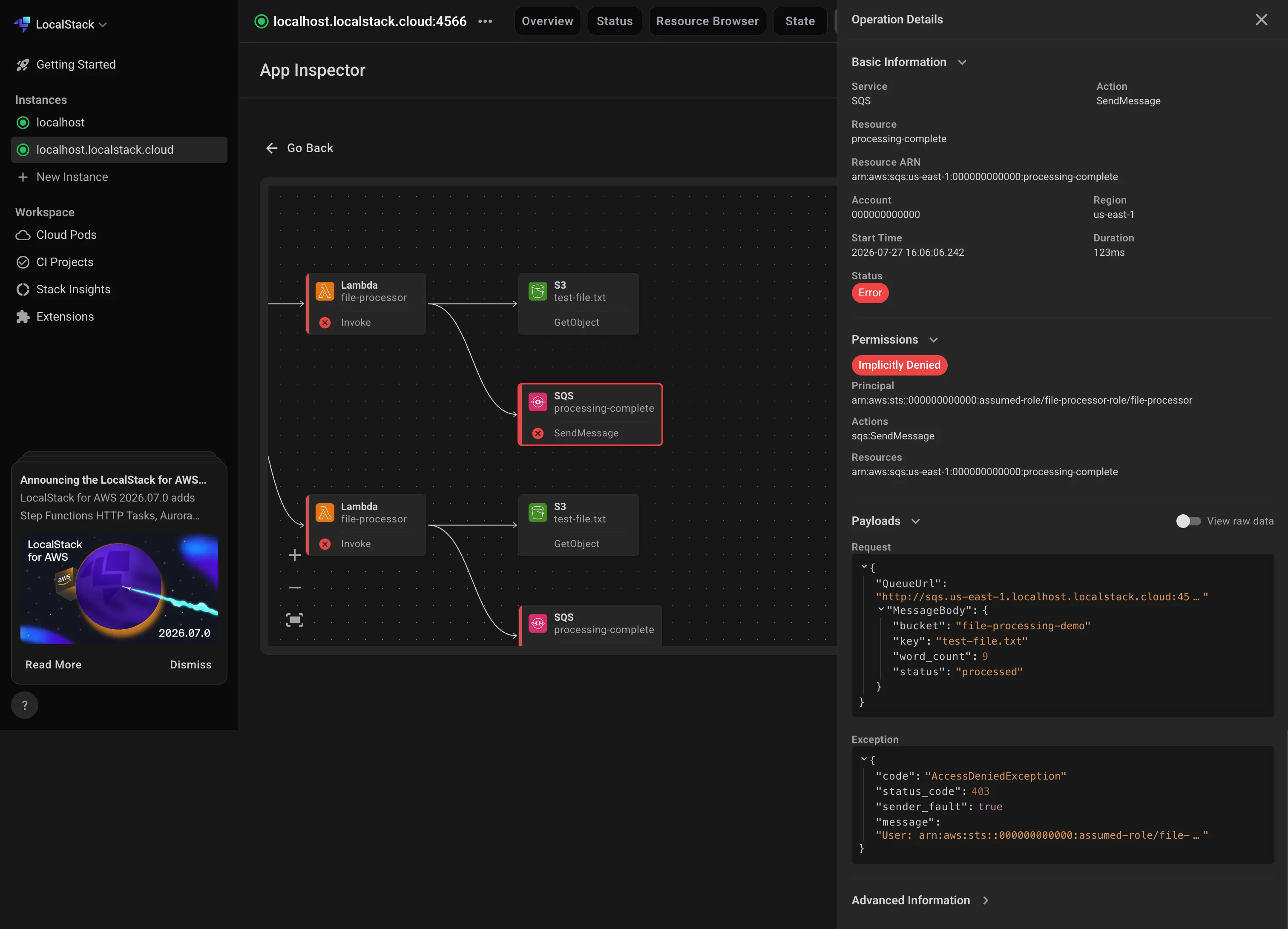
Claude Code doesn’t need to guess. The Permissions section on that operation shows exactly which statement was missing. It calls the IAM policy analyzer, which generates the missing sqs:SendMessage statement scoped to the processing-complete queue, patches the execution role, and redeploys.
The App Inspector view
Re-upload the test file and flip back to App Inspector. This time the graph completes:
[S3: file-processing-demo] | v (ObjectCreated trigger)[Lambda: file-processor] | v (send_message)[SQS: processing-complete]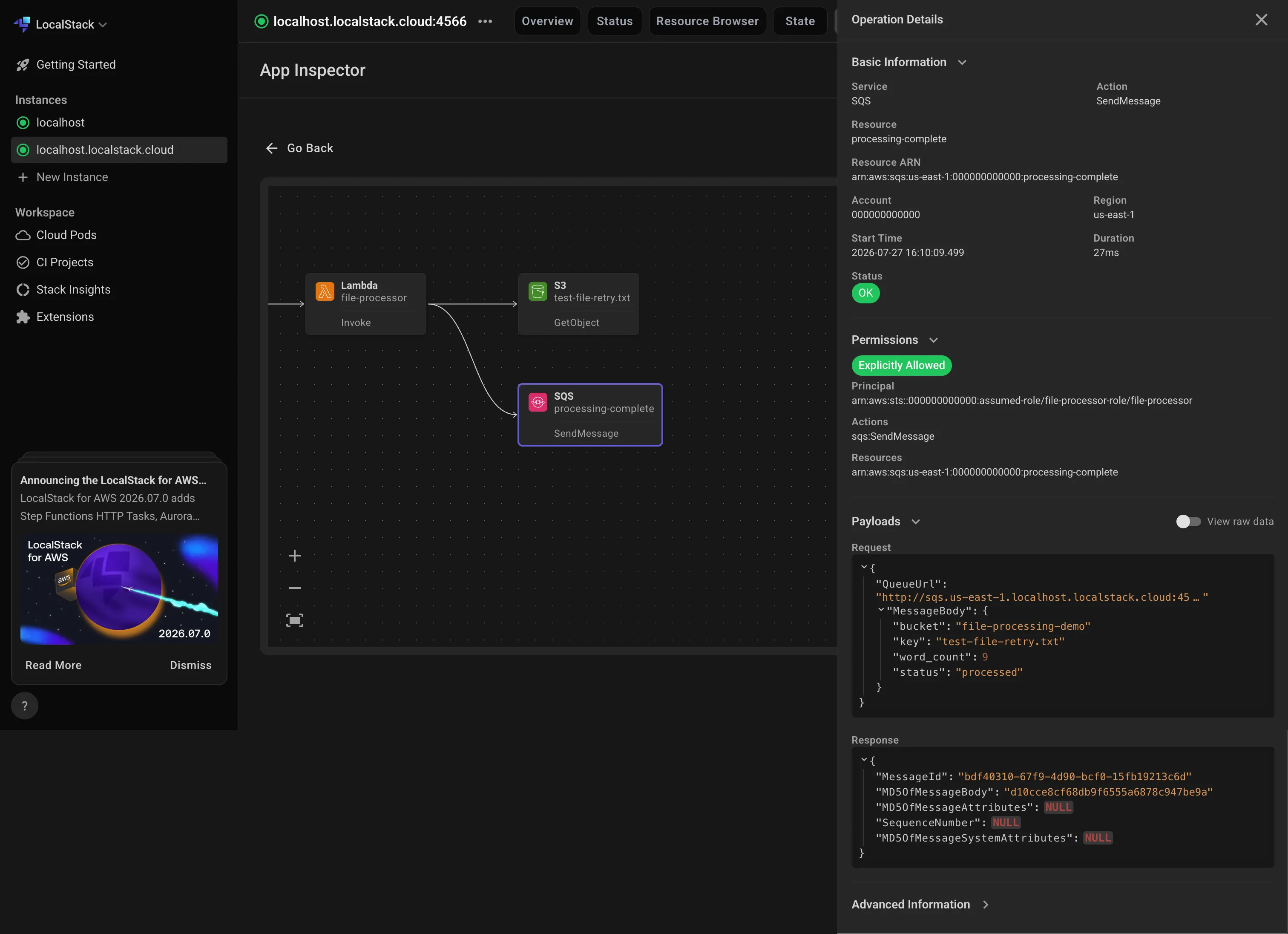
Three services. Clear directional relationships. One real permissions bug, caught and fixed without ever touching a real AWS account. Built by an AI agent. Running entirely on your laptop.
That’s App Inspector earning its keep, not just showing you what exists, but showing you how services relate, what called what, and exactly where it broke. For AI-generated infrastructure especially, that visibility matters. You’re not reading code or guessing at a stack trace to understand what went wrong. You’re looking at a graph with a shield icon on it.
The result
Claude Code polls SQS again and gets back something like this:
{ "bucket": "file-processing-demo", "key": "test-file.txt", "word_count": 42, "status": "processed"}Pipeline ran end-to-end, on the second try. S3 received the file, Lambda processed it, SQS got the message. Zero AWS spend. Zero prod impact. No credentials touched a real service, including during the stretch where the IAM policy was wrong.
That’s what “fail forward safely” actually looks like when it’s not hypothetical. A real error, caught and fixed, with none of the consequences a missing SQS permission would have had against a production queue.
That’s the sandbox doing its job.
The bigger picture
AI agents are getting more capable faster than the infrastructure practices around them are evolving. The conversation about safe AI development has been largely focused on the model layer: alignment, guardrails, output filtering. That work matters. But it doesn’t address what happens when a well-aligned, well-intentioned agent is pointed at a real cloud environment with real credentials and no sandbox.
Cloud engineers are the people who need to own this layer. Not because the models are unsafe, but because cloud infrastructure has always required a deliberate boundary between development and production. That boundary doesn’t disappear because the developer is now an AI.
LocalStack has been that boundary for human developers for years. The tooling is mature, the AWS coverage is broad, and the integration path for agent frameworks is straightforward. The main thing that’s changed is how urgent it is to use it.
If you’re building with AI agents that touch AWS, or planning to, the infrastructure sandbox layer isn’t optional. It’s the part of the stack that lets everything else move fast without things breaking in ways that are expensive or irreversible.
Point your agent at blog.localstack.cloud/ai instead of localstack.cloud. Give it the setup prompt from this post, and it installs lstk, connects the MCP server, and has its own sandbox running in a few minutes.